
HTTP Deep Dive
HTTP is the protocol underneath almost everything you’ll test as a web pentester. Burp Suite, browser DevTools, and curl are three different windows onto the same conversation between a client and a server. Most web vulnerabilities come down to one thing: a server trusted something in an HTTP message that it shouldn’t have.
This page works through HTTP piece by piece, with real requests you can run yourself.
URL structure
Section titled “URL structure”A URL breaks into the following parts.
| Part | Purpose |
|---|---|
| Scheme | How to fetch the resource (https, ftp, ws). https is encrypted HTTP. |
| User info | Optional user:pass@ embedded in the URL. Rarely used, and insecure when it is. |
| Host | The domain or IP of the server. This is what DNS resolves. |
| Port | 80 for HTTP, 443 for HTTPS by default. Only shown in the URL if non-standard. |
| Path | The route to the resource, like a file path (/about). |
| Query string | key=value pairs after a ?, joined with &. |
| Fragment | A section anchor after #. Stays in the browser — never sent to the server. |
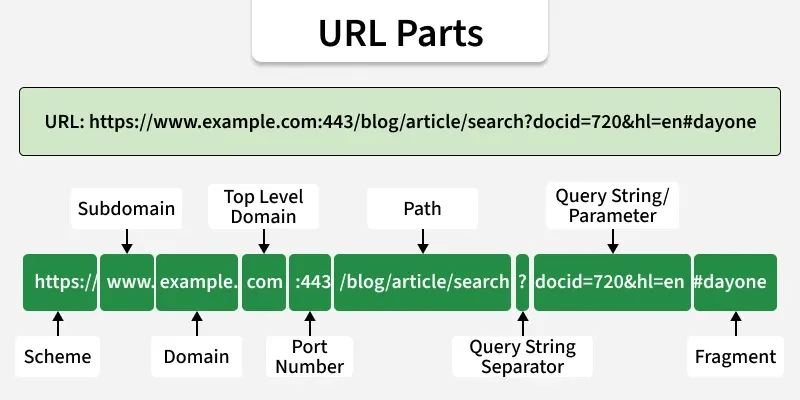 Source: GeeksforGeeks – URL Components and Web Terminologies
Take this URL apart:
https://shop.bytemart.example:8443/products/search?category=shoes&size=10#reviews| Part | Value |
|---|---|
| Scheme | https |
| Host | shop.bytemart.example |
| Port | 8443 (non-standard, so it shows up) |
| Path | /products/search |
| Query string | category=shoes&size=10 |
| Fragment | reviews |
The fragment never reaches the server. If you put a session token after a # by mistake, the server simply never sees it — useful to remember when an app does something unusual with tokens.
Percent-encoding
Section titled “Percent-encoding”URLs only allow a small set of characters: letters, digits, and a handful of punctuation marks. Anything else gets percent-encoded — each byte turns into %XX in hex.
GET /search?query=black%20friday%21 HTTP/1.1That’s black friday!. The space became %20, the ! became %21.
This encoding has a real cost. A 100KB image is 100,000 raw bytes. Encode every byte outside the safe set — which is most of them, since image bytes are essentially random — and you can nearly triple the size, since one unsafe byte (1 character) becomes %XX (3 characters). Putting binary data in a URL is expensive for exactly this reason.
The client-server model
Section titled “The client-server model”HTTP runs on a simple loop: the client sends a request, the server processes it, the server sends back a response.
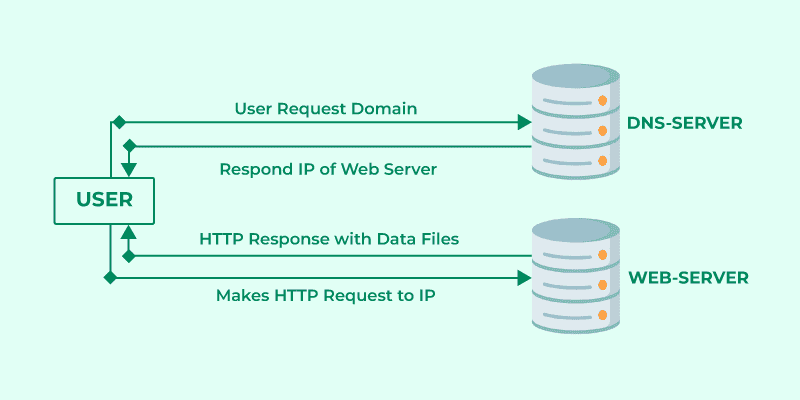 Source: GeeksforGeeks – Client-Server Model
Two properties of that loop matter for testing:
- HTTP is stateless. Without cookies, session tokens, or JWTs, every request is a fresh conversation. The server remembers nothing about you between requests unless something carries that memory for it.
- Proxies sit in the middle. A proxy can read and modify both the request and the response before either side sees the “real” version. Burp Suite’s Proxy and Repeater tabs work exactly this way.
curl is the fastest way to see this loop directly, since it prints raw HTTP instead of rendering it.
curl -v https://bytemart.example> GET / HTTP/1.1> Host: bytemart.example> User-Agent: curl/8.4.0> Accept: */*>< HTTP/1.1 200 OK< Content-Type: text/html; charset=UTF-8< Content-Length: 1256<<!doctype html>...The > lines are what curl sent. The < lines are what came back. Everything below the blank line in each block is the body.
| Flag | Purpose |
|---|---|
-O |
Save output to a file |
-s |
Silent mode |
-v / -vvv |
Verbose — view the full request/response |
-I |
Send a HEAD request, headers only |
-i |
Show headers and body |
-A |
Set a custom User-Agent |
-H |
Set a custom header |
-X |
Set the request method (-X PUT, -X DELETE) |
-d |
Send data in the request body |
-k |
Skip TLS certificate validation |
HTTP transmits in plaintext, so anyone on the same network can read it. HTTPS wraps the same conversation in encryption so intercepted traffic is unreadable.
Encryption depends on public/private key pairs. Each side needs the other’s public key to encrypt messages that only the matching private key can decrypt.
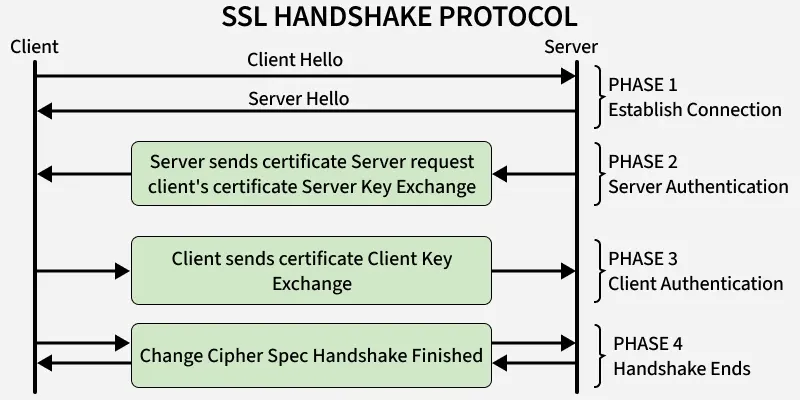 Source: GeeksforGeeks – Secure Socket Layer (SSL)
The handshake that sets up an HTTPS connection runs like this:
- You request
http://on a site that enforces HTTPS, so the browser first hits port 80, unencrypted. - The server replies with
301 Moved Permanently, redirecting to port 443. - The client sends a “Client Hello”: its TLS version, supported ciphers, and a random value.
- The server replies with a “Server Hello,” its certificate, and its chosen cipher.
- The client checks the certificate against a trusted authority and sends its own key material.
- Both sides confirm the handshake with an encrypted “Finished” message.
- Ordinary HTTP resumes, now encrypted end-to-end.
You can watch this happen with curl too:
curl -v https://bytemart.example 2>&1 | grep -i "SSL\|TLS"* TLSv1.3 (OUT), TLS handshake, Client hello* TLSv1.3 (IN), TLS handshake, Server hello* TLSv1.3 (IN), TLS handshake, Certificate* SSL connection using TLSv1.3 / TLS_AES_256_GCM_SHA384Anatomy of a request
Section titled “Anatomy of a request”Strip away the browser and a request is just structured text.
GET /cart?promo=SAVE20 HTTP/1.1Host: bytemart.exampleUser-Agent: curl/8.4.0Cookie: session=5f3c8a91e6b74c2d9a10f7e3b8d4c112
[body, if any]
The first line is the request line: method, path (with optional query string), and HTTP version. Then come the headers, ended by a blank line. Then the body, present for methods like POST and PUT.
One detail matters more than it looks: HTTP/1.1 sends all of this as plaintext, separated by newlines. HTTP/2 sends the same information as binary, using header compression (HPACK). That’s faster but harder to inspect by eye, and differences in how front-end and back-end servers parse that binary framing are a root cause of request smuggling, covered below.
Headers carry a lot of testable surface area.
| Header | Why it matters |
|---|---|
Host |
Confirms scope. Also useful for enumerating virtual hosts on shared infrastructure. |
User-Agent |
Identifies the client. If logged and displayed unsanitized in an admin panel, a crafted value can cause stored XSS. |
Cookie |
The session identifier. Stealing it enables session hijacking. |
Referer |
Where the request came from. Spoofable, so never trust it server-side. |
Accept |
Media types the client will take (*/* means anything). |
Authorization |
Auth credentials or a token, e.g. Basic ... or Bearer .... |
Cookie is frequently the only thing telling the server “this is still the same user.” Burp Repeater is built around that fact: capture a request, change a header or verb, resend it, watch what changes.
Anatomy of a response
Section titled “Anatomy of a response”HTTP/1.1 200 OKServer: Apache/2.4.41Content-Type: text/htmlSet-Cookie: session=5f3c8a91e6b74c2d9a10f7e3b8d4c112; HttpOnly; Secure
<html>...</html>A status line, headers, and a body.
Status codes fall into five ranges. Knowing what each range implies matters more than memorizing all 60-odd codes.
| Range | Meaning |
|---|---|
| 1xx | Informational. Provisional, doesn’t affect final processing. |
| 2xx | Success. A 200 on something you shouldn’t have access to is a flag for broken access control. |
| 3xx | Redirect. A 302 right after login is usually the success case. |
| 4xx | Client error. 404 means “doesn’t exist,” useful for mapping an app. 403 means “exists, you’re not authorized.” |
| 5xx | Server error. A server crashing on one stray character is a classic SQL injection signal. |
curl -s -o /dev/null -w "%{http_code}\n" https://bytemart.example/adminThat one-liner prints just the status code — handy for scripting a quick scan across a list of paths without the noise of full output.
Specific codes worth knowing by name: 200 OK, 302 Found, 400 Bad Request, 401 Unauthorized, 403 Forbidden, 404 Not Found, 500 Internal Server Error.
Headers in full
Section titled “Headers in full”Headers group into five rough categories.
General headers apply to both requests and responses: Date (when the message originated) and Connection (close ends the connection after this exchange, keep-alive leaves it open).
Entity headers describe the body: Content-Type (with charset for encoding), Content-Length (body size), Content-Encoding (compression, e.g. gzip), and Boundary (the separator in a multipart upload). Transfer-Encoding: chunked sends the body as a series of chunks instead of a fixed Content-Length. Mismatches in how Content-Length and Transfer-Encoding get handled across a chain of proxies are a classic root cause of request smuggling.
Request headers add X-Forwarded-For to the list above — proxies set this to record the original client IP. Test whether the app trusts it blindly for access control or rate limiting; it’s spoofable any time a request can reach the app directly.
Response headers include Server (leaks the web server and version), Set-Cookie (issues a session token), WWW-Authenticate (states the required auth type), and Location (the redirect target on a 3xx).
Security headers tell the browser to enforce extra protections: Content-Security-Policy restricts where scripts and other resources can load from, Strict-Transport-Security forces HTTPS-only (HSTS), Referrer-Policy controls what leaks via Referer, X-Frame-Options blocks framing by another site (clickjacking), and X-Content-Type-Options: nosniff stops the browser from guessing a different content type than the one declared.
curl -sI https://bytemart.exampleThat’s a quick way to pull just the response headers and check which of the security headers above are actually present.
Cookies
Section titled “Cookies”Cookies deserve their own stop, since they’re doing most of the work that makes HTTP feel stateful.
Set-Cookie: session=5f3c8a91e6b74c2d9a10f7e3b8d4c112; Secure; HttpOnly; SameSite=Strict; Max-Age=3600| Attribute | Effect |
|---|---|
Secure |
Cookie only sent over HTTPS. Without it, the cookie travels in plaintext if the user ever hits an HTTP page. |
HttpOnly |
JavaScript can’t read the cookie. Blocks a basic XSS-to-cookie-theft chain. |
SameSite=Strict |
Cookie isn’t sent on cross-site requests at all. |
SameSite=Lax |
Cookie isn’t sent on cross-site POSTs, but is sent when the user navigates via a link. The browser default. |
SameSite=None |
Cookie is sent everywhere, including cross-site. Requires Secure. |
Max-Age / Expires |
How long the cookie lives before the browser drops it. |
SameSite is the main lever against CSRF. Strict is the safest setting, but it breaks flows where a user clicks a link from an external site (like an email) and expects to land logged in — that’s why Lax is the default and Strict shows up mostly on sensitive actions, not general sessions.
Cross-Origin Resource Sharing controls which other origins a browser will let JavaScript read responses from. It exists because the browser’s same-origin policy would otherwise block any legitimate cross-origin API call too.
curl -s -H "Origin: https://attacker.example" -I https://api.bytemart.example/user/profileHTTP/1.1 200 OKAccess-Control-Allow-Origin: https://attacker.exampleAccess-Control-Allow-Credentials: trueThat response is a real finding. Access-Control-Allow-Origin reflecting an arbitrary Origin header, combined with Access-Control-Allow-Credentials: true, means any website can make an authenticated request to this API on a logged-in victim’s behalf and read the response. A correctly configured server either returns a fixed, specific origin, or omits the credentials header entirely.
| Header | Meaning |
|---|---|
Origin |
Sent by the browser, states where the request came from. |
Access-Control-Allow-Origin |
Server’s response: which origin(s) may read this response. * means anyone, but * can’t be combined with credentials. |
Access-Control-Allow-Credentials |
Whether cookies/auth headers are included in the cross-origin request. |
Access-Control-Allow-Methods |
Which HTTP methods the cross-origin caller may use. |
A PUT or DELETE request, or one with a custom header, triggers a preflight: the browser sends an OPTIONS request first to check permissions before sending the real one.
curl -X OPTIONS -H "Origin: https://app.bytemart.example" \ -H "Access-Control-Request-Method: DELETE" \ -i https://api.bytemart.example/user/123Caching
Section titled “Caching”Caching headers decide whether a browser, CDN, or intermediate proxy can store and reuse a response instead of asking the origin server again.
Cache-Control: public, max-age=3600ETag: "33a64df551"| Header | Meaning |
|---|---|
Cache-Control: no-store |
Never cache this response anywhere. |
Cache-Control: private |
Only the browser may cache it, not a shared proxy or CDN. |
Cache-Control: public, max-age=N |
Anyone may cache it for N seconds. |
ETag |
A fingerprint of the response. A later request can send If-None-Match with this value; the server replies 304 Not Modified if nothing changed. |
The security angle is cache poisoning: tricking a shared cache into storing a malicious response under a legitimate-looking URL, so every later visitor gets served the attacker’s version. This usually works by abusing a header the cache ignores for the cache key but the origin server still uses to build the response — for example, sending a crafted X-Forwarded-Host that the origin reflects into a redirect or script tag, while the CDN caches the whole thing under the clean URL because it never looked at that header.
curl -s -H "X-Forwarded-Host: attacker.example" -I https://bytemart.example/product/1042If the response reflects attacker.example anywhere and the page is cacheable, that’s worth digging into further.
Request smuggling, concretely
Section titled “Request smuggling, concretely”Earlier sections kept pointing at request smuggling without showing one. Here’s the shape of it.
A front-end proxy and a back-end server sometimes disagree about where one request ends and the next begins, especially when a request carries both a Content-Length and a Transfer-Encoding: chunked header. One server might honor Content-Length, the other might honor Transfer-Encoding. Send a request that both headers describe differently, and the two servers split the byte stream at different points.
POST / HTTP/1.1Host: bytemart.exampleContent-Length: 13Transfer-Encoding: chunked
0
SMUGGLED
If the front end uses Content-Length: 13 it forwards everything up through 0\r\n\r\n as one request and treats SMUGGLED as the start of the next request on the same connection. If the back end uses Transfer-Encoding instead, it reads the 0 as the end of the chunked body and considers the request finished there too — but now SMUGGLED sits in the connection’s buffer, waiting to get prepended to whatever the next real user sends. That’s the basic mechanism behind smuggling a request into someone else’s response.
Modern web architecture
Section titled “Modern web architecture”Architecture decides where the attack surface actually lives.
A monolith keeps the UI, business logic, database access, and session handling in one server. Compromise it, and you likely own everything. A microservices architecture splits that into many independent, single-purpose services — better for resilience and scaling, but it turns one big target into twenty smaller ones, each needing its own enumeration. A single weak service can still undermine the rest.
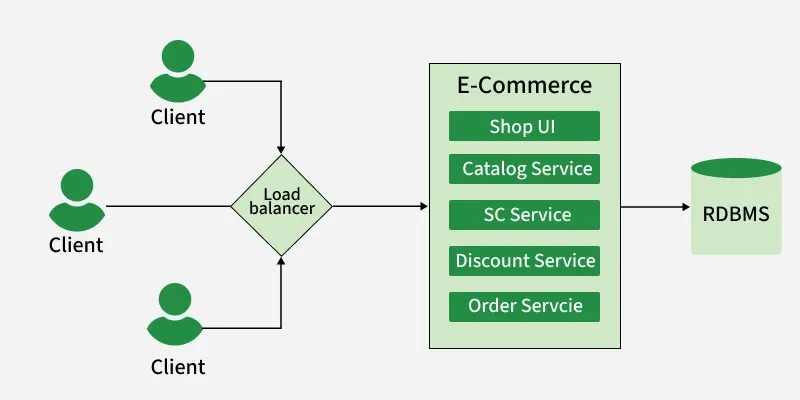
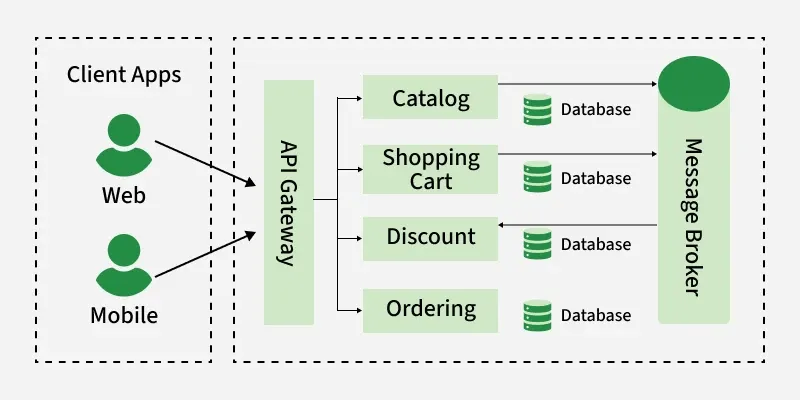 Source: GeeksforGeeks – Monolithic vs Microservices Architecture
Single Page Applications complicate this further. The server sends an HTML/JS shell once, and the page never fully reloads again — every later interaction fires a background API call through JavaScript. There’s no visible page reload to tip you off, but a proxy like Burp catches every one of those calls, and each is a candidate for IDOR or broken access control. The front end can look secure while the underlying API skips the same checks.
Reverse proxies (Nginx, Cloudflare) and API gateways sit in front of all this: browser → gateway/proxy → the right microservice → response back up the chain. More moving parts means more places to check — slow down and enumerate every service rather than assuming a single front door covers the whole app.
HTTP methods
Section titled “HTTP methods”| Method | Description |
|---|---|
GET |
Requests a resource. Extra data travels via a query string. |
POST |
Sends data in the body. Handles text, files, binary — forms, logins, uploads. |
HEAD |
Like GET but headers only, no body. Useful for checking size before downloading. |
PUT |
Creates or fully replaces a resource. Loose controls here allow malicious uploads. |
DELETE |
Removes a resource. Loose controls here enable denial-of-service. |
OPTIONS |
Returns which methods a server accepts for a resource. |
PATCH |
Partial update, as opposed to PUT’s full replace. |
TRACE |
Echoes the request back. Historically enabled Cross-Site Tracing (XST), reading HttpOnly cookies that JavaScript can’t touch directly. Should be disabled in production. |
CONNECT |
Establishes a tunnel through a proxy, typically for HTTPS. A misconfigured one can become an open relay. |
Two properties matter for testing. A method is safe if it shouldn’t change server state at all (GET, HEAD, OPTIONS). A method is idempotent if repeating it has the same effect as doing it once (GET, HEAD, PUT, DELETE, OPTIONS). POST and PATCH are neither. A GET that deletes a record just by being visited — /delete-account?confirm=1 — breaks the safe expectation, and CSRF-via-GET is a real bug class to watch for.
curl -X OPTIONS -i https://bytemart.example/api/users/42HTTP/1.1 200 OKAllow: GET, POST, PUT, DELETEThat Allow header tells you exactly which methods the endpoint accepts, before you’ve sent a single byte of payload data.
GET puts parameters in the URL, so they end up in server logs, browser history, and proxy logs — not great for a password. POST puts them in the body instead, out of those same logs (though not encrypted by that alone — only HTTPS does that). GET URLs are capped around 2,000 characters across most browsers and servers; POST bodies have no comparable limit, which is why uploads use POST.
curl -X PUT https://bytemart.example/api/users/42 \ -H "Content-Type: application/json" \ -d '{"name": "Jane Doe"}'HTTP Basic Auth is worth a separate mention: the server handles it directly rather than the application, which is why it looks and behaves differently from a normal login form (a browser-native credential popup instead of an HTML page).
CRUD operations, mapped onto HTTP
Section titled “CRUD operations, mapped onto HTTP”Most REST APIs map onto the four classic database operations.
| Operation | HTTP method | Description |
|---|---|---|
| Create | POST |
Adds new data to a table |
| Read | GET |
Reads an existing entity |
| Update | PUT |
Replaces an entity’s data |
| Delete | DELETE |
Removes an entity |
# Readcurl -s https://bytemart.example/api/products/1042
# Createcurl -X POST https://bytemart.example/api/products \  -H "Content-Type: application/json" \  -d '{"name": "Wireless Mouse", "price": 24.99}'
# Updatecurl -X PUT https://bytemart.example/api/products/1042 \  -H "Content-Type: application/json" \  -d '{"name": "Wireless Mouse (V2)", "price": 29.99}'
# Deletecurl -X DELETE https://bytemart.example/api/products/1042
Two things to test on any API shaped like this. First, PATCH is the correct method for a partial update (some fields only), while PUT implies a full replace — send OPTIONS to the endpoint to see which the server actually accepts. Second, some APIs “upsert” on PUT: updating a record that doesn’t exist creates it instead of failing. Whether that happens is implementation-specific, so check directly.
Access control sits on top of all this. Not every user can perform every operation, and read access is usually broader than write (create, update, delete). Authenticating against an API generally means a session cookie or an Authorization header, most often a JWT.
Summary
Section titled “Summary”- HTTP is stateless by default. Cookies and tokens create the illusion of an ongoing session.
GETputs data in the URL (visible, logged, capped).POSTputs it in the body (hidden from those logs, uncapped, not encrypted by itself).PUTreplaces,PATCHpartially updates,DELETEremoves.PUTandDELETEare idempotent;POSTandPATCHare not.- 2xx worked, 3xx redirected you, 4xx is the client’s fault, 5xx is the server’s fault — and often the most interesting case to dig into.
- Every header is something the client controls and the server decides whether to trust.
Host,User-Agent,Referer, andX-Forwarded-Forare all spoofable. SameSite,HttpOnly, andSecureon a cookie are quick, concrete checks worth running on every login flow you test.- A permissive CORS policy combined with
Allow-Credentials: trueis a complete finding by itself, not just a theoretical risk. - HTTP/2’s binary framing colliding with an HTTP/1.1 back end is request-smuggling territory, and
Content-LengthvsTransfer-Encodingdisagreement is the classic root cause.
It’s the same handful of pieces, recombined: a URL, a method, some headers, a body, a status code. Reading an HTTP exchange becomes a matter of asking, for each piece, what happens if I change this.