

Computer & C Programming Basics
C works close to the hardware. Learning about pointers, memory addresses, and data types helps you understand how a program runs. It also helps you see how mistakes in code can lead to vulnerabilities.
Programming is a foundation for cybersecurity. You can use it to investigate vulnerabilities, write security scripts, analyze malware, and automate repetitive tasks. Writing and debugging your own code also helps you understand how security tools work and where their limits are.
The examples use the C17 version of C and the GCC compiler on Linux. You can run the first ones in a browser. The inspection and debugging commands below assume a local Linux environment.
C23 was published as ISO/IEC 9899:2024. These examples keep -std=c17 so their language rules remain consistent across compiler versions. GCC’s default dialect depends on its release; select the standard explicitly. See GCC’s supported C standards.
Work through this guide in three passes:
- Start with the hardware and execution sections. Trace how source code becomes a running process.
- Compile the examples on types, control flow, and memory. Predict each result before running it, then change one input and compare.
- Finish with input validation and debugging. Reproduce the boundary error, read the diagnostic, and verify the fix.
You do not need earlier C experience. Basic terminal skills will help with saving files, running commands, and reading compiler output.
How a computer works
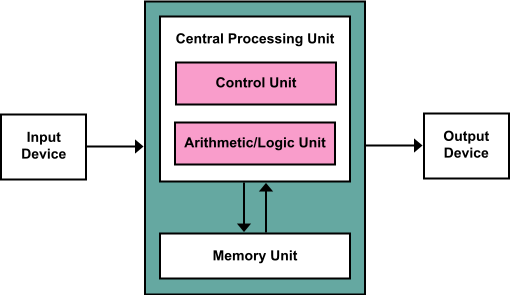
Section titled “How a computer works”A computer follows instructions to process data. Input brings data in, memory holds the data in use, and the processor works on it. Storage keeps files between sessions. Output shows the results.
A general-purpose computer can run many kinds of programs: a browser, an editor, a game, or a compiler. An embedded computer usually has a narrower job, such as controlling a thermostat or a vehicle subsystem. Some embedded systems run an operating system; others run software directly on the hardware.
The main components
Section titled “The main components”| Component | Role | Example |
|---|---|---|
| CPU (central processing unit) | Executes machine instructions | Adds values, compares them, branches |
| Registers | Hold a small amount of state inside the CPU | Instruction pointer, operands, results |
| CPU caches | Keep recently used instructions and data close to the core | L1, L2, and L3 caches |
| RAM (random access memory) | Holds working code and data | Code and values used by a running program |
| SSD (solid-state drive) or HDD (hard disk drive) | Keeps files after power is turned off | Source code, executables, documents |
| Devices and controllers | Handle input, output, and communication | Keyboard, display, network interface |
Registers, caches, RAM, and storage hold different amounts of data at different speeds. Together, these levels form a memory hierarchy. The time needed to access data is called latency. A register holds very little data and is quick to access. An SSD holds much more, but access takes longer.
Input devices → running program → output devices ↕ CPU registers ↕ caches ↕ RAM ↕ SSD / HDDActual hardware has more connections than this simplified hierarchy shows.

Bits, bytes, and number systems
Section titled “Bits, bytes, and number systems”A bit is 0 or 1. On mainstream desktop systems, a byte contains eight bits. The same byte can represent a number, part of a character, or part of an instruction. Its meaning depends on how a program uses it.
ASCII assigns the number 65 to A. UTF-8 can use multiple bytes for one character.
In decimal, the digits in 65 mean six tens and five ones. Binary works the same way, but each position is worth twice the one to its right:
Position value: 128 64 32 16 8 4 2 1Binary digit: 0 1 0 0 0 0 0 1Total: 64 + 1 = 65Hexadecimal uses digits 0 to 9, followed by A to F for values 10 to 15. Four binary digits fit in one hexadecimal digit. Split 01000001 into 0100 and 0001 to get 0x41.
Build a byte, one bit at a time
Toggle a bit to add or remove its value. Try making 45, then turn on all eight bits.
64 + 1 = 65
An integer is a whole number. A signed integer can hold negative values, zero, and positive values. An unsigned integer holds zero and positive values.
An unsigned eight-bit integer has 256 possible values, from 0 to 255. With two’s complement, a common way to represent signed numbers, a signed eight-bit integer ranges from -128 to 127. C17 also allows other signed representations. Use constants such as INT_MIN and INT_MAX from <limits.h> to check the limits on your system.
In eight-bit two’s complement, you can represent -5 by starting with +5, flipping every bit, and adding 1:
Start with +5: 00000101Flip the bits: 11111010Add 1: 11111011The final pattern means -5 when read as an eight-bit two’s-complement number. The same bits mean 251 when read as unsigned. The type tells the program how to interpret them.
Floating-point values have limited precision. On typical systems, a value such as 0.1 cannot be represented exactly in binary, much as one third cannot be written exactly with a finite number of decimal digits.
Before continuing, convert 00101101 to decimal and hexadecimal.
Check your result
Add the positions that contain 1: 32 + 8 + 4 + 1 = 45. Splitting the bits into 0010 and 1101 gives 0x2D.
Byte order is called endianness. On a little-endian system with eight-bit bytes, the two-byte value 0x1234 is stored with 34 at the lower address, followed by 12. The number keeps the same value; endianness describes the order of its bytes in memory.
Fixed-width numbers and binary addition
Section titled “Fixed-width numbers and binary addition”A fixed-width value uses a set number of bits. Each extra bit doubles the number of possible patterns. Four bits give 16 patterns; eight bits give 256. Leading zeroes fill unused positions without changing a positive number’s value.
Binary addition uses carries, just like decimal addition. In binary, 1 + 1 gives 10: write 0 in the current position and carry 1 to the next. For example, adding 1 to 3 gives 4:
0011 (3)+ 0001 (1)------ 0100 (4)With only four bits, the largest unsigned value is 1111, or 15. Adding 1 needs 10000, which takes five bits. A calculation can need more bits than its inputs. This is why checking the allowed range matters in C.
Logic gates
Section titled “Logic gates”Digital circuits commonly represent 0 and 1 using low and high voltage levels. A logic gate takes input bits and produces an output bit according to a rule.
For two input bits, A and B:
| A | B | AND | OR | XOR |
|---|---|---|---|---|
| 0 | 0 | 0 | 0 | 0 |
| 0 | 1 | 0 | 1 | 1 |
| 1 | 0 | 0 | 1 | 1 |
| 1 | 1 | 1 | 1 | 0 |
AND gives 1 when both inputs are 1. OR gives 1 when at least one input is 1. XOR gives 1 when the inputs differ. NOT takes one input and flips it: 0 becomes 1, and 1 becomes 0.
Gates can be connected to build larger circuits. A half adder adds two bits without an incoming carry. It uses XOR for the sum bit and AND for the carry bit. Adding 1 and 1 gives a sum bit of 0 and a carry bit of 1, making binary 10.
From power-on to a running program
Section titled “From power-on to a running program”Firmware is software for hardware devices. It is commonly stored in flash memory, and many devices allow updates. The operating system (OS) manages resources such as memory and devices so applications can use them. Devices such as routers and printers can have both firmware and an OS.
From power-on to a running OS
Section titled “From power-on to a running OS”- Power onThe computer starts its firmware.
- FirmwareInitialize hardware and select a boot entry.
- OS loaderLoad and start the operating system kernel.
- KernelInitialize drivers and start the first program outside the kernel.
- Ready to useShow a login screen, desktop, or shell.
UEFI stands for Unified Extensible Firmware Interface. It defines how modern firmware works with the operating system during startup. Its boot manager reads saved boot options and loads a startup program, such as an OS loader.
For a typical disk boot, the loader sits in a dedicated part of the disk called the EFI System Partition. The UEFI boot manager specification explains this process.
Older PCs use BIOS firmware and boot code in a disk’s Master Boot Record (MBR). UEFI uses a different boot interface. Secure Boot checks whether boot software is trusted under the system’s configured policy. It is a separate part of the boot process.
What the OS does
Section titled “What the OS does”The kernel is the central part of the OS. It shares CPU time between programs, manages memory, organizes files, and controls access to devices.
Virtual memory gives each running process its own view of memory addresses. An address used by a program does not have to point directly to the same address in physical RAM.
Drivers are software that communicates with devices. An interrupt lets hardware ask for the CPU’s attention. Direct memory access lets devices transfer data to or from RAM without making the CPU copy every byte.
Libraries provide functions that programs can call. Some library functions ask the kernel to do work through system calls.
An executable is a program file on disk. When the program runs, it becomes a process with its own memory mappings and resources, such as open files. A thread is a path of execution inside a process. Threads in the same process generally share its memory address space.
Inside the CPU
Section titled “Inside the CPU”The CPU’s registers, arithmetic logic unit, and control unit work together to execute instructions:
| Part | What it does |
|---|---|
| Registers | Hold small groups of bits, such as values being used and results |
| Arithmetic logic unit (ALU) | Performs operations such as addition, subtraction, AND, and OR |
| Control unit | Interprets instructions and sends signals that coordinate the other parts |
A register needs storage circuits to keep its value between updates. A flip-flop is one kind of circuit that stores a bit and can update it at a selected clock edge. An edge is a change from low to high or high to low.
In a simple CPU model, an addition instruction takes values from registers, sends them through the ALU, and saves the result in a register. Control signals select the operation and where the result goes.
How a CPU executes instructions
Section titled “How a CPU executes instructions”A simplified CPU cycle has four stages:
- Fetch the instruction bytes, usually through the instruction cache.
- Decode them to identify the operation and the values or locations it uses, called operands.
- Execute the operation: calculate, access memory, compare values, or change which instruction runs next.
- Write the result to a register or memory when the instruction requires it.
The instruction pointer tracks which instruction comes next. Branches and function calls can change that address. Modern CPUs overlap the stages of different instructions using pipelines. They may also execute multiple instructions at the same time.
- FetchRead the instruction bytes.
- DecodeWork out the operation and its operands.
- ExecutePerform the operation.
- Write backStore a result when required.
A clock produces a repeating timing signal that coordinates many CPU operations. Clock speed measures clock cycles per second: 3 GHz means three billion clock cycles per second. Instructions can take multiple cycles, and a processor can complete multiple instructions in one cycle. Clock speed alone does not determine program performance. Intel’s clock-speed guide explains the difference between cycles and instructions.
An instruction set architecture (ISA) defines the instructions software can use. Examples include x86-64, AArch64, and RISC-V. Assembly gives machine operations readable names such as mov and add.
A compiler builds code for a particular architecture. Whether that program can run also depends on the operating system and its libraries.
Set up a C workspace
Section titled “Set up a C workspace”You need a text editor, a C compiler, and a terminal. The editor saves your source code; the compiler translates it into a program. Installing an editor alone does not necessarily install a compiler.
Install a compiler or try one online
Section titled “Install a compiler or try one online”Install GCC through your system’s package manager, then check gcc --version.
On Windows, MSYS2 provides a GCC environment. On macOS, Apple’s command-line tools provide Clang; use clang in place of gcc for the single-file examples. The readelf and strace examples below assume Linux.
To start without installing tools, paste the first example into OnlineGDB. Compiler Explorer is useful later for comparing C with its generated assembly. Use -std=c17 -Wall -Wextra -Wpedantic as compiler options.
Create your first program
Section titled “Create your first program”Check that GCC is available and create a working directory:
gcc --versionmkdir c-basicscd c-basicsCreate hello.c:
#include <stdio.h>
int main(void){    printf("Hello, World!\n");    return 0;}
Compile and run:
gcc -std=c17 -Wall -Wextra -Wpedantic -g hello.c -o hello./helloHello, World!#include <stdio.h> gives the compiler information about standard input and output functions. The included file is called a header.
main is where your own code begins in these examples. Some startup code runs before it.
Braces { and } group statements into a block. Most statements end with a semicolon. printf displays text here, and \n starts a new line. return 0 reports that the program finished successfully. The void in main(void) says that this form of main takes no arguments.
The warning flags help the compiler point out mistakes. -g adds information that a debugger can use. -std=c17 tells the compiler which version of C to use.
For later single-file examples, replace hello.c and hello in the build command with the filename and executable name for that example.
From C source to an executable
Section titled “From C source to an executable”GCC usually builds a program in four stages:
- hello.cYour source code. Preprocessing handles includes and macros next.
- hello.iPreprocessed C. Compilation translates it to assembly next.
- hello.sAssembly text. The assembler creates an object file next.
- hello.oObject code. The linker resolves references next.
- helloAn executable that the operating system can start.
| Stage | What it does |
|---|---|
| Preprocessing | Handles included files, macros, and conditions that decide which code to compile |
| Compilation | Checks the C code and translates it into code for the target, often shown as assembly |
| Assembly | Turns assembly into an object file, with information the linker needs |
| Linking | Connects references to their definitions and combines code into an executable or library |
Inspect each stage yourself:
gcc -std=c17 -E hello.c -o hello.igcc -std=c17 -S hello.i -o hello.sgcc -c hello.s -o hello.ogcc hello.o -o hello./hello-E stops after preprocessing, -S after compilation, and -c before linking. These options are documented in GCC’s overall options.
Headers usually tell the compiler which functions a library provides and how to call them. The library contains the code for those functions.
With static linking, the needed library code becomes part of the built program. With dynamic linking, the executable records which shared libraries it needs, and those dependencies are resolved when the program runs. The linker does not always copy the whole C library into the executable.
How a compiler reads code
Section titled “How a compiler reads code”Inside the compilation stage, the compiler checks the code and turns it into instructions. Take the expression 2 + 3 * 4:
- Lexing splits the text into tokens, the meaningful pieces of code. Here the tokens are
2,+,3,*, and4. - Parsing checks how those tokens fit the language’s grammar and builds a syntax tree.
- Semantic checks look at meaning, such as whether names are declared and types allow the requested operations.
- Code generation turns the checked code into lower-level instructions. The compiler may also optimize the code.
A simplified abstract syntax tree (AST) shows the structure of this expression:
+ / \ 2 * / \ 3 4Each operation connects to the values it uses. Multiplication sits inside the addition, so the expression means 2 + (3 * 4) and gives 14. Parentheses can change that grouping. Clang’s compiler terminology explains these compiler roles.
Bytecode and virtual machines
Section titled “Bytecode and virtual machines”A compiler translates code into another form. An interpreter carries out a program’s operations in software. Compilation and interpretation can work together.
Some compilers produce bytecode, instructions for a software virtual machine (VM). The VM implements those instructions and runs the program. An interpreter can execute the bytecode one instruction at a time.
The GCC examples here produce machine code for the target CPU. TinyLang shows another route: its compiler produces instructions for its own stack-based VM. That VM keeps working values on a stack and performs operations such as addition and multiplication.
What happens when you run it?
Section titled “What happens when you run it?”On a typical Linux system, the OS sets up a process with memory areas for code, data, the stack, and any shared libraries. It can bring parts of the executable into RAM as needed. It does not have to copy the whole file into RAM before starting the program.
Runtime initialization eventually calls main. A call to printf goes through library code and may eventually use a system call to write bytes. A CPU has no single instruction meaning “print this C string to the terminal.”
When the process terminates, the OS releases its resources. Releasing memory does not necessarily mean immediately overwriting every physical byte with zeroes.
Inspecting a Linux executable
Section titled “Inspecting a Linux executable”Linux commonly uses ELF, the Executable and Linkable Format, for executables, object files, and shared libraries.
Build hello.c from the first example, then inspect it with GNU Binutils:
gcc -std=c17 -Wall -Wextra -Wpedantic -g hello.c -o helloreadelf -h helloreadelf -S helloreadelf -s helloreadelf -d helloobjdump -d hello| Command | What to look for |
|---|---|
readelf -h |
Architecture, file type, and entry address |
readelf -S |
Sections, such as .text for code and debug-information sections |
readelf -s |
Symbols, which describe names such as functions and objects |
readelf -d |
Dynamic-link information, including shared-library dependencies when present |
objdump -d |
Disassembly, a readable form of machine instructions |
The Binutils readelf reference documents these views. Exact names and addresses depend on your compiler, architecture, and build options. The executable’s entry address usually leads to runtime startup code before main.
In this executable, sections organize the file’s contents. When the program runs, the loader uses groups called loadable segments to set up its memory mappings. These serve different purposes from file sections.
Virtual memory lets the OS connect program addresses to physical storage. The OS can bring memory pages into RAM as needed and set permissions that control reading or executing their contents.
On Linux, strace can show system calls made by your program. If it is installed, run:
strace -e trace=write ./helloLook for a write call with file descriptor 1 and the bytes for Hello, World!\n. A file descriptor is a number identifying an open file or other I/O resource to the OS; 1 normally means standard output. Startup code and libraries may make other calls too. See the strace project for tool documentation.
Look for main in the symbol listing and disassembly. You may not find a call named printf: the compiler can replace this particular call with another library function that produces the same output. Compare the C program’s behavior with the actual instructions generated.
Variables, types, and expressions
Section titled “Variables, types, and expressions”A variable names a stored value. Its type tells C what kind of value it holds and which operations apply. In C, an object is a region of storage that holds a value. Give each variable a starting value before reading it; this is called initialization.
#include <limits.h>#include <stdbool.h>#include <stdio.h>
int main(void){    int count = 7;    double price = 2.5;    char grade = 'A';    bool ready = true;
    printf("count=%d price=%.2f grade=%c ready=%d\n",           count, price, grade, ready);    printf("int occupies %zu bytes; a byte has %d bits\n",           sizeof(int), CHAR_BIT);    printf("7 / 2 = %d; 7 / 2.0 = %.1f\n", count / 2, count / 2.0);    return 0;}
Use %d for an int, %f for a double in printf, %c for a character, and %zu for size_t, the type returned by sizeof.
Type sizes can differ between systems and compilers. An int or pointer does not have one fixed size on every system. The GNU C manual’s type-size chapter explains sizeof.
Operators and conversions
Section titled “Operators and conversions”| Operators | Purpose | Example |
|---|---|---|
+ - * / % |
Arithmetic; % is integer remainder |
7 % 2 gives 1 |
= += -= |
Assignment and compound assignment | count += 1 |
== != < <= > >= |
Compare values | count == 7 |
&& || ! |
Logical operations | ready && count > 0 |
& | ^ ~ << >> |
Bit operations | flags & mask |
Integer division drops the fractional part. Mixing types can also change how C handles a value, such as converting a signed integer to unsigned.
Signed integer overflow is undefined behavior. This means C gives no guarantee about what happens. The program might crash, give a wrong answer, or behave in another way.
Unsigned arithmetic wraps around after its maximum value. Converting 256 to an unsigned eight-bit type gives 0. Check the range before doing arithmetic that could exceed it.
Assignment = stores a value. Equality == compares two values. Use parentheses when the order of operations could be unclear. Logical && and || can skip a later check when the result is already known; this is called short-circuiting. Bitwise & and | work on the individual bits of integers.
Defined, implementation-defined, and undefined behavior
Section titled “Defined, implementation-defined, and undefined behavior”Some differences between machines are allowed by C; others are errors in the program.
| Kind | Meaning | Example in C17 |
|---|---|---|
| Implementation-defined | The implementation chooses and documents its behavior | Whether plain char is signed |
| Unspecified | Several behaviors are allowed, without a required documented choice | Which function argument is evaluated first |
| Undefined | The language imposes no requirements on the result | Signed overflow or dereferencing an out-of-bounds pointer |
Operator precedence groups an expression; it does not generally set evaluation order. Avoid modifying a variable and reading or modifying it again without sequencing those operations. Use separate statements when the order matters. See WG14’s C11 draft, sections 3.4 and 6.5, and GCC’s implementation-defined behavior.
Using a bit mask
Section titled “Using a bit mask”Flags store independent yes/no choices in different bits. Use unsigned operands for these bit operations.
#include <stdio.h>
int main(void){    const unsigned int can_read = 1u << 0;    const unsigned int can_write = 1u << 1;    unsigned int permissions = can_read | can_write;
printf("read=%d write=%d\n", (permissions & can_read) != 0, (permissions & can_write) != 0); permissions &= ~can_write; printf("write after clearing=%d\n", (permissions & can_write) != 0); return 0;}read=1 write=1write after clearing=0| sets selected bits, & tests them, and & ~mask clears them. A shift count must be nonnegative and smaller than the width of the promoted left operand. The GNU C manual’s bitwise operations covers these operators.
Control flow and functions
Section titled “Control flow and functions”A branch chooses which code runs. A loop repeats code. A function groups code for a task so you can call it when needed.
The function square takes an integer and returns its square. static keeps this function’s name private to its source file. The for loop starts i at 1, repeats while i <= 4, and increases i with ++i after each iteration. The if statement chooses which message to print.
#include <stdio.h>
static int square(int value){    return value * value;}
int main(void){ for (int i = 1; i <= 4; ++i) { int result = square(i); if (result % 2 == 0) { printf("%d is even\n", result); } else { printf("%d is odd\n", result); } } return 0;}1 is odd4 is even9 is odd16 is evenC passes function arguments by value. The function receives a copy of each argument. Passing a pointer gives it an address it can use to access an existing object.
Scope means where a name can be used in your code. Lifetime means how long an object exists while the program runs.
Trace the condition and variable changes for each pass through the loop before running it.
Other ways to repeat and branch
Section titled “Other ways to repeat and branch”Use for when a counter makes the repetition easy to follow. A while loop checks its condition before running its body, so it may run zero times. A do ... while loop checks afterward, so it runs at least once.
#include <stdio.h>
int main(void){    int remaining = 3;    while (remaining > 0) {        printf("%d ", remaining);        --remaining;    }    putchar('\n');
    int attempts = 0;    do {        ++attempts;    } while (attempts < 1);    printf("attempts=%d\n", attempts);
    for (int i = 0; i < 5; ++i) {        if (i == 1) {            continue;        }        if (i == 4) {            break;        }        printf("%d ", i);    }    putchar('\n');
char operation = '+'; switch (operation) { case '+': puts("addition selected"); break; case '-': puts("subtraction selected"); break; default: puts("unknown operation"); break; } return 0;}3 2 1attempts=10 2 3addition selectedThe first and third output lines also end with a space. continue skips the rest of the current pass through a loop. break exits the nearest loop or switch.
A switch starts running at the matching case. Without a break or another exit, it keeps running into the next case.
Conversions and casts
Section titled “Conversions and casts”Small integer types such as char and short usually become int before arithmetic. C calls this integer promotion. When an expression mixes types, conversion rules decide which type to use for the calculation.
With int total = 7; and int count = 2;, total / count is 3. Writing (double)total / count gives 3.5: the cast requests a conversion before division. Writing (double)(total / count) gives 3.0 because the fraction has already been discarded.
A cast asks C to convert a value. It does not check whether that value fits the new type. Check the range first.
Also avoid directly comparing an int that could be negative with size_t. On common systems, this comparison turns the negative value into a large unsigned value.
Short-circuit evaluation helps guard an operation. In count != 0 && total / count > 2, the division runs only if count is nonzero. The same guarantee does not apply to bitwise &.
Compare 2 + 3 * 4 and (2 + 3) * 4: the results are 14 and 20. For a calculator, handle division by zero before dividing. For signed integer division, also reject the overflow case where the minimum value is divided by -1 on a two’s-complement implementation.
Arrays, strings, and pointers
Section titled “Arrays, strings, and pointers”An array holds a fixed number of elements of one type. Indexing begins at zero. A three-element array has valid indices 0, 1, and 2; C does not automatically check array bounds.
#include <stdio.h>#include <string.h>
int main(void){    int values[] = {10, 20, 30};    size_t count = sizeof values / sizeof values[0];    int *first = &values[0];
    for (size_t i = 0; i < count; ++i) {        printf("values[%zu] = %d\n", i, values[i]);    }
    *first = 99;    printf("first value = %d\n", values[0]);
    char name[] = "C basics";    printf("%s: length=%zu, storage=%zu\n",           name, strlen(name), sizeof name);    return 0;}
Here & obtains an address, int * declares a pointer to an integer, and *first accesses the pointed-to integer. Changing *first changes values[0].
A C string ends with a null character, \0. This marks the end of the text and is called the terminator. The array initialized by "C basics" uses nine bytes: eight for the text and one for the terminator. strlen counts the bytes before that terminator.
An array and a pointer are different types. In many expressions, C converts the array to a pointer to its first element. GNU’s pointers and arrays chapter explains this relationship.
The calculation sizeof array / sizeof array[0] divides the size of the whole array by the size of one element. It works where C still has the actual array type. A function parameter written as an array becomes a pointer parameter, so pass the element count separately.
Following pointers through an array
Section titled “Following pointers through an array”A pointer stores an address. Here first points to the first element of int values[] = {10, 20, 30};. Adding 1 to that pointer moves forward by one whole integer. The size of that integer depends on the compiler and target system.
- [0]10
- [1]20
- [2]30
- One pastNo element
#include <stddef.h>#include <stdio.h>
static void double_values(int *values, size_t count){    for (size_t i = 0; i < count; ++i) {        values[i] *= 2;    }}
int main(void){    int values[] = {10, 20, 30};    size_t count = sizeof values / sizeof values[0];    double_values(values, count);
for (const int *p = values; p != values + count; ++p) { printf("%d\n", *p); } return 0;}204060The function needs at least count valid elements. Their values must be small enough to double without overflow. The loop in main moves forward by one integer each time.
A pointer may reach the position just after the last array element. You can use that position to mark the end, but you cannot read or write an element there. Pointer arithmetic must stay inside the same array or at that end position.
A null pointer does not point to an object. A dangling pointer refers to storage you can no longer use. Checking p != NULL does not prove that p is valid. Freeing memory does not automatically change the pointers that held its address.
Change double_values to add 5 to each element. The output should be 15, 25, and 35. Keep the count argument; the function cannot recover an array’s length from its pointer.
String length and capacity
Section titled “String length and capacity”A string’s length counts the bytes before \0. Its capacity is the space available in its array. A five-byte array can hold at most four bytes of text plus the terminator.
Before copying text, check that the destination has room for both. strncpy can leave a destination without a null terminator when the source is too long, so its name alone does not make a copy safe.
#include <stdio.h>#include <string.h>
int main(void){    const char *source = "Asha";    char name[8];    size_t length = strlen(source);    if (length >= sizeof name) {        fputs("Name does not fit\n", stderr);        return 1;    }    memcpy(name, source, length + 1);    printf("name=%s length=%zu capacity=%zu\n",           name, strlen(name), sizeof name);    printf("matches Asha: %d\n", strcmp(name, "Asha") == 0);
    const char *found = strchr(name, 's');    if (found != NULL) {        printf("text from s: %s\n", found);    }
return 0;}name=Asha length=4 capacity=8matches Asha: 1text from s: shamemcpy copies the number of bytes you give it. The + 1 includes \0. Both memory areas must have room for those bytes and must not overlap.
strcmp returns zero when the strings match. Using == on pointers compares addresses.
strchr finds the first matching character and returns its address. If there is no match, it returns NULL. Here NULL is a null pointer constant that means no matching address was found.
Change name to char name[4]. The program should reject the copy because four text bytes leave no room for the terminator.
Memory layout and object lifetime
Section titled “Memory layout and object lifetime”Storage duration means how long C keeps memory reserved for an object. An ordinary local object has automatic storage duration: its storage lasts while its block is active. Objects declared outside functions and those declared static last for the whole program.
- Code / text
- Machine instructions for the program.
- Read-only data
- Data such as string literal contents.
- Initialized data
- Objects kept for the whole program, with stored initial values.
- BSS
- Objects kept for the whole program and initialized to zero.
- Stack
- Active function calls and many ordinary local objects.
- Allocated storage
- Storage requested through an allocator such as malloc.
This is a common memory layout. C defines how long objects last, but it does not require this exact layout. The compiler can keep values in registers or remove objects during optimization. Actual addresses can vary.
Allocate, use, and release
Section titled “Allocate, use, and release”- RequestCall malloc or calloc for the storage you need.
- CheckIf the result is NULL, take the failure path.
- UseInitialize values and stay within the allocated bounds.
- ReleaseCall free once when the storage is no longer needed.
#include <stdio.h>#include <stdlib.h>
int main(void){    const size_t count = 3;    int *values = malloc(count * sizeof *values);    if (values == NULL) {        fputs("Allocation failed\n", stderr);        return EXIT_FAILURE;    }
    for (size_t i = 0; i < count; ++i) {        values[i] = (int)i + 1;        printf("%d\n", values[i]);    }
    free(values);    return EXIT_SUCCESS;}
This example uses a small fixed count. If the count comes from input, set a limit and check that multiplying it by the element size will not overflow before asking for memory.
malloc gives you uninitialized storage. Write values before reading them. Check whether the memory request failed, and release the memory when you finish using it. See GNU’s allocation introduction.
If you lose every pointer to allocated memory before freeing it, you have a memory leak. Accessing memory after free is a use-after-free. Freeing the same allocation twice is a double-free.
Returning a pointer to an ordinary local variable is another lifetime mistake. Once that variable stops existing, the caller cannot use the pointer to access it.
Check allocation sizes and resize safely
Section titled “Check allocation sizes and resize safely”For a positive element count, reject count > SIZE_MAX / sizeof *values before multiplying. Include <stdint.h> for SIZE_MAX. A limit based on your application’s needs should also prevent unreasonable allocations.
realloc can move an allocation. Store its result in a temporary pointer: for a nonzero requested size, failure leaves the original allocation available. After success, use the returned pointer and discard aliases into the old allocation. See the GNU C Library’s block-resizing reference.
#include <stdint.h>#include <stdio.h>#include <stdlib.h>
int main(void){    int *values = malloc(3 * sizeof *values);    if (values == NULL) {        return EXIT_FAILURE;    }    for (size_t i = 0; i < 3; ++i) {        values[i] = (int)i + 1;    }
    const size_t new_count = 6;    if (new_count > SIZE_MAX / sizeof *values) {        free(values);        return EXIT_FAILURE;    }    int *resized = realloc(values, new_count * sizeof *values);    if (resized == NULL) {        free(values);        return EXIT_FAILURE;    }    values = resized;    for (size_t i = 3; i < new_count; ++i) {        values[i] = 0;    }    printf("first=%d last=%d\n", values[0], values[new_count - 1]);    free(values);    return EXIT_SUCCESS;}
The output is first=1 last=0. Existing values survive a successful resize up to the smaller of the old and new sizes. Initialize newly added elements before reading them. This example always requests a nonzero size, avoiding the version-dependent rules for realloc(p, 0).
Read and validate input
Section titled “Read and validate input”These terminal examples expect text without null bytes in the input itself. The name reader accepts up to 30 bytes before the newline. It rejects longer lines. Its buffer also has room for the newline and the null byte that marks the end of the string.
A buffer is an area of memory used to hold data temporarily. stdin means standard input, normally your keyboard in these examples. stdout means standard output, normally the terminal, and stderr is the separate stream for error messages.
#include <stdio.h>#include <string.h>
int main(void){    char name[32];    fputs("Name (up to 30 bytes): ", stdout);    if (fflush(stdout) == EOF || fgets(name, sizeof name, stdin) == NULL) {        fputs("Could not read a name\n", stderr);        return 1;    }
    size_t length = strcspn(name, "\n");    if (length > 30) {        fputs("Name is too long\n", stderr);        return 1;    }    name[length] = '\0';    if (length == 0) {        fputs("Name cannot be empty\n", stderr);        return 1;    }
    printf("Hello, %s!\n", name);    return 0;}
fgets limits how much it reads. It can include the newline in the result. strcspn(name, "\n") counts the bytes before that newline, or the whole string length if there is none. Assigning \0 at that position removes the newline when present.
Part of a long line can remain unread. This matters if your program asks for input again. The C11 committee draft, sections 7.21.7.2 and 7.24.5.3, specifies these functions.
Reading and checking a number
Section titled “Reading and checking a number”A number typed in a terminal starts as text. Reading the line and converting it are separate tasks. This program accepts one decimal integer from 1 to 100 and stops if the input is invalid.
#include <ctype.h>#include <errno.h>#include <stdio.h>#include <stdlib.h>#include <string.h>
int main(void){    char line[128];    fputs("Enter a number from 1 to 100: ", stdout);    if (fflush(stdout) == EOF) {        return EXIT_FAILURE;    }    if (fgets(line, sizeof line, stdin) == NULL) {        fputs("No input, or a read error\n", stderr);        return EXIT_FAILURE;    }    if (strchr(line, '\n') == NULL && !feof(stdin)) {        fputs("Input line is too long\n", stderr);        return EXIT_FAILURE;    }
    errno = 0;    char *end;    long value = strtol(line, &end, 10);    if (end == line || errno == ERANGE) {        fputs("Could not read a whole number\n", stderr);        return EXIT_FAILURE;    }    while (isspace((unsigned char)*end)) {        ++end;    }    if (*end != '\0' || value < 1 || value > 100) {        fputs("Use a whole number from 1 to 100\n", stderr);        return EXIT_FAILURE;    }    printf("Accepted: %ld\n", value);    return EXIT_SUCCESS;}
For input 42, the program prints Accepted: 42 after the prompt. It rejects 42cats, 3.5, an empty line, 0, 101, and a number too large for long. Spaces before or after the number are accepted.
strtol leaves the address where conversion stopped in end. If end == line, it found no digits.
Some library functions report errors through errno. Reset it before the conversion so an old error does not affect the check. ERANGE means the result did not fit. The Linux strtol manual describes these checks.
The cast to unsigned char makes the value valid for isspace, including on systems where plain char is signed.
EOF means end of file and also applies to terminal input. On Linux, pressing Ctrl+D at an empty prompt commonly signals it. This program rejects a full buffer without a newline because the whole line may not fit. If you add a retry loop, discard the rest of a rejected line before asking again.
To accept scores from 0 to 100, change the lower range check to value < 0. Check 0, 100, -1, and 101. The first two should succeed and the last two should fail.
Group related data with structures
Section titled “Group related data with structures”A structure groups related values into one record. An enum gives names to integer choices. A typedef gives an existing type another name.
#include <stdio.h>
typedef enum {    SCORE_MISSING,    SCORE_PRESENT} ScoreState;
typedef struct {    char name[32];    int score;    ScoreState state;} Student;
static int valid_student(const Student *student){    return student->name[0] != '\0'        && student->state == SCORE_PRESENT        && student->score >= 0        && student->score <= 100;}
int main(void){ Student student = {"Asha", 85, SCORE_PRESENT}; if (!valid_student(&student)) { fputs("Invalid student record\n", stderr); return 1; } printf("%s: %d\n", student.name, student.score); return 0;}Asha: 85Use . to access a field through a structure value and -> through a pointer. The validation function needs a valid pointer to a Student.
It checks the fields required by this example. If you load a name from a file, also check its length and make sure it has a string terminator before using it as a string.
Alignment sets rules for where values of a type can sit in memory. To follow those rules, the compiler may add unused bytes between structure fields or after the last field. These bytes are called padding.
This means sizeof(Student) can be larger than the sizes of its fields added together. Save the fields using a defined file format instead of copying the structure’s raw memory into a file.
Set the score to 101 and the validator should reject it. With SCORE_MISSING and a score of 85, the record also fails: this program requires a recorded score.
Files and command-line arguments
Section titled “Files and command-line arguments”A command-line interface (CLI) takes options or filenames from the command used to start it.
In main(int argc, char *argv[]), argc gives the number of arguments and argv holds them as strings. In the command below, argv[0] names the program and argv[1] names the input file.
The file tool counts bytes, newline characters, and words. It treats a run of bytes separated by whitespace as a word. It does not count Unicode characters or handle every language’s word boundaries.
#include <ctype.h>#include <stdint.h>#include <stdio.h>#include <stdlib.h>
int main(int argc, char *argv[]){    if (argc != 2) {        fputs("Usage: file-stats FILE\n", stderr);        return EXIT_FAILURE;    }    FILE *file = fopen(argv[1], "rb");    if (file == NULL) {        perror(argv[1]);        return EXIT_FAILURE;    }
    size_t bytes = 0, newlines = 0, words = 0;    int in_word = 0;    int ch;    while ((ch = fgetc(file)) != EOF) {        if (bytes == SIZE_MAX) {            fputs("File is too large for these counters\n", stderr);            fclose(file);            return EXIT_FAILURE;        }        ++bytes;        if (ch == '\n') {            ++newlines;        }        if (isspace((unsigned char)ch)) {            in_word = 0;        } else if (!in_word) {            ++words;            in_word = 1;        }    }    int failed = ferror(file);    if (fclose(file) == EOF) {        failed = 1;    }    if (failed) {        fputs("Could not finish reading the file\n", stderr);        return EXIT_FAILURE;    }    printf("bytes=%zu newlines=%zu words=%zu\n", bytes, newlines, words);    return EXIT_SUCCESS;}
Create a sample file and run the tool:
gcc -std=c17 -Wall -Wextra -Wpedantic -g file-stats.c -o file-statsprintf 'hello C\nsecond line\n' > sample.txt./file-stats sample.txtbytes=20 newlines=2 words=4The shell’s > writes output to a file. It replaces any existing file with that name.
fgetc returns an int so it can hold both a byte value and the separate EOF value. After the loop, ferror tells us whether reading failed or reached the end normally.
The number of newlines or words cannot exceed the number of bytes. Checking the byte counter for overflow therefore covers those counters too.
Mode "r" reads text. Mode "rb" reads binary bytes. They behave alike for ordinary files on Linux, but text mode can translate data on other systems.
For reading or writing blocks of data, fread and fwrite return the number of complete items transferred. Compare that count with what you requested.
The library can collect data in a buffer before passing it to the OS. This is called buffering. A write can appear to succeed while its data is still in that buffer. An error may show up later in fflush or fclose. When you add file writing, check both the write operation and fclose.
A file containing only hello with no newline has five bytes, zero newline characters, and one word. Counting newline characters is different from counting a final unterminated line.
Splitting a program into files
Section titled “Splitting a program into files”As a program grows, group related functions in separate source files. Put the declarations that other files need in a header. A declaration describes a name; a definition supplies its function body or defines its object.
Save these three files in the same directory:
#ifndef MATH_UTILS_H#define MATH_UTILS_H
int square(int value);
#endif#include "math-utils.h"
int square(int value){ return value * value;}#include <stdio.h>#include "math-utils.h"
int main(void){ printf("square(5)=%d\n", square(5)); return 0;}gcc -std=c17 -Wall -Wextra -Wpedantic -g calculator.c math-utils.c -o calculator./calculatorsquare(5)=25The header’s #ifndef, #define, and #endif form an include guard. This stops the compiler from processing the same header contents more than once during one compilation.
Quotes in #include "math-utils.h" are used for a local header. Including it in each source file lets the compiler check that the declarations match the calls and definitions.
Linkage describes whether a name refers to the same function or object in different parts of a program. The square function has external linkage, which lets another source file call it. Adding static to a helper function gives it internal linkage, keeping that function within its source file.
Put ordinary function bodies in source files. Use headers to share the declarations that other source files need.
Leave math-utils.c out of the GCC command and linking fails. The compiler can see the declaration, but the linker needs the function’s definition too.
Debug a boundary error
Section titled “Debug a boundary error”An off-by-one error happens when a boundary is wrong by one position. This example deliberately reads one element beyond an array. Save it separately from your working programs.
#include <stdio.h>
int main(void){    int values[] = {10, 20, 30};    for (size_t i = 0; i <= 3; ++i) {        printf("%d\n", values[i]);    }    return 0;}
Build it with runtime checks:
gcc -std=c17 -Wall -Wextra -Wpedantic -g -O0 \ -fsanitize=address,undefined -fno-omit-frame-pointer \ bounds-bug.c -o bounds-bug./bounds-bugOn supported GCC targets, the checks should report that the program accessed memory outside the array, often labeled stack-buffer-overflow. The exact message can vary. Read its filename and line number, then compare the index with the valid positions: 0, 1, and 2.
Without these checks, the bad read still has undefined behavior. You cannot rely on any fourth value it prints.
Replace the loop condition with i < sizeof values / sizeof values[0], rebuild, and run again. The output should contain only 10, 20, and 30, with no sanitizer report for this access.
Pause and inspect values with GDB
Section titled “Pause and inspect values with GDB”Use the earlier control-flow.c program with a normal debug build:
gcc -std=c17 -Wall -Wextra -Wpedantic -O0 -g control-flow.c -o control-flowgdb ./control-flowEnter these commands at GDB’s prompt:
break squarerunprint valuebacktracenextcontinuequitThe first stop in square has value equal to 1. A breakpoint pauses execution; a backtrace shows the chain of active function calls. next moves to the next source line without stepping into a called function. continue runs until another stop or program exit. The GDB breakpoint manual explains how to choose stopping points.
Check assumptions and boundaries
Section titled “Check assumptions and boundaries”An assertion checks something that should be true inside your code. After including <assert.h>, assert(length <= capacity); checks that an array’s used length stays within its capacity.
Defining NDEBUG can disable assertions. Keep normal error checks for input and operations that can fail.
For the number reader, try the smallest allowed value, the largest allowed value, one outside each boundary, text, an empty line, an overlong line, and EOF. For the file tool, try an empty file, a missing file, and a last line without a newline. These cases test different behavior; running the same successful input repeatedly would miss them.
Security foundations in everyday C
Section titled “Security foundations in everyday C”Many C security problems start with ordinary coding mistakes. A program might write past the end of an array, convert a number before checking its range, or use an object after its lifetime ends. Practice checking these cases in your own code before studying how an attacker could exploit them.
| Mistake | What goes wrong | Safer habit |
|---|---|---|
| Copying text without checking capacity | Data can be written beyond the destination | Reserve space for \0 and reject text that does not fit |
Using printf(input) |
Input controls the format string | Use printf("%s", input) or fputs(input, stdout) |
Converting a negative count to size_t |
It becomes a large unsigned value | Validate the signed value before conversion |
| Multiplying an unchecked element count by its size | Overflow can produce a smaller allocation | Check the count against the size limit before multiplying |
| Reading through a freed pointer | The object is no longer available for use | Define ownership and stop using every alias when its lifetime ends |
Compiler warnings and sanitizers help find mistakes while you develop a program. Protections such as address space layout randomization (ASLR), non-executable memory, and stack protection can make some attacks harder. Your code still needs to check array limits, number conversions, and object lifetimes.
Summary
Section titled “Summary”A compiler translates C source into code for a target system, and the linker connects the definitions the program needs. The operating system loads the executable into a process and manages its resources.
In C, a pointer gives access to an object only while that object exists and the access stays within its bounds. Keep array lengths and string capacities alongside their storage. Check input conversions, allocation sizes, and file-operation results before using the resulting data.
Build with warnings, use a debugger to inspect execution, and run sanitizers while developing. A successful run on one input does not establish that every memory access or conversion is valid.